

Threads has caught the attention of affiliate marketers who rely on organic traffic. For teams dealing with repeated bans and volatile reach on TikTok and Instagram, Meta’s text-based platform offers another way to reach an audience.
The recommendation feed can surface posts from new profiles with no followers. Writing posts also removes the need to edit video or keep finding ways to repurpose clips.
Posting offer links over and over won’t get you far. Meta can limit the reach of posts with links in the body, and active discussions are a stronger signal for recommendations.
This guide explains how to drive organic traffic from Threads in 2026. It covers recommendations, account setup, post formats that get people talking, ways to move readers through your funnel, and affiliate verticals you can test.
Threads Audience and Organic Reach
By mid-2026, Threads’ monthly audience reached 500 million active users, up from 400 million at the end of 2025. Daily online users exceeded 150 million, and on smartphones the social network surpassed X: 141.5 million daily users versus 125 million. For affiliate marketers, this growth means a constant influx of new audience and the ability to collect traffic without an ad budget.
Over 60% of the platform’s audience is aged 18 to 34, with the largest group being 25–34 years old. Meanwhile, 56–58% of users are men, and 42–44% are women. The presence of an adult male audience allows active testing of dating, gambling, betting, and crypto funnels.
By user count, the US leads (about 100 million), followed by Brazil (~65 million) and India (~55 million). For new app installs, India leads (32%), Brazil (22%), and the US (16%).
Besides audience volume, the platform is attractive for several reasons:
- Text format. Unlike TikTok or Reels, you don’t have to constantly search for new ways to repurpose existing clips, which change almost weekly. Texts are written faster, require no editing costs, and are easy to scale across multiple accounts.
- Reach on new accounts. The recommendation feed gives initial views even to fresh profiles with no followers. You can test funnels right away, without lengthy warming.
- Lenient moderation. Content checks in Threads are noticeably softer than on TikTok, allowing more freedom to test borderline content formats.
- Clickable links without restrictions. You can add up to five active links in your profile description. There’s no 1,000-follower threshold and no need to switch to business mode with document verification like on TikTok to redirect people to a pre-landing page or Telegram.
How the Threads Recommendation Feed Works
In Threads, the recommendation feed is generated by machine learning algorithms, as Meta directly states in its Transparency Center.
Unlike platforms where impressions depend on follower count, here the algorithm evaluates the actual text of the post and how readers react to it in the first few minutes. Thanks to this, a new profile without an audience immediately gets initial exposure in the general feed.
Post ranking is based on five key factors:
Speed of reactions. The first 30–60 minutes after publication determine whether the post will move further into recommendations or if impressions will stop. The algorithm tracks the dynamics: 30–50 reactions and replies in the first half hour give a post a much bigger boost than a hundred likes spread evenly throughout the day.
Depth of threads and dialogues. Instagram head Adam Mosseri has repeatedly noted in his platform reviews that the author’s activity in the comments affects reach just as much as the post itself.
The algorithm prioritizes not single likes, but threads where the author and readers engage in lively dialogue or debate. A post with ten detailed replies will be ranked higher than a post with a hundred likes and no comments.
Time spent reading. According to Meta Transparency, the algorithm tracks how long a user spends reading a post, as well as clicks on hidden text or expanding threads. If someone stays on a post and reads it to the end, the algorithm increases the internal quality score and shows it to a similar audience.
Downranking for engagement bait. In the official Content Distribution Guidelines, Meta clearly states that algorithms downrank posts with direct calls to action—phrases like “comment with a +,” “like if you agree,” or “tag a friend.”
Platform filters recognize these patterns and cut impressions. So you need to engage your audience natively: through controversial opinions, everyday situations, or questions where people have their own views.
One topic tag instead of hashtag spam. Threads allows only one topic tag per post, as stated in the Instagram Help Center. According to Meta, posts with a tag get initial impressions faster because the algorithm immediately identifies the content category and directs it to users with similar interests.
If the tag doesn’t match the topic of the text, the post will first be shown to an audience that isn’t interested in this content. As a result, people just scroll past the post, the algorithm sees the lack of engagement, and quickly stops showing it.
Posts get additional views thanks to integration with Instagram. Algorithms automatically pull successful threads right into the main Instagram feed as interactive blocks, and viewing the author’s profile in Instagram boosts the visibility of their posts in Threads.
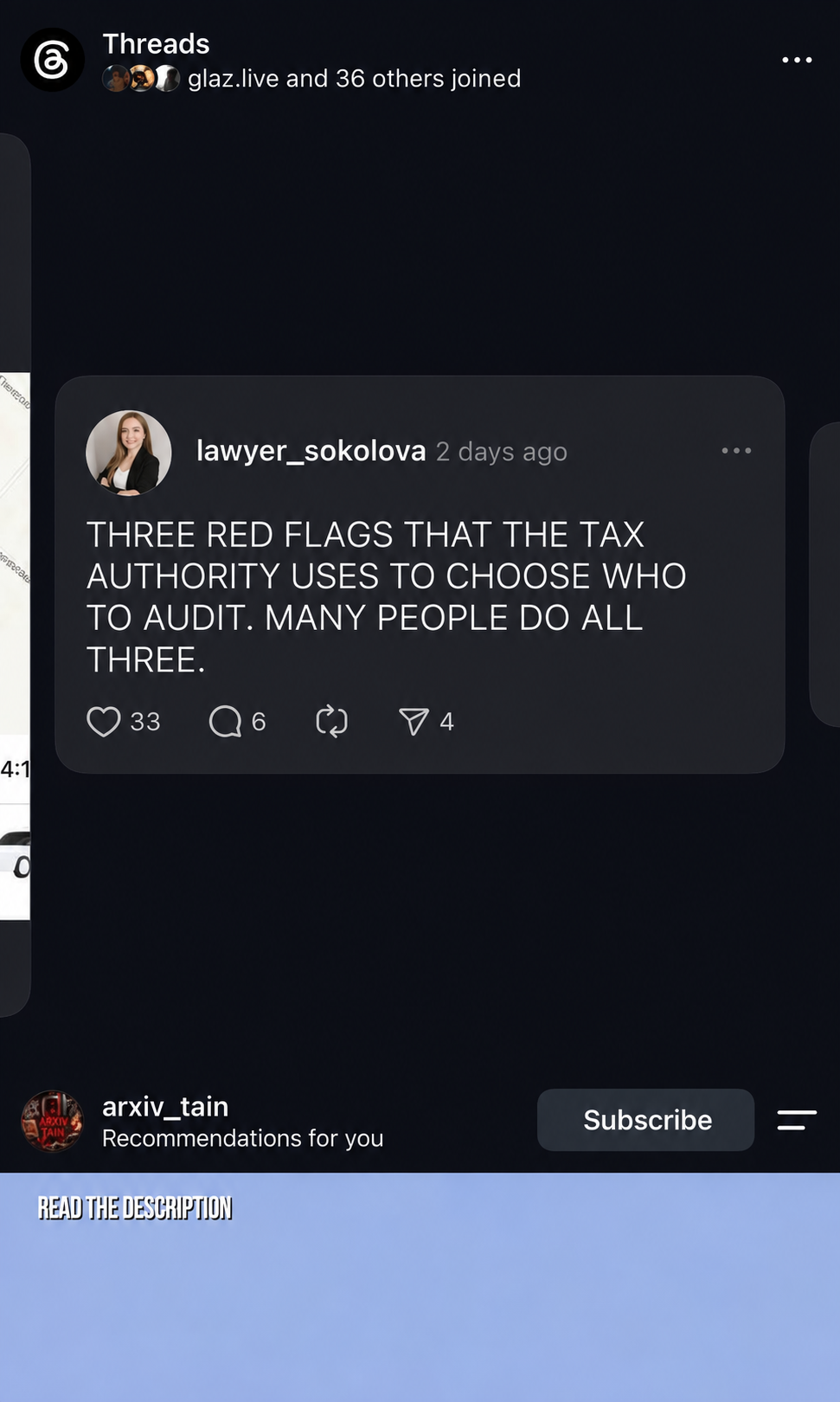
Since the depth of discussion directly affects impressions, you can drive traffic not only from your own posts but also through commenting. Instead of waiting for the algorithm to start pushing your own posts, you can find viral threads in your niche and leave meaningful comments there.
Replies that get likes and responses rise to the top of the thread. Users see such a comment and, out of curiosity, visit the author’s page, from where you can lead them further down the funnel.
Technical Setup: Devices, Proxies, and Accounts
To start working with Threads, you only need a smartphone, a proxy, and a batch of purchased accounts. But if you make a mistake with device parameters or use accounts previously used for spam, profiles will immediately get banned or hit with shadow restrictions.
Devices
Managing profiles exclusively from desktop browsers is not recommended. The same logic applies as in Instagram: the platform has always been suspicious of activity only from PCs. And since you can create a Threads account only if you have an Instagram profile, it’s logical to assume the same attitude toward desktops here.
So, to gain more trust from the platform, it’s better to manage profiles from real mobile devices or at least through cloud phones.
- Physical smartphones. It’s most reliable to launch from real phones. Devices on iOS (iPhone 11 and newer) perform more stably, as their anti-fraud systems are less picky about hardware parameters compared to Android.
- Limits per phone. In affiliate marketing, organic affiliate marketers recommend keeping no more than 3-5 accounts on one device, and the same principle should be applied to Threads.
- Cloud phones. If you don’t have physical smartphones, you can launch through antidetects that support cloud phones (for example, MoreLogin). They transmit proper mobile hardware parameters, unlike standard emulators.
Proxies for Your Target Market
You need proxies from the country where you plan to drive traffic.
- Choosing the connection type. For Threads, private mobile proxies from the target country are used. They have high trust because regular mobile users are on operator pools. Sometimes private IPv4 proxies are used to save on testing, but the risk of bans is higher, especially when working with higher-risk verticals.
- Configuring the phone for the network. Device settings are adjusted to match the proxy location: the phone’s system language, region, and time zone are set to the target country. This is necessary so that anti-fraud systems don’t raise questions due to discrepancies between the network connection and system parameters.
Instagram Accounts
You can’t create a Threads profile separately: login is strictly through an Instagram account.
The quality of the main account directly affects whether the platform will give you initial impressions.
- Buying ready-made profiles. Registering accounts manually before launching is pointless: fresh auto-registered accounts without history immediately trigger checks after the first actions. It’s much easier to buy ready-made Instagram profiles with 3 to 6 months of age. On average, they cost $2-5 each.
- Account requirements. The profile must be fully completed: avatar, several posts in the feed, and access to the original email included, so you can quickly receive the confirmation code when logging in.
Preparing Accounts Before You Start Posting
After buying an account, you shouldn’t immediately add a link to the bio or publish posts urging users to visit the profile. Sudden activity from a new device and IP change attracts extra attention from anti-fraud systems: the profile may get fewer initial impressions or even end up in a shadowban.
To reduce risks and help the algorithm quickly connect with the right audience, the account is gradually put into operation.
Getting an Instagram Account Ready
A Threads profile is created through an Instagram account, so anti-fraud evaluates the overall history of the page. If you log into a purchased profile and immediately start posting in Threads, the platform won’t trust it.
In this case, the account quickly gets restricted: similar to TikTok, it can get a shadowban (posts don’t get recommended and receive 0-2 views) or action blocks, where the social network temporarily forbids likes and comments. In the worst case, Meta immediately sends the profile to a checkpoint with a selfie or phone number, after which you can’t recover the purchased account. This risk is highest in the first days, especially with gray topics and aggressive provocations.
Meta doesn’t provide official warming-up instructions, so everything described below is solely the author’s personal experience and established practice. To gain initial trust and boost activity signals, I usually do the following:
- On the first day, I search by tags or keywords for posts related to my offer’s topic, open several posts or Reels, and give 10-15 likes.
- On the second and third days, I simply scroll through the main feed and Reels, linger on themed videos, and like them. You need to show live user activity and wait until the Instagram feed fills with content from your niche.
On average, this preparation takes 3-4 days. During this time, the profile builds a history of normal actions in the eyes of antifraud, after which you can start working in Threads.
Setting Up Your Threads Profile
After warming up in Instagram, proceed to logging in to Threads itself:
- Page setup. Upload an avatar relevant to your offer’s theme and add a short profile description. It’s better not to add a website or Telegram channel link at this stage to avoid triggering antifraud on a new profile.
- Publishing initial posts. Share 2-3 neutral texts related to your niche: brief thoughts, questions, or observations on the topic. This is necessary so that the page doesn’t look empty when users start visiting your profile from the main feed. For example:
- For crypto: “What percentage of your deposit do you currently keep in stablecoins?” or a short observation: “Bitcoin is testing the support level again. I wonder if altcoins will get a chance to breathe this week or if they’ll get dumped again.”
- For dating: “Why do guys still start conversations on dating sites with ‘Hi’? Is it really that hard to come up with a decent opener?” or “Is it even possible to find a normal relationship in dating apps in 2026? Share your experience.”
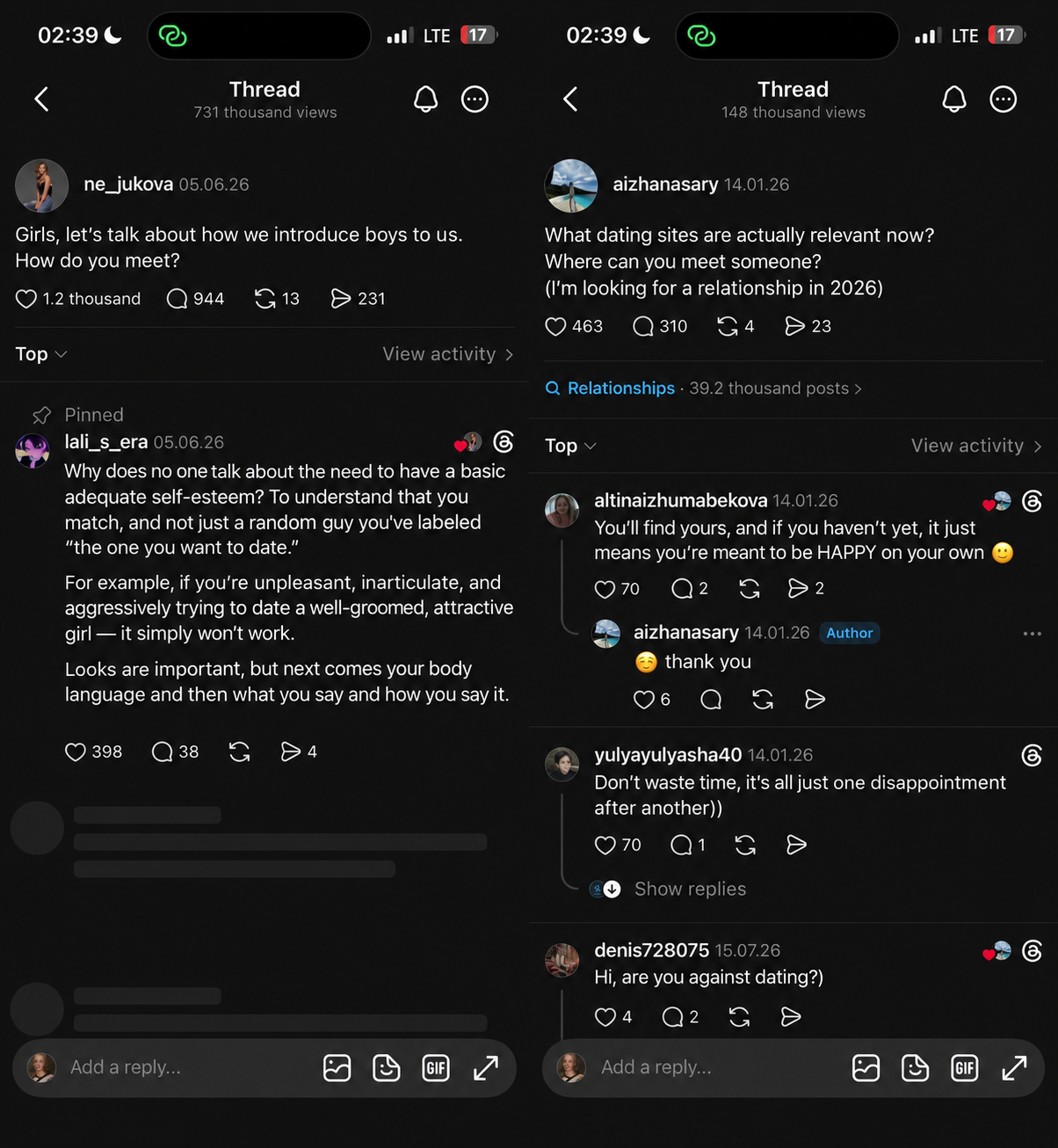
- First days on the account. For the first couple of days, spend 15-20 minutes in the feed: read threads, follow 5-10 authors in your niche, open discussion branches, and like a few posts from others.
- Comment work. On the third day, start joining popular discussions in your topic and leave meaningful replies. This way, you can get your first profile visits even before active posting.
On the fourth day, start posting one post per day in your niche. If your posts appear in the feed, get even minimal reactions and views from users who aren’t subscribed to you, it means you did everything right in terms of technical setup and warming up the account.
Now you can confidently add a link to your pre-lander (Telegram channel, multi-link, or landing page) and test more aggressive posts.
Post Formats That Get Recommended
As we’ve already established above, the reach of posts in Threads directly depends on activity within the thread. The more actively readers argue, reply to the author, and click on their profile, the wider the algorithm pushes the post in the main feed.
Therefore, the text of the post should grab the reader emotionally, provoke a response in the comments, and ultimately lead them to the page with the link.
Bold Takes and Everyday Debates
This approach works best with topics like money, relationships, and everyday beliefs, where every user has their own opinion and a desire to prove they’re right. The text starts with a bold statement that’s hard to silently agree with.
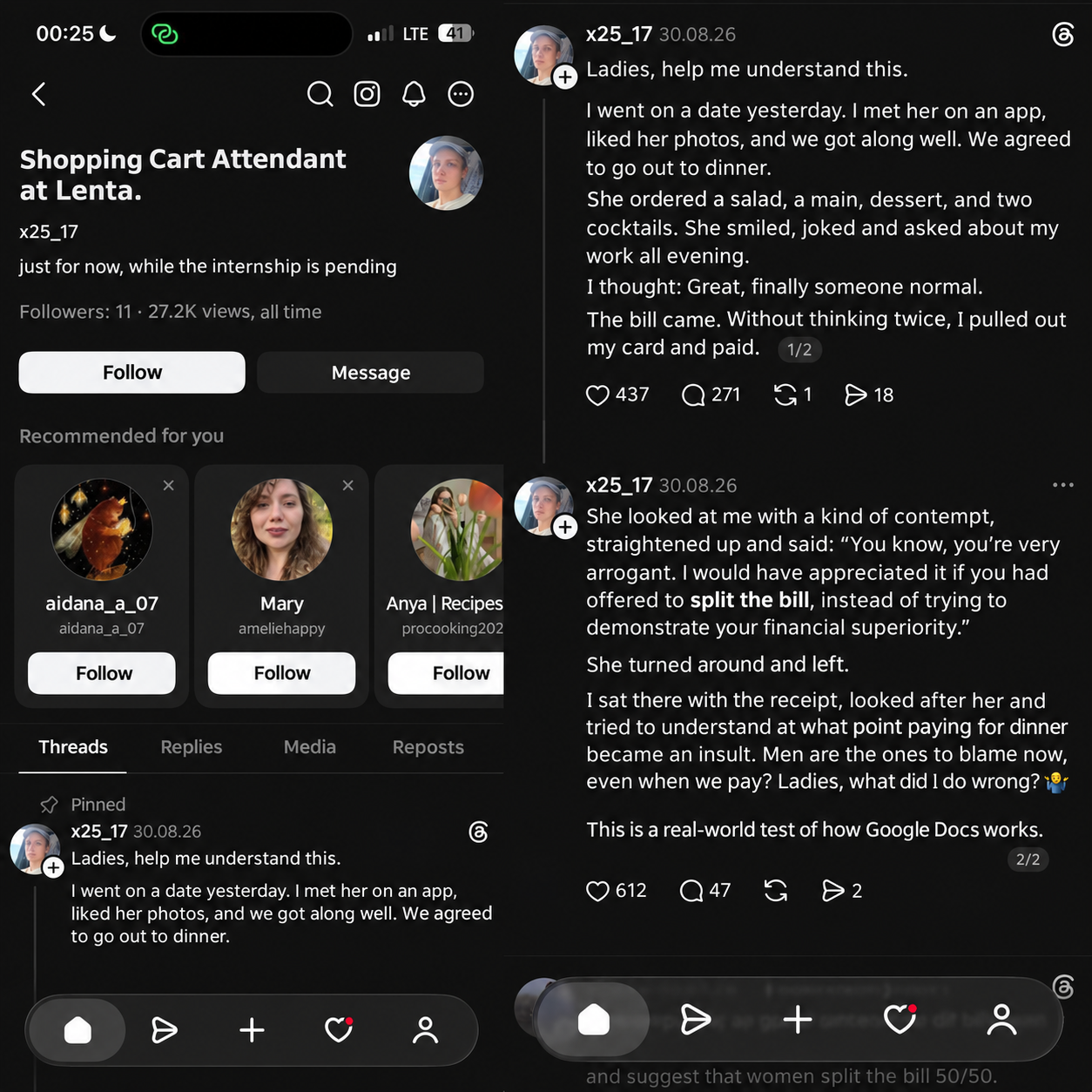
Here are specific examples. For dating, you can start with controversial financial expectations in relationships:
| “If a guy suggests splitting the bill on the first date, that’s an immediate red flag. Why even invite a girl to a restaurant if you can’t handle basic expenses?” |
Let’s break down a real-life example for clarity: we found an account with only 11 followers. Neutral posts on this page barely got any views, but as soon as a personal story about paying a restaurant bill on a date was posted, the publication immediately racked up over 27,000 impressions, hundreds of likes, and nearly three hundred comments in the thread.
The same logic applies to crypto and finance topics: here, the audience loves to argue about earnings, prove their expertise, and teach others. To spark genuine engagement, it’s enough to make a bold statement about trading, investing, or risks.
For example, let’s take a real profile: the account has only 51 followers, but the page has accumulated over 450,000 recent views in total.
The author posted a brief, controversial thesis: “Trading is evil, don’t fall for fairy tales, only 5% of people make money there at most, it’s better to just invest for the long term.”
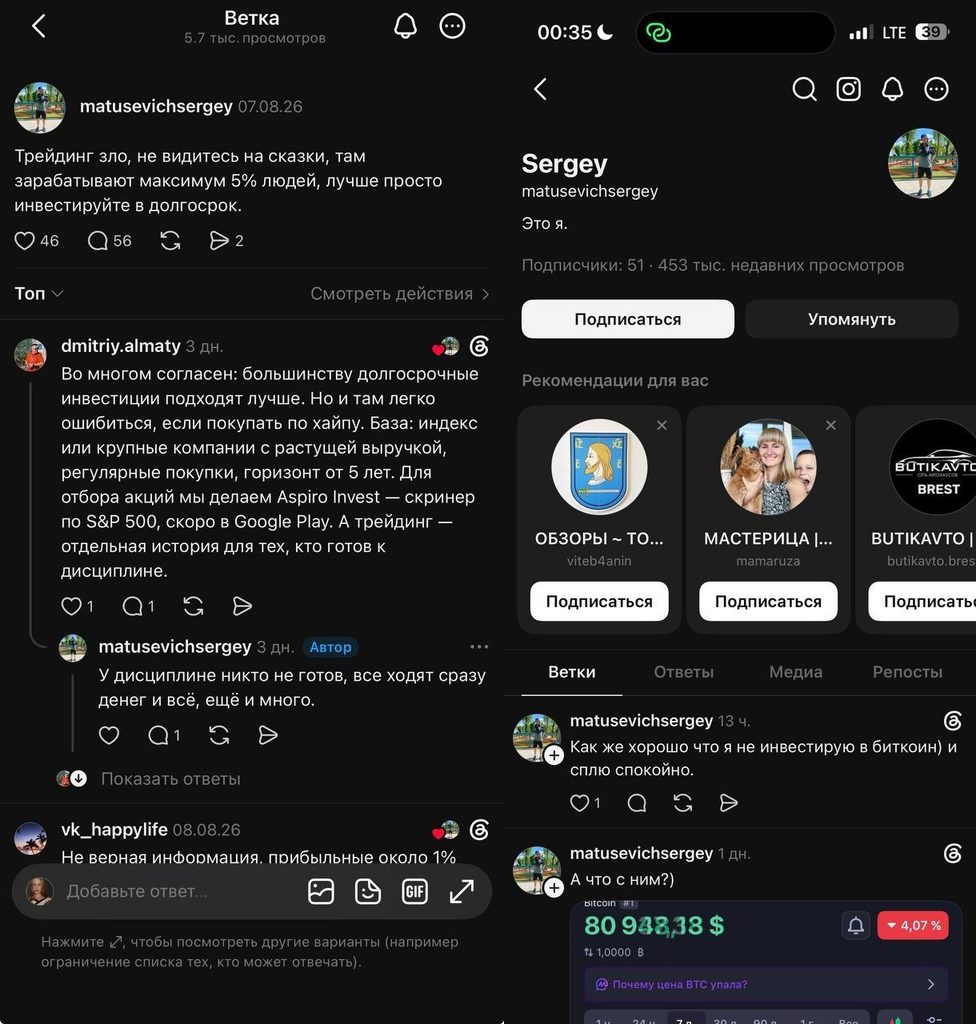
A two-sentence post without images instantly gathered almost 6,000 impressions and sparked an active discussion in the comments. Other users quickly joined the thread: some started detailing their long-term buying strategies for S&P 500, others argued that the real percentage of profitable traders is no more than 1%.
The author regularly responds to commenters and keeps the debate going, which helps the thread stay active longer and maintain visibility in the feed.
As a result, people visit the author’s page to see who posted this. If the account is set up for dating, the description says “I don’t meet with stingy people, reasonable ones message here” with a link to a bot.
When targeting crypto or trading, the account description includes a link to a Telegram channel where analytics, free signals, or educational materials are posted. The user follows the link and enters the funnel.
Stories That Leave Readers Wanting the Ending
This format is more suitable for those in selling courses or digital products or who funnel audiences into their Telegram channels for selling services, software, or guides.
The idea is simple: the post shows quick results in money or an easy solution to a tough problem, but the actual mechanics aren’t revealed in the text. Readers are shown only proof in the form of payment screenshots, and for details, they’re invited to visit the profile.
For clarity, let’s look at a real example: the channel owner posted just a couple of sentences:
| “I reused an old account warm-up method by accident. Now I sell accounts for $182 each, and each takes me no more than five minutes. The first orders are in: four sales this morning.” |
The post includes a screenshot showing incoming transfers of about $182 each. It appears to be AI-generated rather than an authentic bank record.
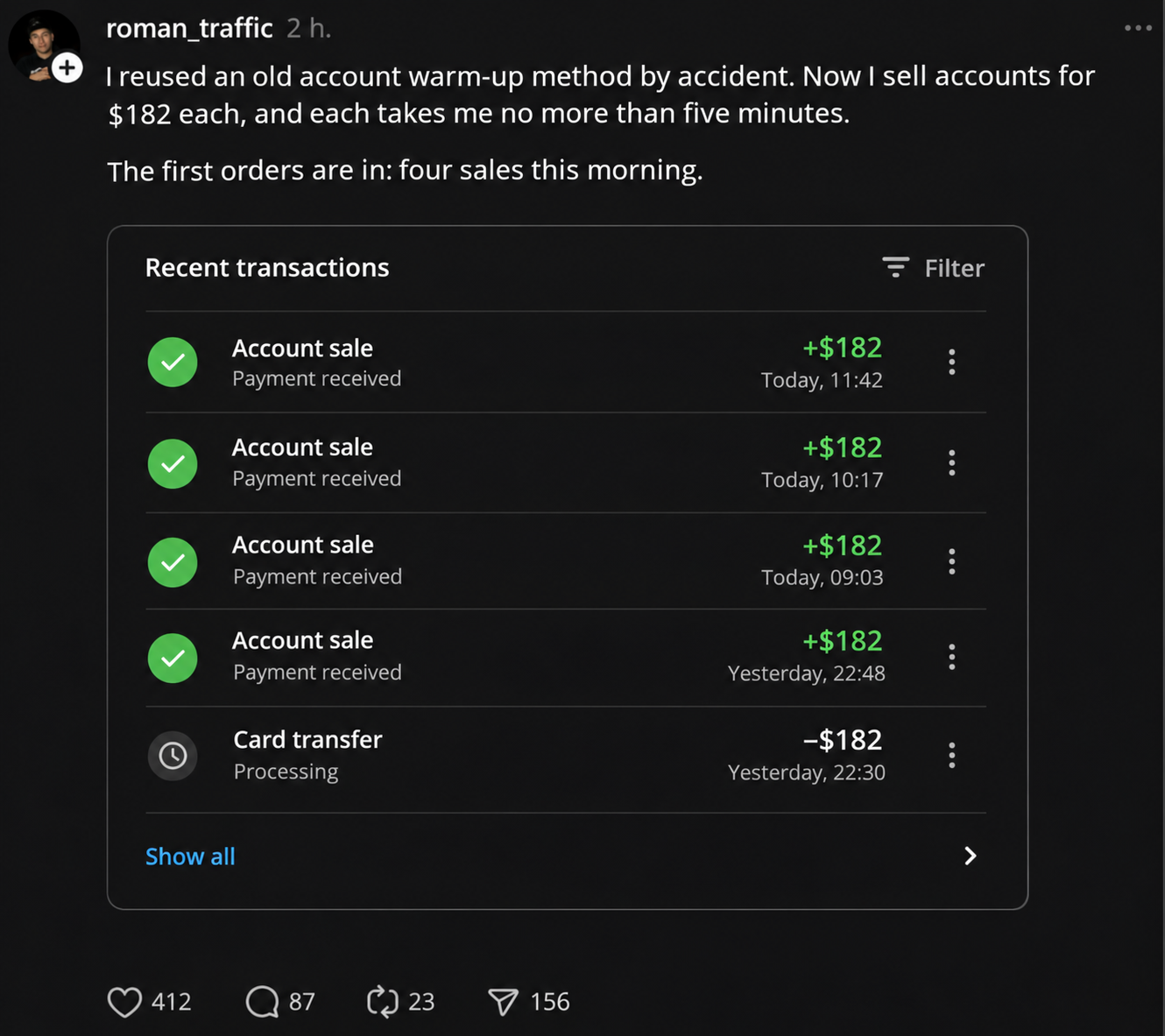
The post got over 400 likes, dozens of reposts, and nearly a hundred comments where people started asking about the method. Since there’s no specifics in the post itself, users out of curiosity visit the author’s profile to find out which accounts are being discussed and where to get this scheme.
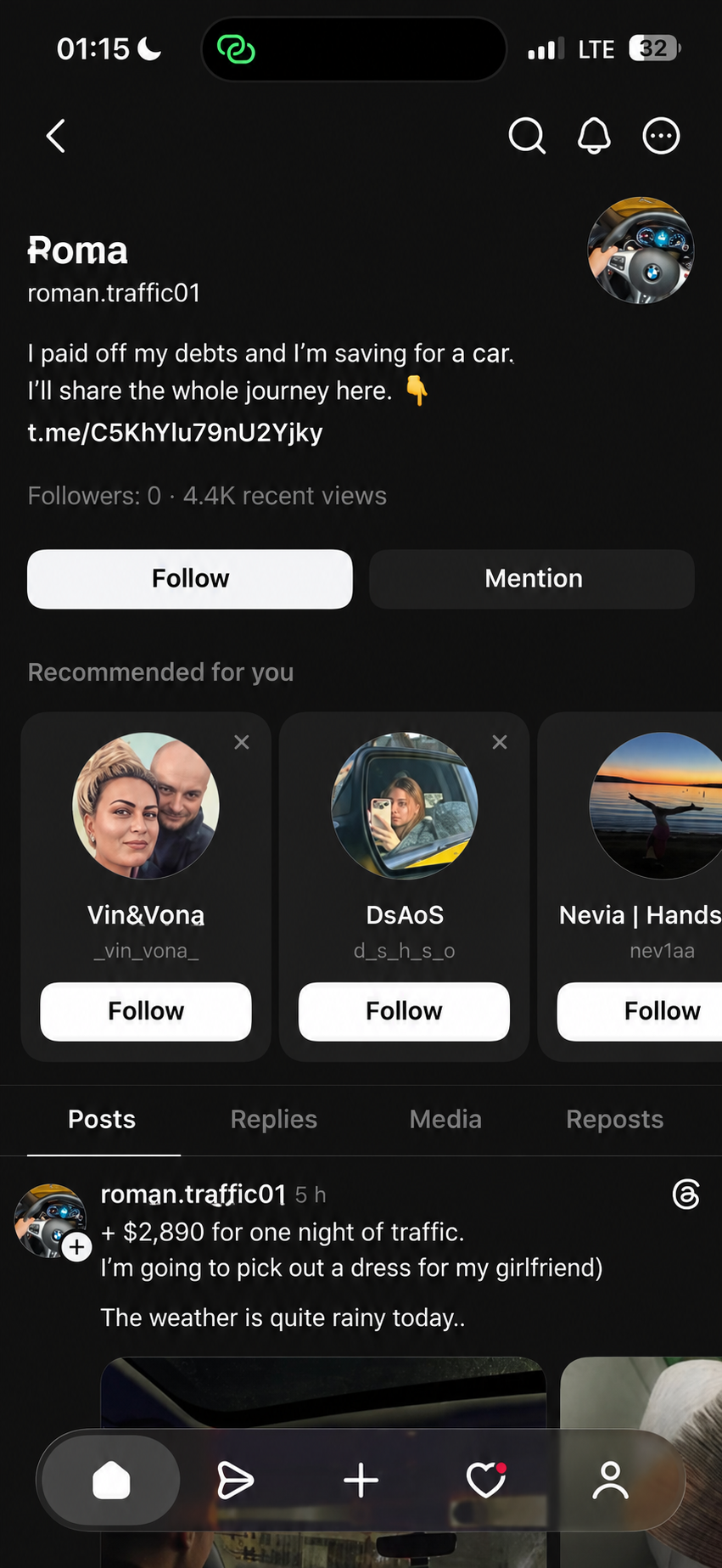
The profile description includes a link to a Telegram channel where a detailed guide is supposedly posted. The person wants a ready-to-use working setup, clicks the link in the bio, and enters the funnel.
Posts That Spark Curiosity
The idea is to give the reader part of the information, but most importantly, lead them to the account bio.
Let’s break down two posts from the feed where the authors present a similar topic in completely different ways. In the first post, a woman writes that she will never return to the office and shares her first earnings from creating AI videos for YouTube: she made $1,272 from 12 videos.
The focus here is on a simple life goal—quitting a regular job and working for yourself. A screenshot with modest analytics numbers backs up her words and doesn’t raise unnecessary suspicion.
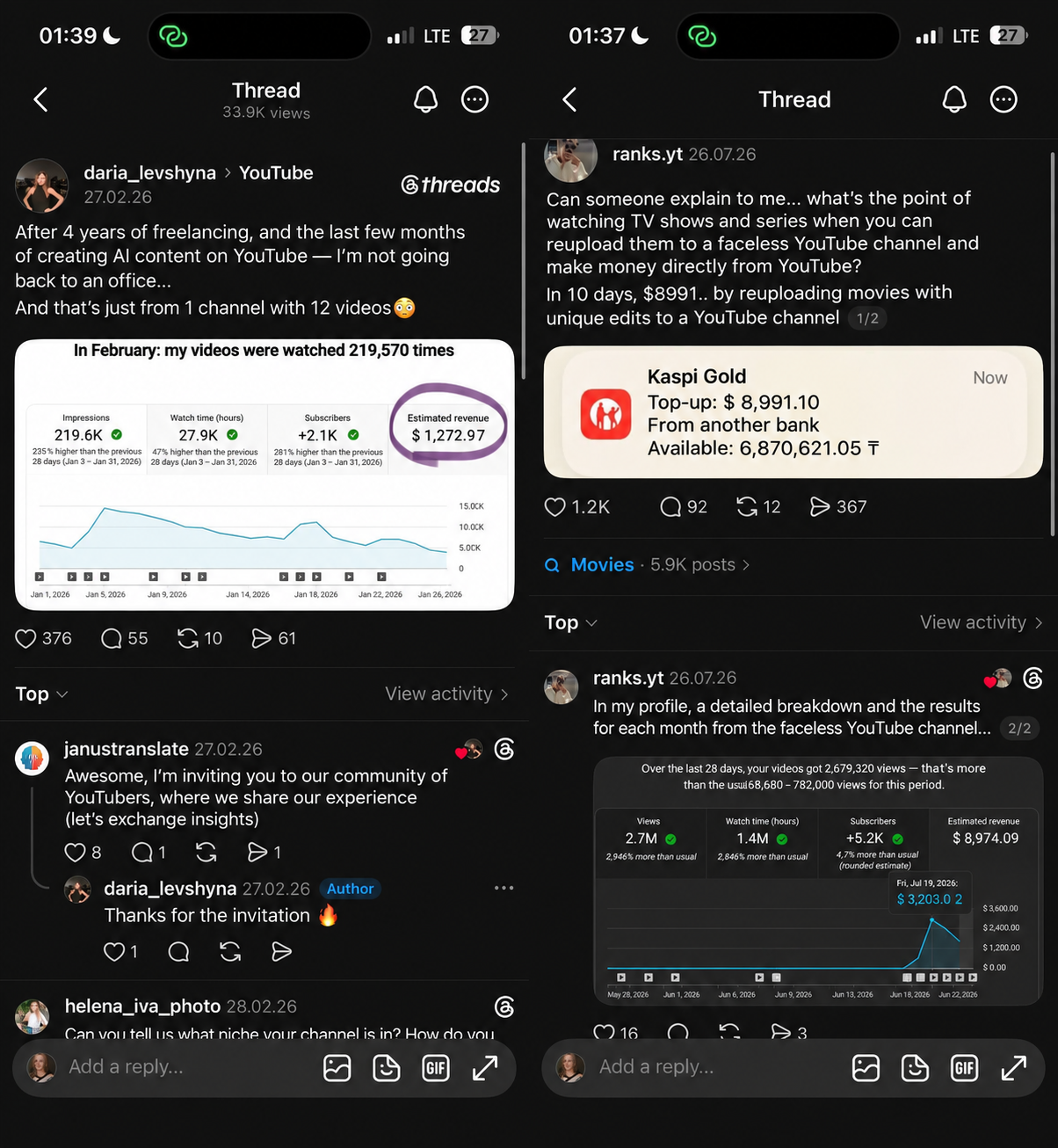
In the second post, the author appeals to greed and easy money: instead of watching TV shows and wasting time, he suggests making money by re-uploading movies to YouTube without permission, showing a bank notification screenshot for $8,991 in just 10 days.
In a follow-up reply, he attaches a YouTube Studio chart and invites readers to visit his page for all the details. Thanks to the huge amount on the screenshot, the post got over a thousand likes and hundreds of saves, even though the text doesn’t mention how to select movies or make the videos unique.
In both cases, the logic is the same: the reader sees the result but doesn’t understand how to repeat the scheme, so they click the profile and move further down the funnel.
Getting Profile Visits From Comments
Another way to get traffic in Threads is to work with other people’s popular posts. In this social network, the algorithms are set up so that comments with the most likes and replies automatically rise to the top. So anyone opening the thread immediately sees your message.
For this method to work, you need to find posts in your niche that were published recently—literally within a couple of hours. If you join the thread too late, other replies with dozens of reactions will already be pinned, and it’s almost impossible to beat them in activity.
Let’s model a specific situation. You find a fresh crypto post where the author writes: “Bitcoin has broken $80,000 again, now is a great entry point, only growth ahead.” Instead of agreeing, you can post an opposing thesis with just as strong a stance:
| “Buying at the very peak is a classic rookie mistake. The market is overheated, big funds are just locking in profits from those jumping in on the hype.” |
If you’re not confident in the topic’s nuances, you can copy the original thread, go to Claude or Gemini, and ask the AI assistant to craft a confident reply with the opposite point of view.
The key is to make the wording sound categorical: then the post author will want to challenge your opinion, and other commenters will start liking or arguing in reply threads.
Thanks to the activity under your comment, the algorithm keeps it at the top. Readers notice the categorical reply, visit the author’s page out of curiosity, see the link in the profile description, and move further down the funnel.
How to Find Trends and Test Your Own Ideas
In reality, there are many more working approaches that generate reach. We showed these examples so you understand exactly how Threads algorithms operate.
The platform primarily gives decent reach to posts that spark debates and make people reply in threads. If you’re not sure what to write about in your niche yet, don’t reinvent the wheel—just use the tried-and-true method and check what your competitors are publishing right now.
To do this, create two or three profiles for different topics. First, set up your Instagram recommendation feed for the theme you need: scroll through the feed, watch videos on your topic, and engage actively.
After a couple of days, log into Threads with these same profiles, find channels in your niche, and open discussion threads. Then, the recommendation feed will start showing relevant content, and you’ll see your competitors’ posts.
All you need to do is save posts with good engagement, see which points provoke people to comment, and adapt these approaches for your own offers.
The US, Brazil, and India are the three largest Threads markets by user count in the figures above.
For international audiences, use a tool like ChatGPT or Gemini to adapt your posts to the language and cultural references readers actually use.

Comments (0)