

The more neural networks evolve, the more relevant UBT work becomes. If before you had to jump through hoops trying to make someone else’s video unique, now you can create your own clips almost on the fly. And the results are nothing like what we saw 2–3 years ago.
This is especially true for Reels clips. Practice shows there’s still a huge male audience there, ready to watch videos of attractive girls and engage with them.
Why Create Reels for Instagram
According to statistics, Instagram’s main target audience is people aged 18 to 44.
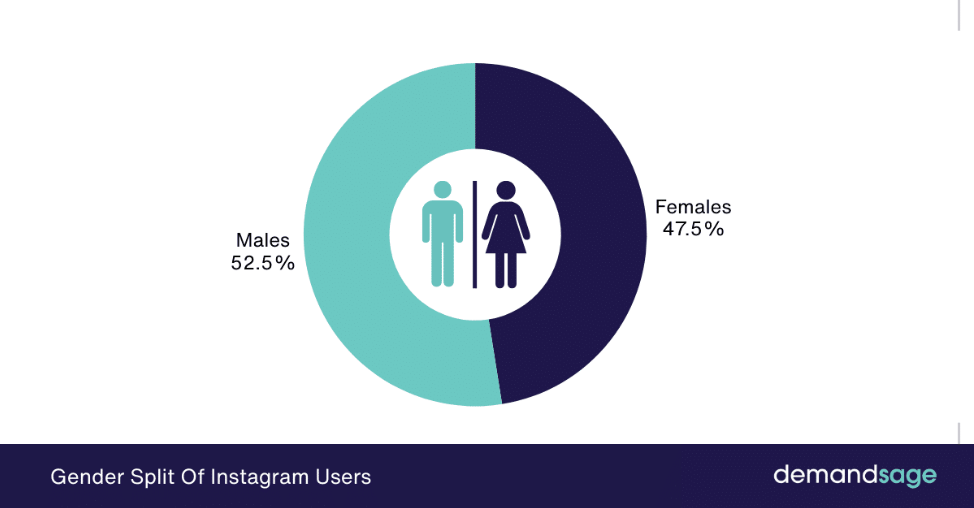
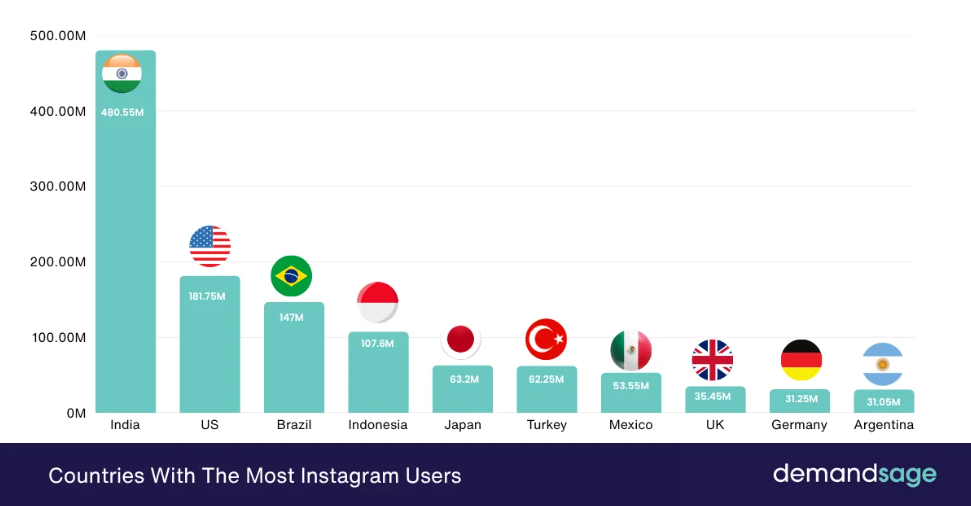
Those unfamiliar with the source might say the lion’s share of this traffic is from the US. But the stats say otherwise.
Now let’s get to the main point—why test this source. To answer, let’s look at a screenshot of Reels from a girl’s profile.
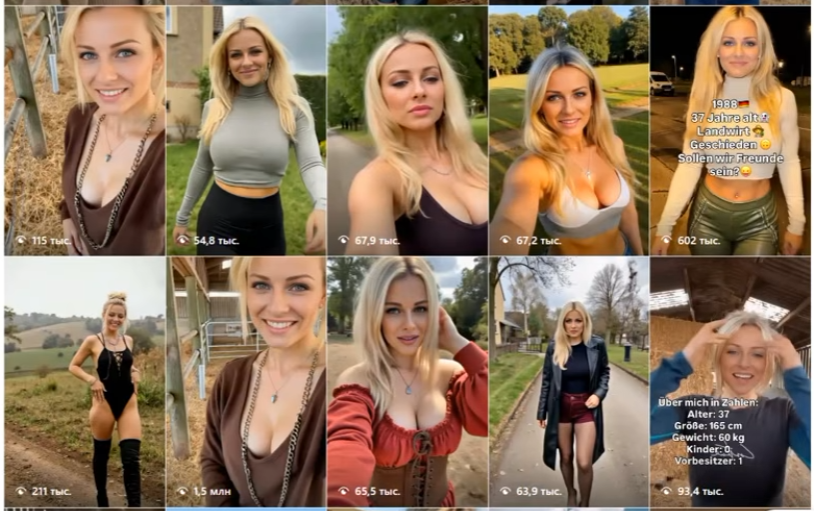
It’s easy to see this is an AI model. Even a complete beginner can make one like this. And even so, generated girls can deliver solid results.
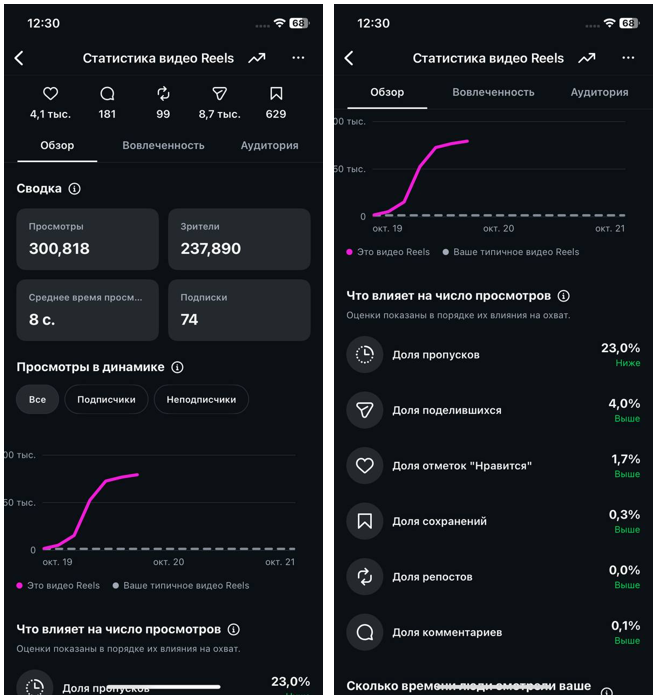
If you’re not ready to test different model types, sift through dozens of generations, and get traffic out of thin air, this material probably won’t interest you. For everyone else, we’ll focus on practice: step-by-step instructions on generating these Reels, which services to use, and how much it all costs. As usual, we’ll break down two options—conditionally free and paid.
How to Create Reels with Neural Networks
To put it simply, the process looks like this:
Find a beauty or create one from scratch → get a video donor → swap the face.
In reality, there are a lot of nuances here, which we’ll cover in detail.
Step-by-Step Breakdown of the Process
The first step is creating the girl. After that, we either make a unique video or modify someone else’s by inserting our beauty. Let’s break it down further.
Finding or Creating a Girl
First, we need a girl to promote the offer. The worst option is to use photos of influencers who are already active on Instagram. The system quickly detects non-unique content and won’t give you much reach. It’s much more effective to either collect images from specialized platforms or create them yourself.
Free. Go to a platform like Pinterest and type in keywords like girl. If you don’t specify the model type, you’ll see everything: from slim Asian girls to busty Slavs.
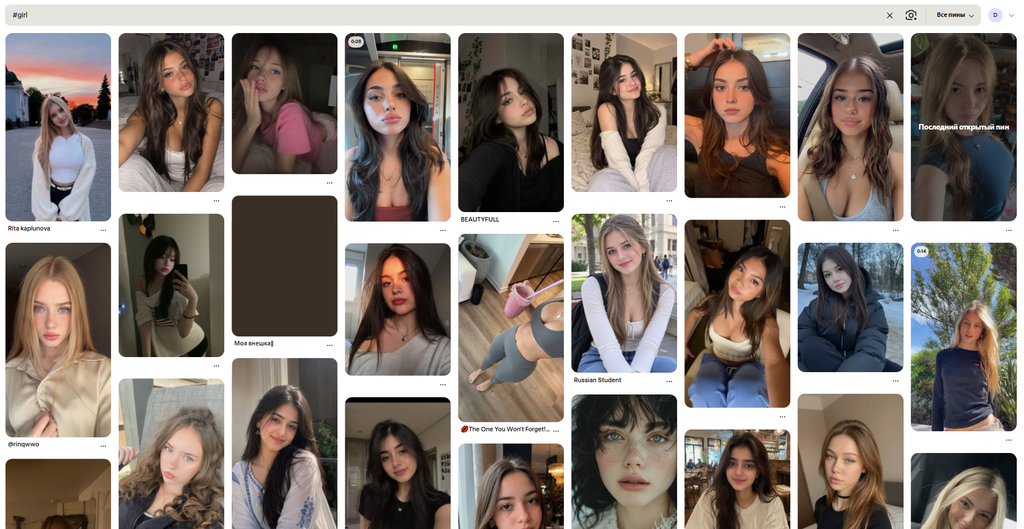
This method is perfect for getting started because it costs $0. However, its downside is this: to borrow the face of the beauty you find, you’ll need 10–20 reference images of her. Ideally, these should be similar to the style used in the video donor. For example, if the donor video features a close-up of the heroine talking, your references should be face shots from different angles, lighting, and emotions. If the girl is dancing in the video, you’ll need samples of the model in various poses and positions, and so on. Sometimes you find an interesting look on Pinterest, but can’t locate other photos of the same girl. This affects the final video quality.
Freemium. In this option, we take the selected photos and go to something like Gemini or ChatGPT. For example, ChatGPT doesn’t explicitly mention limits: it will keep generating photos until the server gets overloaded. There’s a joke online that overload happens when US vibe coders wake up. The NanoBanana2 Lite model works for free, but the quality isn’t always great. It’s easier to just buy a subscription and not worry about it.
No matter which scenario you choose, upload references either for cloning or for description to enable unique generation later.
First, let’s ask ChatGPT to show how the girl from the reference would look from different angles.
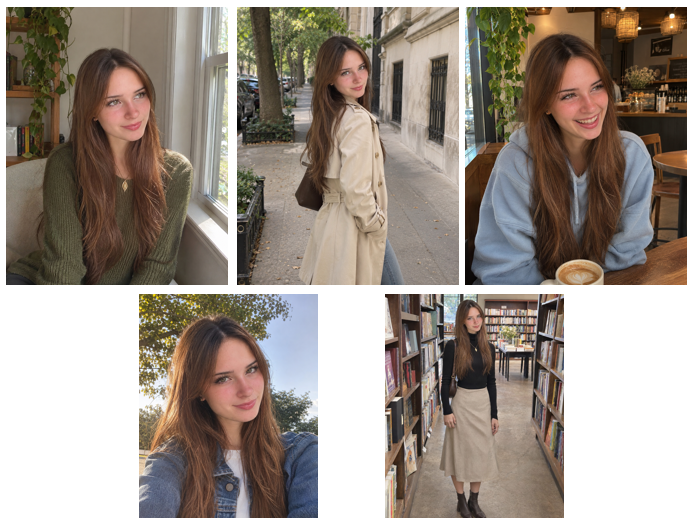
The same, but from NanoBanana2 Lite.
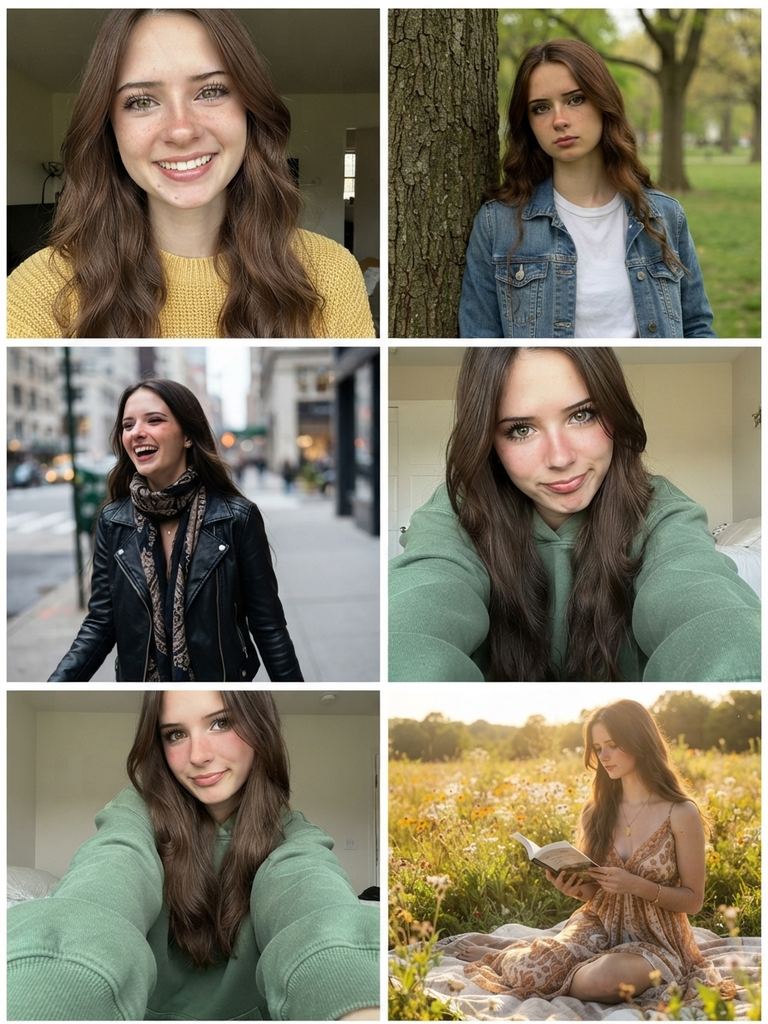
Now let’s give it a set of original photos of a real beauty and ask it to create her twin, who never actually existed. Here’s what ChatGPT came up with:
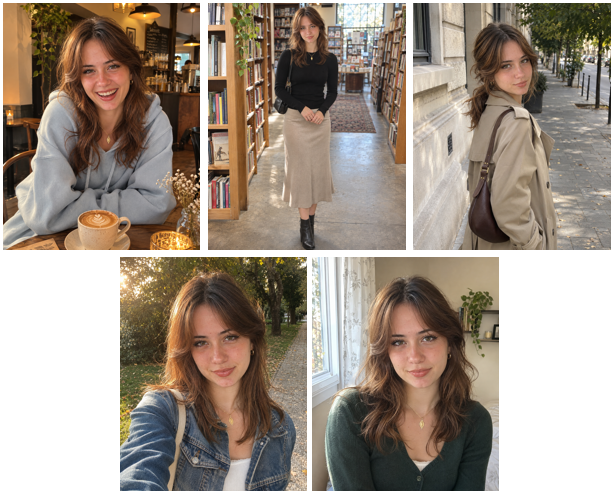
And here’s the result from NanoBanana 2 Lite:
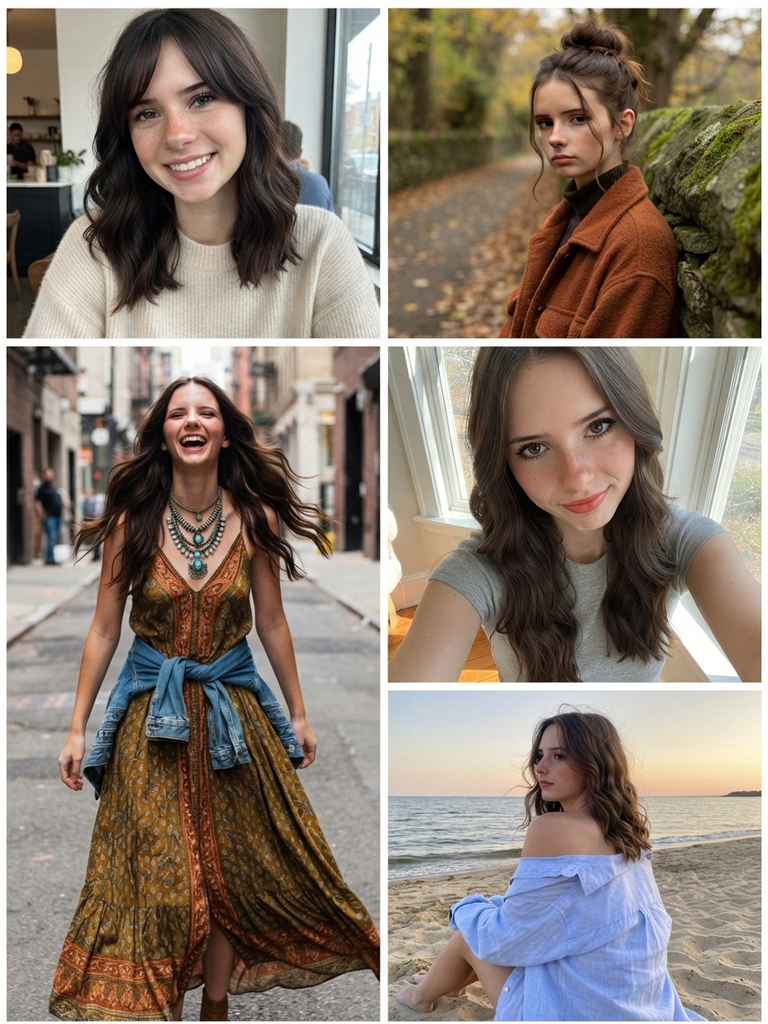
Both the first and second girls are unique. If you want, you can edit their appearance right in the chat, but for this task it’s more optimal to use NanoBanana in Google AI Studio: it’s free and it’s hard to use up the entire quota even if you work all day. Let’s take a random photo and change the hairstyle.
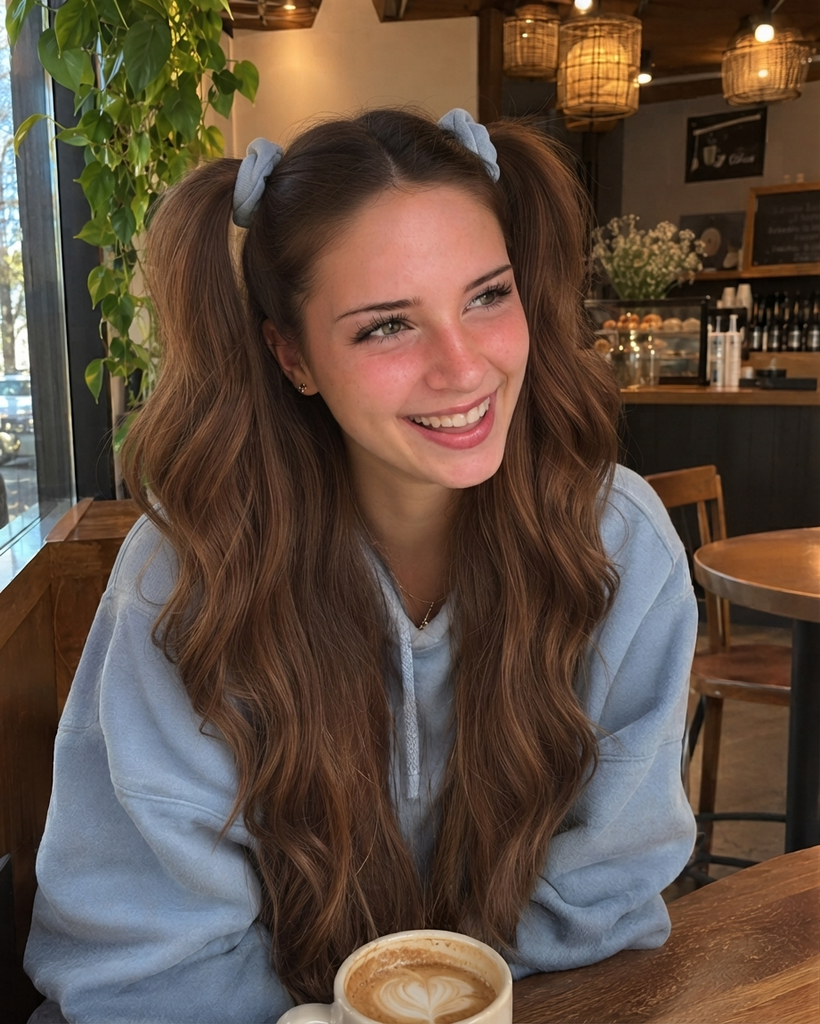
Let this girl remain our model.
Generating video
If your budget allows, it’s more profitable to create videos based on your own script. Often this requires several generations (usually $3-4 each to make it look natural), but the resulting content is original. That’s why it gets more reach. However, not all LLMs will agree, for example, to create dancing naked girls. But for white niches, this is the perfect option. An alternative approach is to rework already existing videos. There’s a risk of getting shadowbanned with those, but such videos cost next to nothing.
Let’s start with generation. To try it yourself, buy a Pro subscription to Google Flow and get 1,050 credits per month. That’s enough for about 60-70 generations. New accounts get a discount—3 months at $4.99, then $20 per month. So for $20 and 4 subscriptions in the first 3 months, you get 240 videos per month.
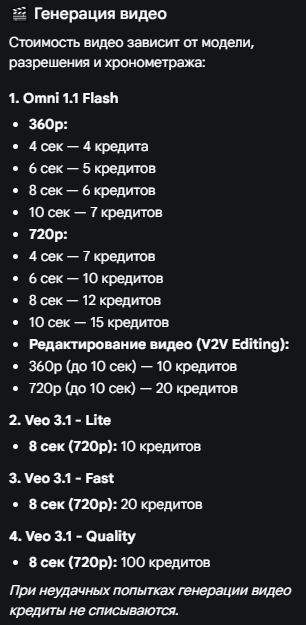
Omni 1.1 is Google’s best model in terms of generation speed and quality at the time of this article. It can create not only video, but also audio. However, it doesn’t always work: several times the model stopped generating and refunded credits due to issues with audio creation.
First, a quick test—upload our beauty to Google AI Studio, add a Tinder-like logo in the chat, and ask her to hold a phone with that logo. It turned out pretty well on the first try.
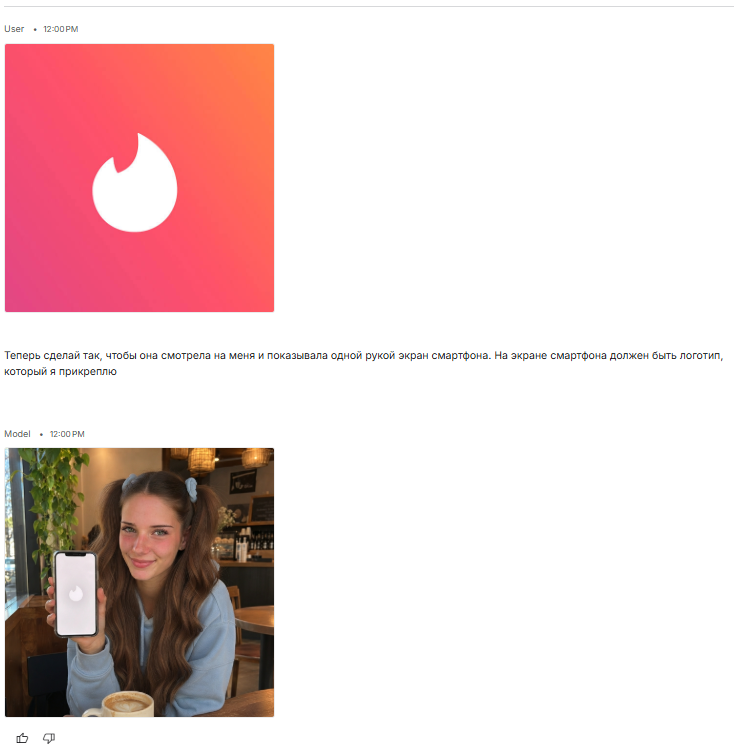
Now upload both references to Google Flow and grab the prompt from ChatGPT to generate the video.
| Create a 10-second ultra-realistic vertical 9:16 UGC dating app advertisement using the two provided reference images. REFERENCE IMAGES: Image 1 is the exact STARTING FRAME. Image 2 is the exact ENDING FRAME. CHARACTER CONSISTENCY:The woman in both images is the same person. Preserve her exact facial identity, facial proportions, green-hazel eyes, natural skin texture, long chestnut-brown hair styled in two high ponytails with pale blue scrunchies, light blue oversized hoodie, and subtle makeup. No changes to her face, hairstyle, age, outfit, or accessories. SCENE:A cozy coffee shop with warm pendant lighting, wooden furniture, leafy plants, and a cup of latte on the table. Natural smartphone footage, authentic casual UGC aesthetic. TIMELINE: 0–2 seconds:Start exactly as shown in Image 1. The woman smiles warmly while looking slightly to the side. She slowly lowers her eyes toward the coffee cup, giving a small, shy smile. She then looks back toward the camera with a playful, slightly flirtatious expression. 2–7 seconds:She makes direct eye contact with the camera, tilts her head slightly, and speaks in Russian with a soft, natural, youthful female voice. Exact spoken dialogue in Russian: «Привет… Ты мне понравился. Может, познакомимся поближе?» She speaks with a playful, slightly shy intonation, as if flirting with someone sitting across the table. Include a tiny pause after «Привет». Her lips must synchronize accurately with every Russian word. Her expressions remain subtle, human, and believable. 7–10 seconds:After speaking, she smiles mischievously, briefly glances down, reaches for her smartphone from below the frame, and naturally raises it toward the camera. She turns the smartphone screen outward and presents it clearly to the viewer. The phone display must show exactly the same application logo, icon, colors, and screen layout as in Image 2. The screen must be clearly visible, sharp, and stable. Finish with the exact composition of Image 2. She holds the phone next to her face and smiles at the camera. CAMERA AND MOTION:One continuous shot, no cuts, no transitions, no camera jumps. Mostly static camera positioned across the table at eye level, with subtle natural handheld movement. Realistic head motion, natural blinking, accurate finger anatomy, realistic hand-to-phone interaction, physically believable hair movement. AUDIO:Natural Russian female speech with perfect lip synchronization. Soft background coffee shop ambience. No music, no narration, no other voices. STYLE:Photorealistic smartphone video. Authentic TikTok / Instagram Reels UGC advertisement. Natural facial expressions, realistic skin pores and imperfections, subtle lighting variations. Not cinematic, not overly polished, not artificial. STRICT CONSTRAINTS:No facial morphing, no identity drift, no hairstyle changes, no extra fingers, no distorted phone, no changing the application logo, no subtitles, no text overlays, no watermarks, no exaggerated gestures. The video must appear as a genuine, spontaneous recording of a real woman casually flirting with the viewer in a coffee shop. |
For 15 credits and 1.5 minutes, the model produces this result. Google Flow only outputs 10-second segments. So, for longer videos, it’s better to split them into meaningful parts and stitch them together.
Editing Someone Else’s Video
There’s no universal source with ready-made videos, but there are three most obvious platforms: Pinterest, YouTube, and Instagram itself. The video format depends on your idea. Some might want to create dance creatives, others just a regular lipsync. We’ll test two formats: talking head and dance. We found both video sources on YouTube Shorts, you can watch them here and here.
Let’s start generating the dance. To do this, create the first batch of reference images in the same style as the video source. For example, if the original features a full-body model, we need full-body references. If it’s waist-up, then waist-up.
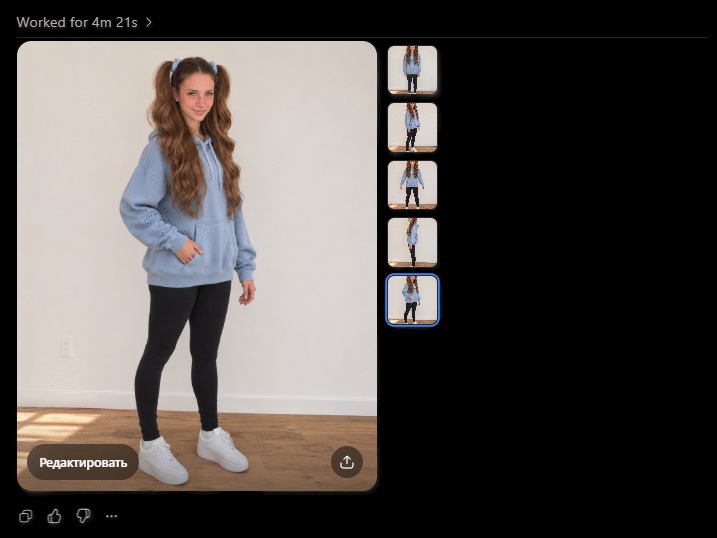
Now let’s get the prompt from ChatGPT as well:
| Create a realistic vertical 9:16 video using the uploaded materials. INPUT MATERIAL ROLES: — Reference Images 1–5 are identity and body reference images of the target girl. — The uploaded video is the motion and choreography reference. GOAL: Generate a new video where the girl from Reference Images 1–5 performs the same dance as in the reference video. CHARACTER IDENTITY: Use the girl from the reference images as the main subject. Preserve her exact recognizable identity: — young woman — fair skin — green-hazel eyes — long chestnut-brown wavy hair — hairstyle: two high ponytails with light blue scrunchies — soft natural makeup — youthful face and proportions OUTFIT: Keep the exact outfit from the reference images: — oversized light blue hoodie — black leggings — white sneakers BODY AND PROPORTIONS: Follow the body shape, height, proportions, and overall silhouette from the full-body reference images. Keep her looking like the same girl in all frames. MOTION TRANSFER: Use the uploaded reference video as the choreography source. Transfer the dance performance to the target girl as accurately as possible: — same sequence of moves — same rhythm and timing — same body sways — same steps — same arm gestures — same head movement — same playful energy The goal is not a random dance inspired by the video, but a close recreation of the same dance performance using the target girl. SCENE: Place her in a simple clean indoor space suitable for dance, similar to a casual home recording. Use a plain light wall and clear floor space. Keep the environment uncluttered so the body remains fully visible. CAMERA: — vertical 9:16 — full-body framing for most of the clip — one continuous shot — camera facing her from the front — stable smartphone-like framing — no cuts — no zoom jumps — no angle changes unless necessary to preserve the original motion feel STYLE: Photorealistic, natural smartphone video. The result should look like a real girl genuinely dancing, not like CGI. Natural lighting, realistic anatomy, realistic hair movement, realistic clothing folds. IMPORTANT CONSTRAINTS: — preserve facial identity — preserve hairstyle and hair color — preserve outfit — no identity drift — no face morphing — no extra limbs or fingers — no deformed hands — no body distortion — no random choreography changes — no scene changes — no text overlays — no subtitles — no watermark PRIORITY ORDER: 1. Keep the girl’s identity consistent with the reference images 2. Recreate the choreography and timing from the reference video 3. Maintain realistic motion, anatomy, and natural hair/clothing physics OUTPUT: A polished, realistic dance video where the reference girl performs the same dance as the motion-reference video. |
We upload the video reference and photos of our beauty to Google Flow, insert the prompt. Remember the important limitation: the model only creates 10-second fragments. So it suggests making either 0-10 seconds or 10-20 seconds. We create two segments and edit them together in ChatGPT. See the result here.
Now for the talking head. We take the second source and create references for it.
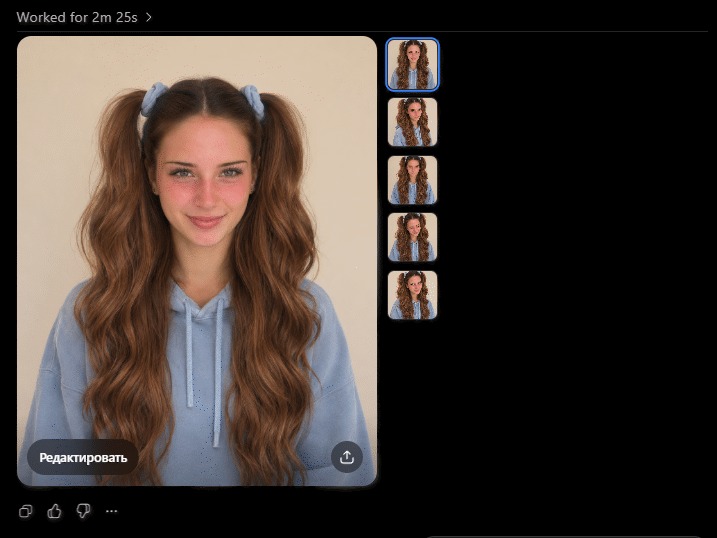
We upload the prompt and manually write the text the girl should say:
| Create a highly realistic 10-second vertical 9:16 smartphone talking-head video. Use the uploaded reference images to recreate the exact identity of the brunette woman. Use the provided reference video ONLY as a guide for camera framing, speaking style, natural facial movements and overall presentation. Do not copy the original speaker’s face or voice. CHARACTER: A young adult woman with green-hazel eyes, natural rosy skin, long chestnut-brown wavy hair styled in two high ponytails with pale blue scrunchies, wearing a light blue oversized hoodie. Preserve the same recognizable face from the reference photographs throughout the entire video. SCENE: The woman is sitting indoors in front of a plain warm beige wall. Static smartphone camera at eye level. Medium close-up, showing her face, shoulders and upper chest. PERFORMANCE: She looks directly into the camera and speaks naturally in Russian, with subtle head movements, occasional blinking, realistic lip movements and restrained facial expressions. She sounds thoughtful, slightly ironic and confident. DIALOGUE IN RUSSIAN: «Если женщина говорит фразу: «Я тебя не держу, если хочешь — уходи», вам больше нечего делать с этой женщиной. Зачем вам ребенок, который из раза в раз будет вами манипулировать вместо того, чтобы строить здоровые, равные отношения?» VOICE: Generate an entirely new female Russian-speaking voice. Voice characteristics: — young adult female — natural mid-range pitch — warm, slightly low and velvety timbre — clear native Russian pronunciation — conversational delivery — confident, calm intonation — subtle emotional emphasis — no artificial or robotic speech The voice must be completely different from the original video’s speaker. Do not imitate or clone her voice. Accurate Russian lip synchronization is essential. VIDEO STYLE: Authentic casual smartphone recording, realistic skin texture, natural indoor lighting. One continuous shot. No transitions, no background music, no subtitles, no text overlays. STRICT REQUIREMENTS: Preserve facial identity. No face morphing, no hairstyle changes, no distorted mouth, no unnatural expressions, no audio glitches, no robotic speech. |
The text should fit within 10 seconds. Because of this, the beauty dropped one word, but otherwise it turned out pretty well. See here.
For the sake of a clean experiment, let’s test Wan 3.0 Prime – the advanced model from Alibaba. We upload 5 images of our girl, attach a video, and set a dry prompt:
| Replace the woman in video1 with the woman from image 1-5 |
Unlike Google Flow, Wan 3.0 Prime took almost 20 minutes to generate the video. Moreover, this LLM was originally designed as API-only. This means it doesn’t have an official interface like ChatGPT or Google Flow. Access is only possible through providers.
You can see the generation result here. This option is clearly not for quick tests, but in our opinion, the quality of the facial expressions is almost indistinguishable from the original.
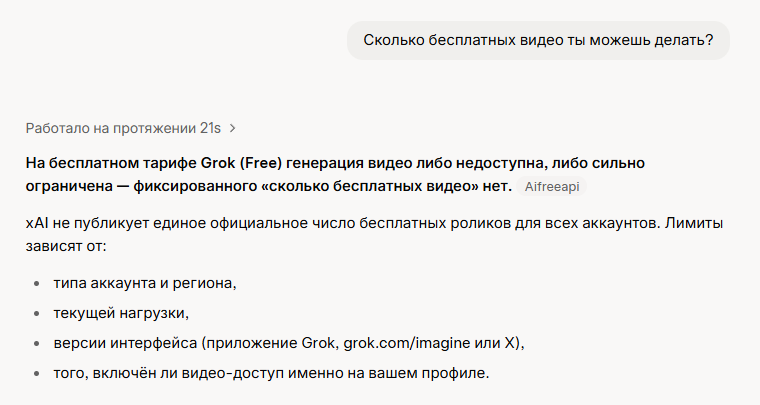
As a bonus, let’s take the prompt for Flow and give it to Grok. We don’t have a paid subscription, but we tried to make a 6-second video in 480p. If you want to generate 10 seconds in higher quality, you’ll have to pay. The result can be seen here.
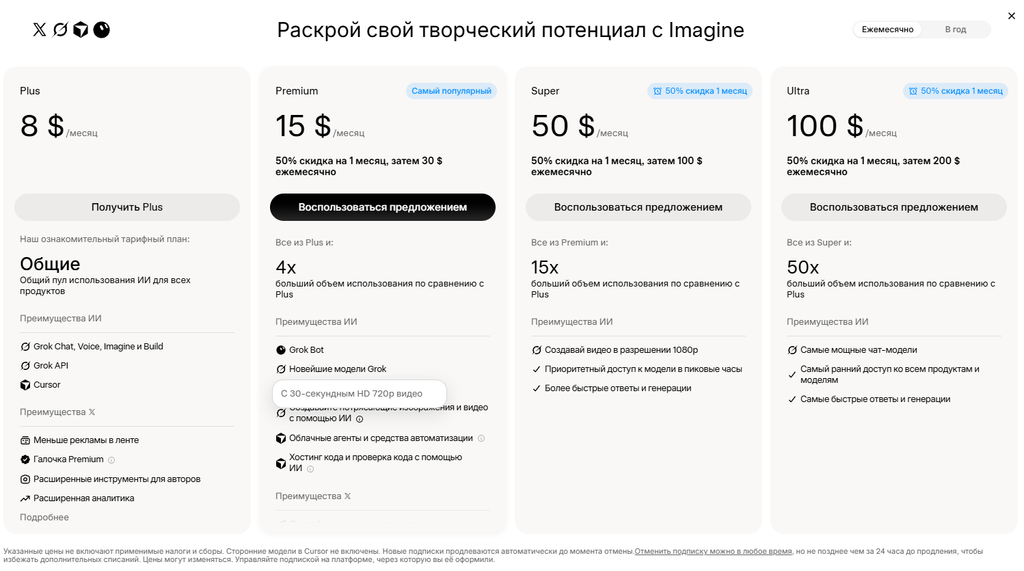
In theory, you can pay $30 for a subscription and generate up to 30 seconds in 720p at a time. But of course, we won’t do that. It’s funny that Grok itself insists you can’t create videos on the free plan.
What’s next?
Upload the finished videos to Reels, YouTube Shorts, and other platforms. If you use a video donor from Reels, it’s best not to upload the processed clip to the same Instagram account. Otherwise, you risk getting shadowbanned.
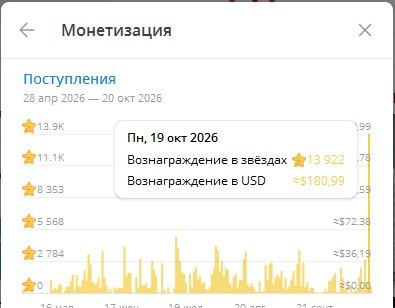
Later, you can monetize the content through Telegram and private content, or with third-party offers. Some specialists have found this to be quite profitable.
Conclusion
Neural networks have significantly simplified the production of short videos. Now, to create Reels, you don’t need to hire models, organize shoots, or spend hours editing. All you need are a few references, a suitable video donor, and a well-crafted prompt. As our tests showed, even free tools can deliver quite decent results.
However, it’s still not possible to fully automate the process. Neural networks make mistakes in movements, change the appearance of characters, don’t always handle speech well, and often require repeated generations. So the main resource here isn’t so much money for subscriptions, but time for experimentation.
You can start with free tools and invest in paid generation after your first successful tests. And most importantly, don’t confuse the realism of a video with its effectiveness. Even a perfectly generated girl doesn’t guarantee reach or clicks by itself.

Comments (0)