


In August, affiliate marketer Maxim from the MAXIMAFFILIATE channel placed bids on GoDaddy domain auctions using an AI agent in Codex. The agent mixed up the amounts (in Russian): instead of $15–45 per domain, bids went in at $615–645. No one outbid them, and Maxim didn’t dare refuse the purchase—he risked getting his account banned by the auction. The result: a $2400 loss. The mistake itself was minor, like a typo, but real money and “Full rights for any actions” (in Russian) made it expensive.
The opposite case. In February 2026, SEO specialist Oleg Shestakov from Rush Analytics built himself a keyword rank tracker (in Russian) in 2–3 evenings for less than $20. Fun fact from his own words: the first such module in Rush Analytics back in 2014–2015 took 12 months to develop and cost about 40,000 euros.
The two projects show how much the choice of task, workflow and permissions matters. This guide starts with the basics so you can test vibe coding on a $20–$200 subscription without repeating a $2,400 mistake.
What Is Vibe Coding? AI Agents vs. Chatbots
Imagine, for example, that every morning you spend 30 minutes manually opening domains, checking which ones dropped, writing things down, and comparing them yourself. But if you’re a vibecoder, your workflow is different—you open Claude Code or Codex on your laptop and write in plain language: “Check which domains from my list are active and collect the results in a table.”
The agent will ask clarifying questions, outline a plan, write the script, ask for permission to run it, and show you the table. Then it will do this automatically, on schedule, without further questions. That’s exactly what I did below in the article—the check took less than three minutes.
| Vibe coding (вайбкодинг, вайб-кодинг) is a way of creating programs where you describe the task in plain language, and the neural network writes the code. If you don’t dive into the details (we’ll cover those later), your job comes down to two things: clearly outlining the task in the brief and checking that the result works. |
An agent is a neural network that’s allowed to:
- create files,
- install programs,
- run code,
- access the server.
A regular chatbot gives you a piece of code and stops there, while an agent runs the code, reads the error, and fixes it without waiting for you.
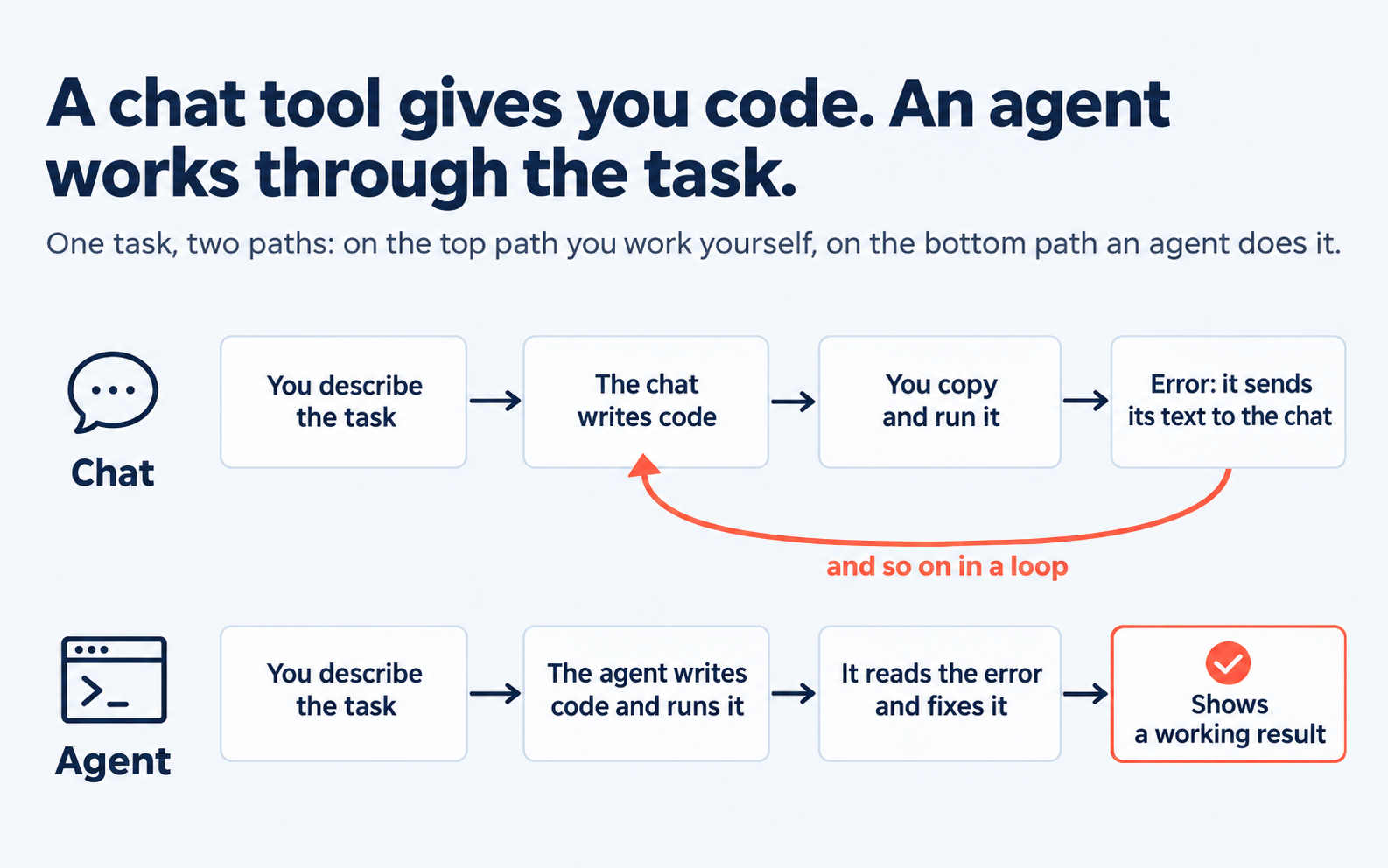
You don’t need to be a programmer for this. One of the authors of “SeoShim Gambling” rates her programming skills at 4 out of 10 (in Russian), and her team built their own stats tracker.
You need to be someone who knows what a good result looks like. Start by choosing a task whose correctness you can check yourself—for example, a table with numbers from a familiar dashboard. Just like in affiliate marketing, it’s best to test on small volumes so the cost of mistakes at the start is lower.
| Also read: Vibe Coding tracker: exploring the new trend |
Four Types of Vibe Coding Tools
To create your own custom working tool, an affiliate almost always needs an agent that runs the code itself—Claude Code or Codex for $20 a month: nearly all the cases below are built on them. You don’t need to know the terminal for this, both have desktop apps.
There are four classes in total, and they differ by where the code lives, who runs it, and whether you see every edit. The boundaries are blurred: chats now have agent modes, and terminal agents are often launched inside code editors. Prices are from official pages as of October 21, 2026.
Chat assistants: ChatGPT, Claude, DeepSeek, GigaChat
The chat writes code in the conversation window, but saving and running it is up to you. It doesn’t see your files and won’t know the code crashed until you bring it the error text. For one-off tasks, that’s enough: a formula for a spreadsheet, a script for export, a snippet of markup for a prelander.
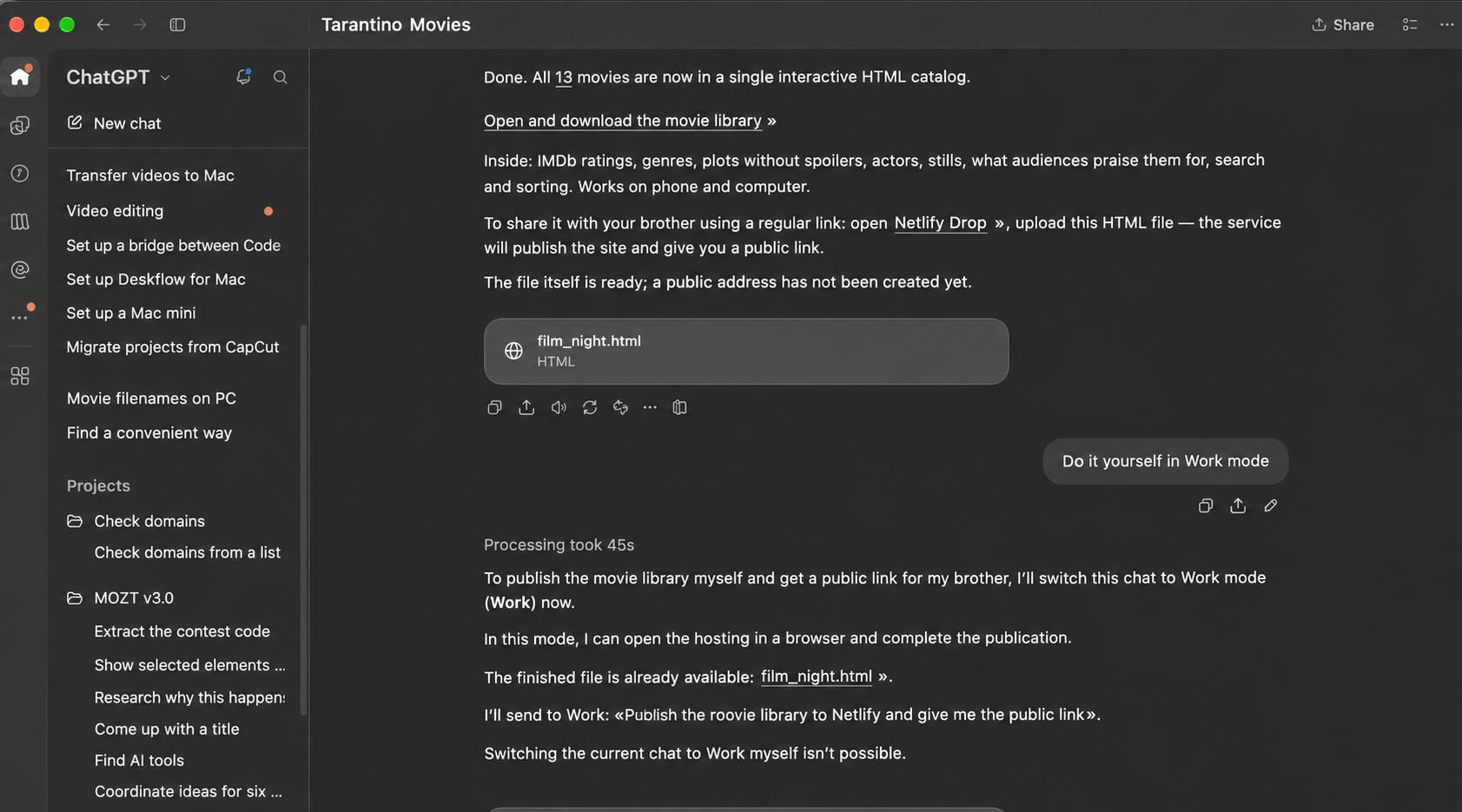
A real-life example: I spaced out and didn’t switch to Codex—so ChatGPT in a regular chat couldn’t upload a simple html for my brother anywhere. Well, at least it assembled it.
Free plans are available from ChatGPT and Claude, paid plans start at $8 for ChatGPT Go and $20 for Claude Pro. Russian GigaChat (in Russian) from Sber is free, unlimited, and can write and edit code. It’s mentioned here for reference. Yes, it’s used in major Russian companies, but as my developer friends’ experience shows, it’s more often paired with Chinese neural networks like Qwen and Kimi. American Claude and ChatGPT, for obvious reasons, unfortunately can’t be used for work. GigaChat isn’t up to the task yet, so I won’t recommend it.
Agent modes have appeared in chats themselves, where the agent completes the task independently: in Claude, the Cowork agent mode has been gradually integrated into regular chat since September, and in ChatGPT this mode is called “Work.” For one-off tasks, they’re enough: a personal service is built on Cowork in an hour or two (in Russian), but if you need it regularly, you write a full-fledged app in Claude Code.
App builders: Lovable, Bolt, Replit, VibeCraft
An app builder assembles a website or web app on its platform: you describe what you need, see the result in a window next to it, and publish it with a button. The code is stored by the service, so you don’t need to install anything on your computer.
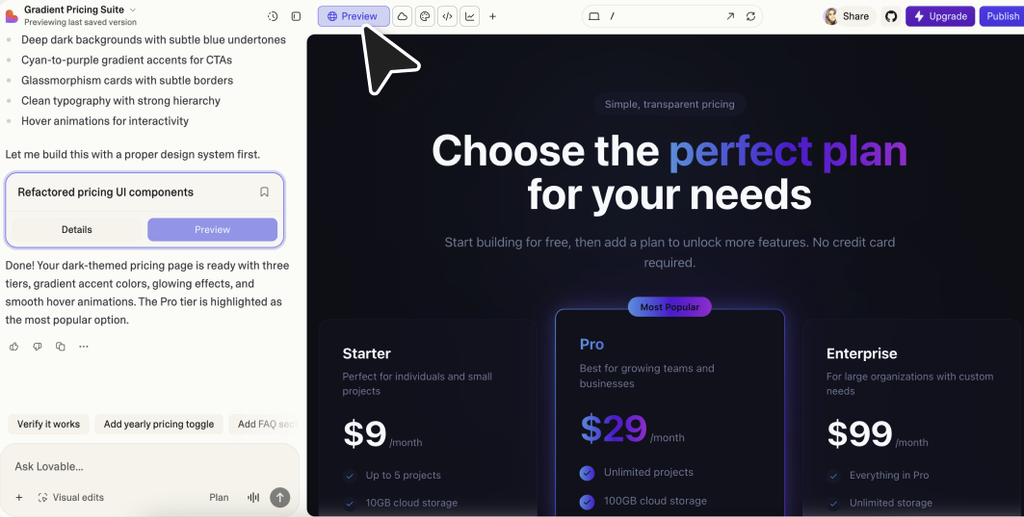
This is what Lovable looks like—prompting through a familiar chat, results visible on the canvas, and you can make pinpoint changes. Under the hood: Claude, ChatGPT, Grok models, etc. Source: html.to.design
The free plan is enough to try it out: Lovable gives 5 credits per day and no more than 30 per month (a landing page with images, for example, costs 1.7 credits), while custom domain and code editing are unlocked on Pro for $25 per month. Pro at Bolt.new is $18 per month if paid annually. Among Russian services, VibeCraft by Yandex (in Russian) is closest to this class: 500 free neurocredits per month, paid Start plan — $14.
The builder is convenient when you need a single page: pre-lander, quiz, white. Under the hood are third-party models like Claude, ChatGPT, Grok, etc. For regular work, most professionals use an agent and pay for models directly: Maxim, who vibe-codes daily, sees no point in overpaying for such add-ons (in Russian) over third-party neural networks.
Agents in the Code Editor: Cursor, Devin Desktop, and Antigravity
An IDE is a program where developers write code and see all project files. An IDE agent integrates a neural network into it: you write a task in the sidebar, the agent edits files in your folder, every change is visible (and you can manually adjust it if needed).
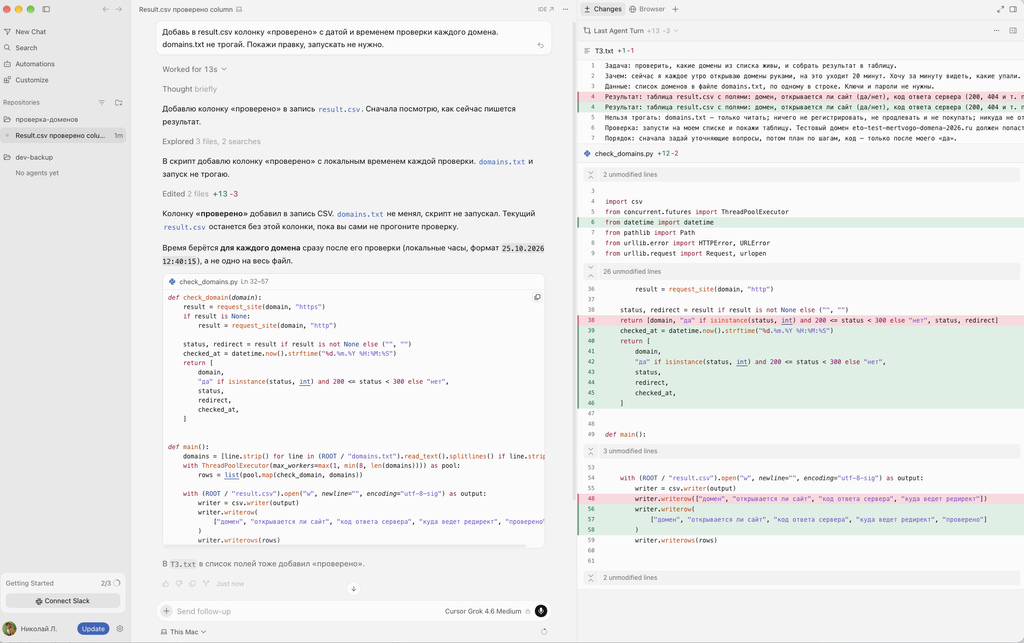
Cursor: in the middle — task and agent’s response, on the right — code edits, green for added, red for removed
Cursor has been sold since October as a bundled subscription with the Grok neural network and the X social network. Plus for $8 per month works only on Cursor’s own models. Claude, GPT, and Gemini are unlocked with Premium for $30 and are paid extra via API — this is direct access to the model, where you pay for the workload.
Windsurf has been called Devin Desktop since June, and Pro costs $20.
Antigravity by Google is free with a weekly limit.

Cursor pricing: Claude, GPT, and Gemini models are available only with Premium
An IDE often serves as a window for an agent from the next class: Claude Code runs directly in VS Code (in Russian), Microsoft’s free code editor.
Terminal Agents: Claude Code, Codex, and OpenCode
The terminal is a window where you give commands to the computer in text. A terminal agent works directly in it: reads the project, installs programs, runs code, logs into the server, and checks what broke on its own.
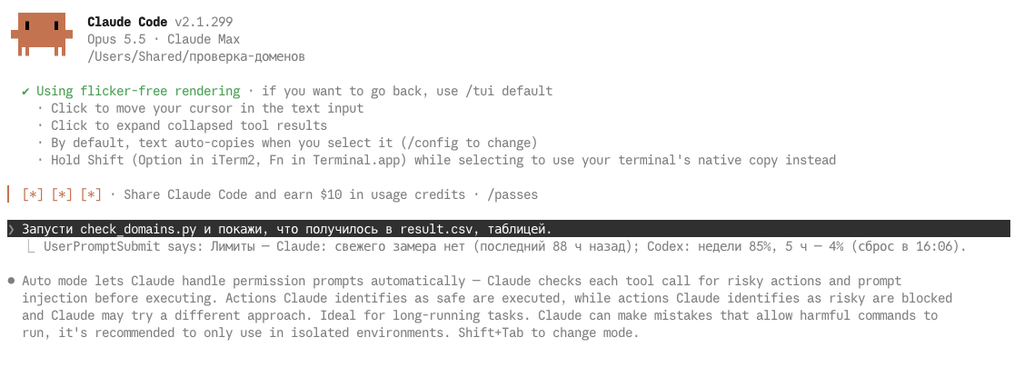
Claude Code in the terminal: you write tasks in plain language. Below, the agent itself warns that the mode where it solves tasks without you is best enabled only in an isolated environment
The main two. Claude Code by Anthropic is not included in the free Claude plan and starts with the Pro tier at $20 per month, then Max at $100 and $200. Codex by OpenAI is available in the free ChatGPT, but limited: the basic model and only in the desktop app.
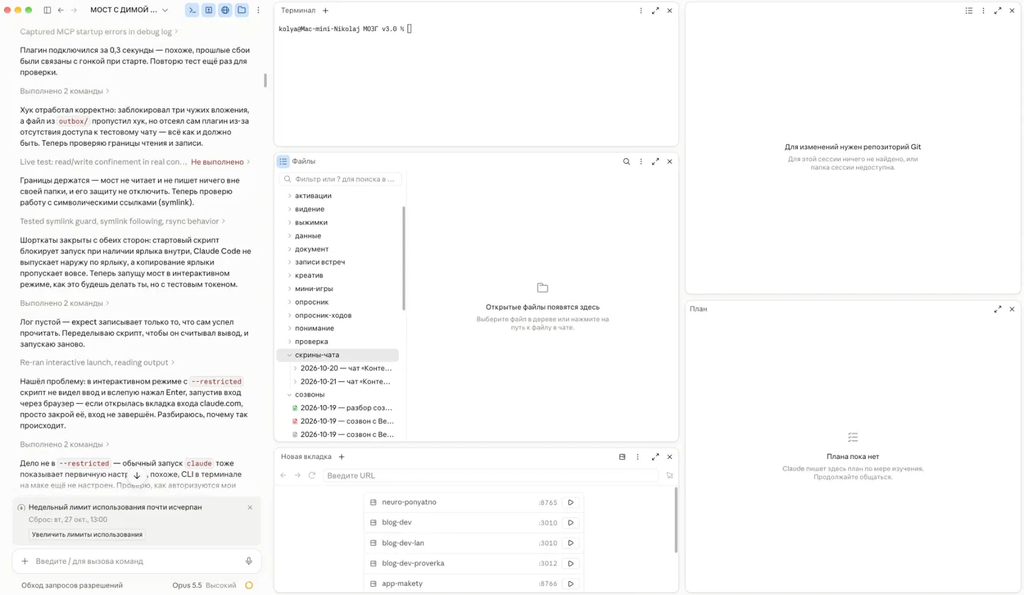
Claude Code: chat with the agent, terminal, project files, built-in browser, edits and plan. The panels on the right are empty — there was no session where the agent edited code. All these tools can be kept on screen at the same time
The full set with terminal opens up in Plus for $20, then Pro from $100. The free option is OpenCode: the agent itself is open source and free, there are free models (though temporary), and the Go subscription for stronger models costs $10.
| Class | Examples | Where code lives | Who runs it | Paid entry | For what |
| Chat assistant | ChatGPT, Claude, DeepSeek, GigaChat | in chat window | you | $8–20 per month, GigaChat — free | one-off script, formula, code snippet |
| Builder | Lovable, Bolt.new, Replit, VibeCraft | at the service | service | $18–25 per month, VibeCraft — $14 | pre-lander, quiz, white |
| IDE agent | Cursor, Devin Desktop, Antigravity | in your folder | agent, you see every edit | $8–30 per month | project where you want to see the code |
| Terminal agent | Claude Code, Codex, OpenCode | on your machine or server | agent itself | $20 per month, OpenCode Go — $10 | parsers, bots, panels, routine |
There’s no clear answer to which is better, Claude Code or Codex. In “Seo Gambling” one author works in Codex, the other in Claude (in Russian), and their tasks are almost identical.
Pavel Molyanov, founder of the content marketing agency Sdelayem, writes a lot about working with AI agents. In spring, he criticized Codex, and in September canceled his Claude subscription (in Russian) and made Codex his main tool. But then he switched again. And that’s normal, because companies compete for users and constantly improve their products.
Personally, I use a Claude + Codex combo. Claude Code writes texts, prepares solution options, and manages agents; Codex does extra research and gives a second opinion. Physically, it’s one window: I work in Claude Code, and it launches Codex itself — via a terminal command, gives it a task, and takes back the report. No need to switch between tabs.
There are now tools that let you use them and other neural networks simultaneously in a single interface. For example, Molyanov recently installed IDE bb (in Russian), which automatically pulls in Claude and Codex subscriptions. But at first, you shouldn’t dive deep into such shells: get comfortable with one agent first.
Rules, memory, and skills are shared and sync automatically, so work doesn’t stop when one hits its limits. Some tasks run directly on the Mac, without the cloud: transcription in Whisper, text recognition, semantic search, and for private tasks — local models.
Here’s the handoff I use when Claude and Codex work in the same terminal window:
| Claude Code passes the full brief to Codex in the terminal. | Codex does the research and sends Claude Code its report. |
| When Claude delegates a task to Codex | The entire task, only a report comes back |
I don’t claim the diagram is perfect, but even in this form it boosted my work about twofold (rough estimate, of course).
Choosing an AI Tool for Your Affiliate Workflow
An agent handles typical tasks best, and affiliates have plenty: Telegram bots, landing pages, and parsers — templates the neural network has seen millions of times during training (in Russian).
Telegram bots and notifications
A bot is one of the simplest first projects, especially a bot for yourself. For example, for transcribing voice messages (in Russian): Claude Code writes this in a single request, and you can judge how convenient it is for yourself.
A bot and any scheduled task need a computer that stays on, so automated tasks are launched from a server (in Russian).
Pre-Landing Pages, White Pages, and Landing Pages
A white or pre-lander is the most obvious task for an agent. The Konvertov channel author announced the niche of white generators dead (in Russian) back in spring: “No point generating a white for $10 each when you can get Claude Code or Codex for $20 and make white pages for every occasion.” Even developer Daniil Vygolov, who looks skeptically (in Russian) at white-label services for sale, admits (in Russian) that with an agent “you can instantly create a good-looking affiliate lander.”
Naumov bought a domain and tasked Claude with creating and launching a site (in Russian) for the referral program of a certain service. After a couple of months, there were 36 registrations and €460 in revenue: clients were brought in by ChatGPT, which started recommending the site in its answers. However, he hasn’t been able to repeat this yet — the next two sites didn’t make it into AI responses in the first two weeks.
To avoid making your site average and bland, start with the search results: give the agent 10–20 top sites (in Russian) and ask them to find common blocks — for single-brand gambling sites, that’s bonuses, payment methods, licenses, reviews, FAQs — and then build your own template from those. This is another confirmation of my point at the beginning of the article: try not to reinvent the wheel.
Collecting Offer Data, Search Results, and Link Prospects
Naumov calculated how much manual work a nutra webmaster does: 300 products across 17 language versions — that’s 5,100 pairs of “offer + GEO” (in Russian), each with its own flow ID and price. With Claude Code, he built an offer database with an interface and connected API exports for new items from affiliate programs: daily monitoring of 20–30 minutes shrunk to a couple of clicks (in Russian).
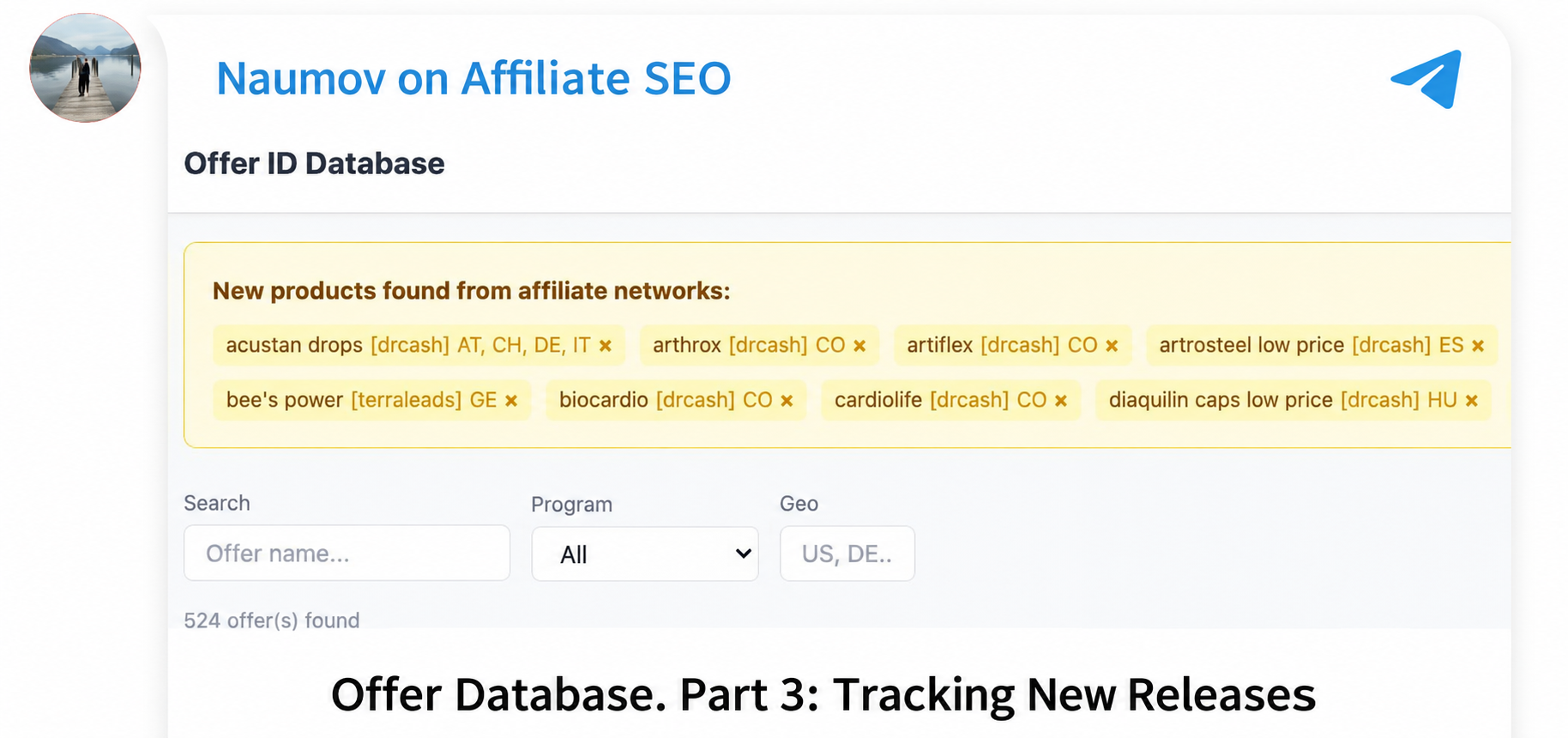
Naumov’s offer database: new items from affiliate programs automatically appear in the list and are visible at the top
Shestakov also built a system for finding link prospects for placements (in Russian): it grabs the top 10 for keywords, analyzes pages, classifies platforms, and pulls out contacts. “From idea to implementation took 2 hours,” he writes.
A reverse example is Naumov’s lottery site. Using AI, he wrote parsers for Nigerian lottery results (in Russian) and a “prediction” generator, and traffic started immediately — about 1,000 visitors per day. Over a year and a half, the site brought in $77.16.
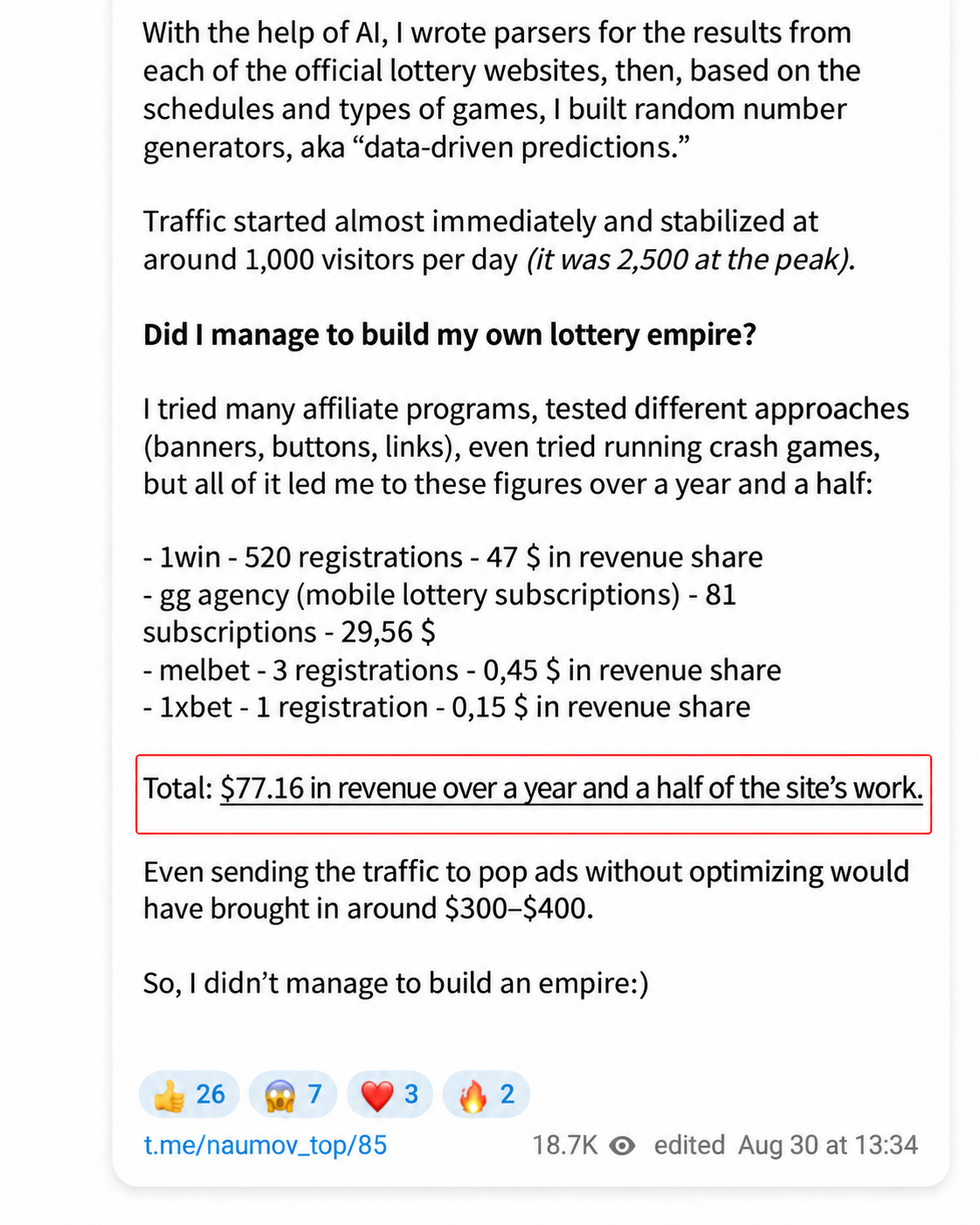
Naumov’s anti-case: the lottery site gets traffic, but over a year and a half earned $77.16
Before you build a scraper, identify who needs the data and whether anyone would pay for it.
Dashboards, Reporting, and Custom Trackers
The author of the TRAFF NOT DEAD channel got a $300 bill for a year’s subscription (in Russian) to the Search Console stats service and instead of renewing, described to Claude what kind of service he wanted. The result was a custom dashboard with multiple accounts and period comparisons, and the data matched Search Console.
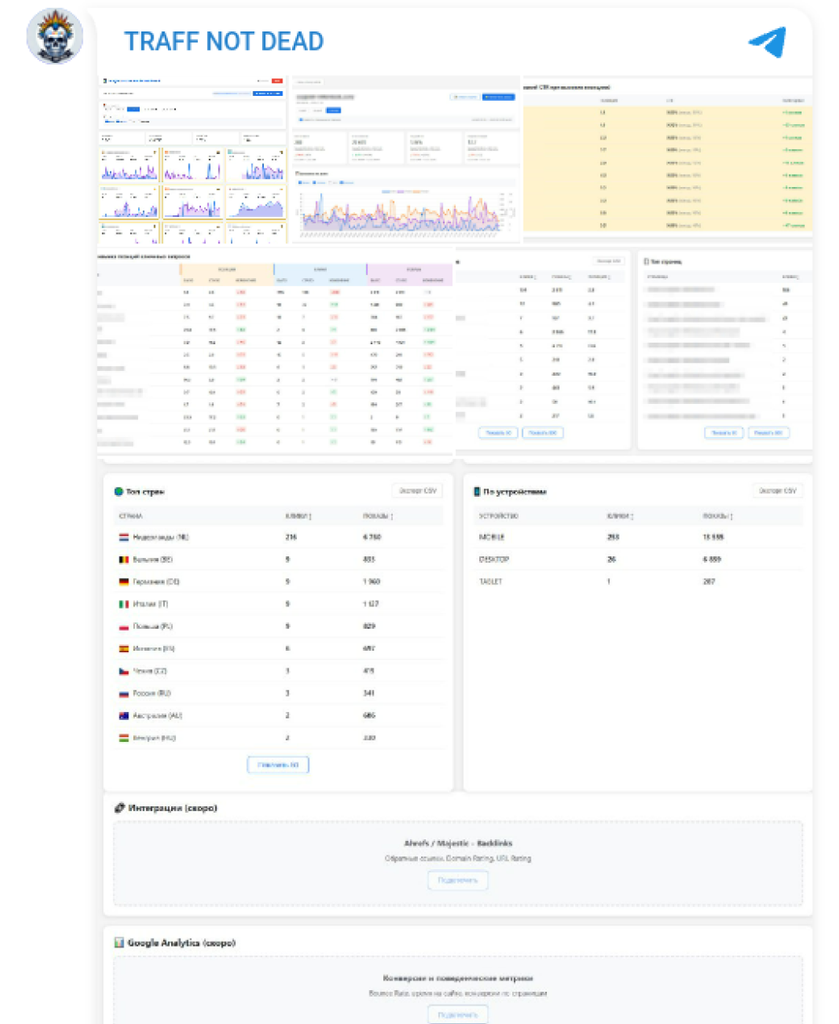
TRAFF NOT DEAD’s custom dashboard instead of a $300/year subscription
Custom trackers are also a one-evening task. Shestakov’s keyword rank tracker from the beginning of the article checks the SERP every 30–120 minutes and draws graphs, while Naumov built the first version of his own TDS (in Russian) — a traffic distribution system — in one evening instead of Keitaro.
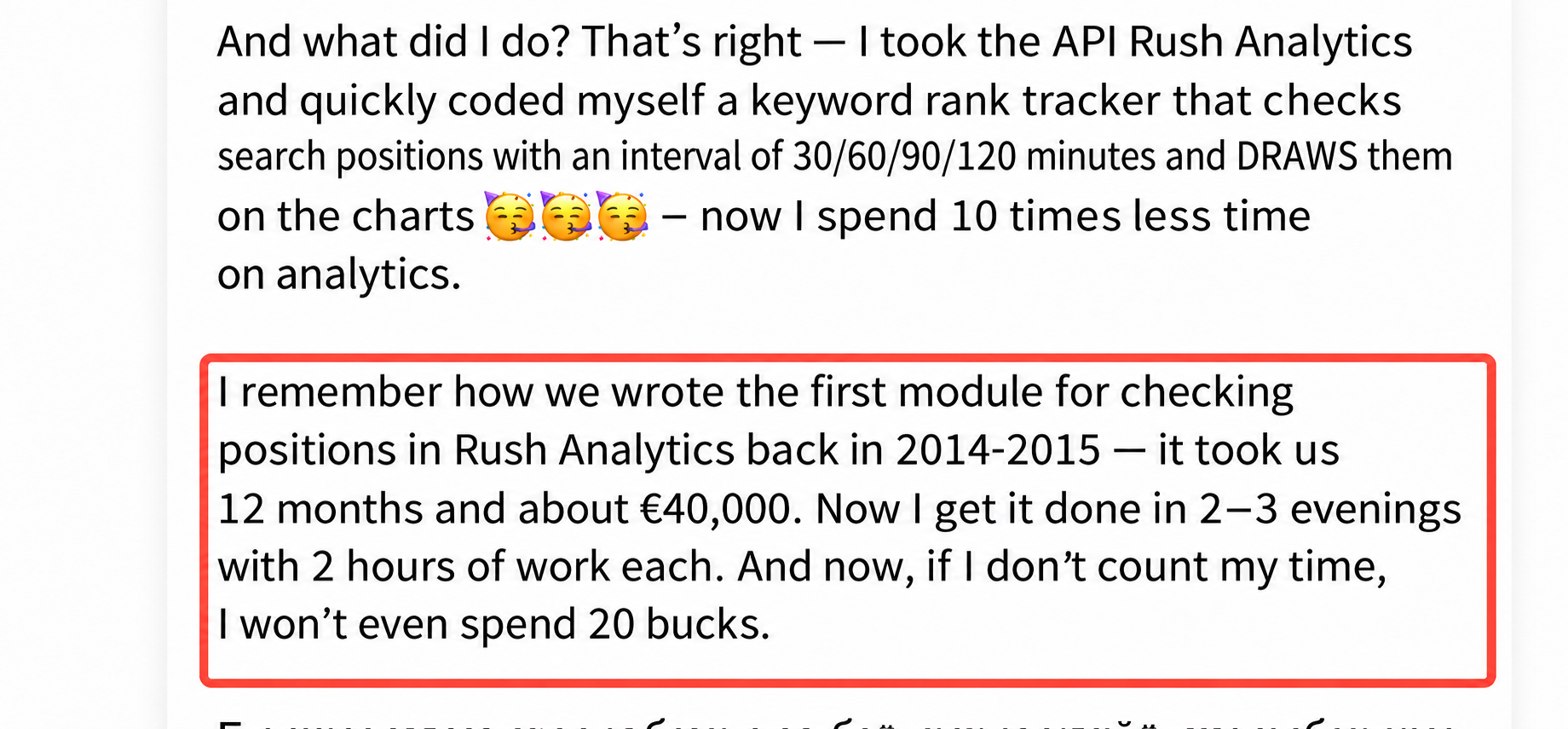
Oleg Shestakov’s post: the position checking module in Rush Analytics in 2014–2015 took 12 months to develop for €40,000, while building his own tracker with an agent took 2–3 evenings and less than $20, not counting his time
Your own panel is most needed by those who have dozens of sites. When a reader asked how to manage a hundred iGaming sites, the author of the “Tikhiy Chas” channel answered (in Russian): “In the vast majority of cases, these are custom systems, simple panels that teams have coded for themselves.” “Seoshim Gembla” collected their stats in two days and spent at least four more days on ‘desync’ (in Russian) — discrepancies in numbers across different parts.
By summer, it was already running on 463 sites (in Russian), and the author suggests repeating its “System” section: feed screenshots to your agent and ask to do the same. Personally, I often do just that. In most cases, it’s better not to reinvent the wheel and “steal like an artist”—at least in areas where you’re not an expert, and then adapt what you’ve copied to your needs.
Check the numbers in such a panel manually. A neural network can draw a nice dashboard, but fill it with mock data or invent a formula (in Russian)—mock data means placeholder numbers that don’t exist in the source. So, verify each metric at least once against the dashboard.
Automating Domains, DNS, Hosting, and Search Console
Another group of tasks—operations that used to be repeated manually every day. Maxim with Claude Code learned to register domains and change DNS in bulk via API (in Russian)—records that link a domain to a server. At “Seoshim Gembla,” the agent, after launching a site, automatically adds it to Search Console (in Russian), uploads the sitemap, and sends pages for crawling.
| Task | Class | Where to start | Where to be careful |
| Preland, white, landing | builder or terminal agent | give the agent 10–20 top sites and ask for a common template | without samples, the agent creates an “average” site |
| Offer or SERP parser | terminal agent | one source and export to a table | check numbers against the dashboard manually |
| Telegram bot, notifications | terminal agent and server | a bot that messages only you | bot key—not in code and not in chat |
| Dashboard, statistics | terminal agent | one metric from one API | agent may use invented data |
| Domains, DNS, Search Console | terminal agent | one operation on a test domain | domain registration costs money: keep an amount with the registrar you’re okay to lose |
When the process runs smoothly for several weeks, regular launches are handed over to the usual script (in Russian) — a program that executes the same commands every time and doesn’t consume the subscription limit.
Vibe Coding Costs and Availability in Russia
The working minimum for Claude Code and Codex is $20 per month: that’s the cost of Claude Pro and ChatGPT Plus with full Codex. When tasks increase, the next tier is $100 (in Russian). The ceiling is higher for those living in agents: in August, Maxim paid $200 for Kimi Code, Claude Code, and three Codex subscriptions (in Russian).
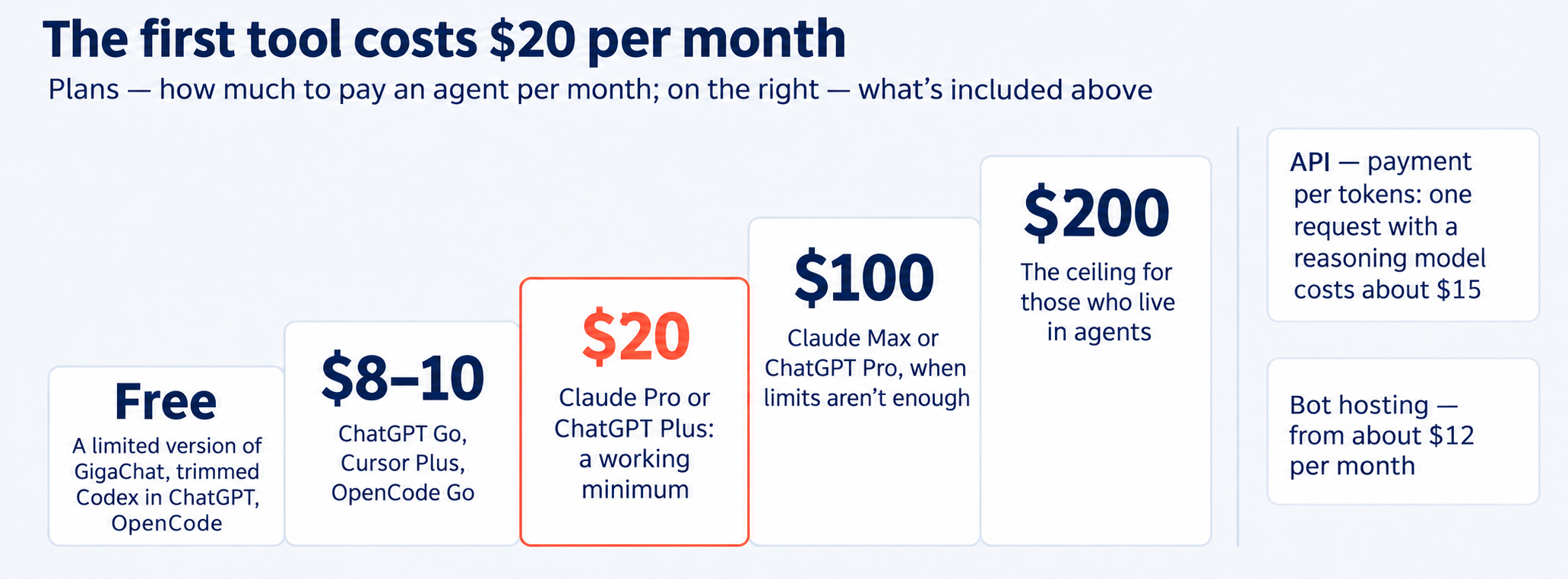
Prices are from official rate pages as of October 21, 2026; API consumption example is from Timur Ugulava’s channel
Claude’s subscription has a double limit: in Pro the restriction resets every five hours, plus there’s a weekly limit, and it’s shared between chat and Claude Code.
The second way to pay is via API, without a subscription, per token. A token is a piece of a word: the neural network counts everything it reads and writes in tokens. For a million input tokens, the Claude Sonnet 5.5 model charges $2, and $10 for output; Chinese DeepSeek Flash during peak hours — $0.30 and $1.20. With API, the agent pays for everything it reads and for its responses, and it reads a lot: one layout with research via API consumed about $15 per session (in Russian). For regular work, a subscription is cheaper.
The first barriers for beginners are access from Russia and payment with a foreign card (in Russian). It’s recommended to start with Codex: you can register there via a Google account.
Officially, Claude does not operate in Russia: Russia is not on the Anthropic country list, nor in the lists for OpenAI API and Gemini. According to Anthropic’s rules, your physical location matters when using Claude. OpenAI warns that access outside the list may result in account blocking.
Practitioners bypass these restrictions at their own risk. I pay with a Georgian card I got while living in Georgia; some use virtual cards — there are arbitration options like Capitalist, and public white-label services such as Plati po miru. Buying cheap accounts or accounts with shared access (when several people use a subscription from different devices) — you’ll get banned quickly.
The author describes his setup while working from Russia: geo card, geo IP, and a limited pool of devices you use should ideally match, or at least remain stable—for example, I have a Georgian card, have been living in Russia for half a year, only use an American IP, and a maximum of two active devices. So far, knock on wood, I haven’t been banned—probably they think I’m a Georgian who moved to America and carelessly traveled to Germany a couple of times.
Without a foreign card, you’re left with Russian services paid in rubles: the free GigaChat chat, VibeCraft builder, and the Code Assistant (in Russian) from Yandex—it works in the code editor and terminal with the built-in OpenCode agent, subscription from $14 per month. Bitrix24 VibeCode is suitable only if you build apps for the Bitrix24 portal (in Russian). Claude and GPT in rubles are sold via gateways like AI Gateway at Timeweb Cloud (in Russian), but you’ll have to pay via API, and the gateway’s terms for Anthropic and OpenAI aren’t described on the page.
The risk of getting banned doesn’t go away, no matter how careful you are: Maxim had Claude block two $200 accounts in a row (in Russian)—he worked with Claude via Kimi web, and doesn’t specify the reason. So, start with monthly payments and the lowest plan: if you get banned, you lose $20, not $200.
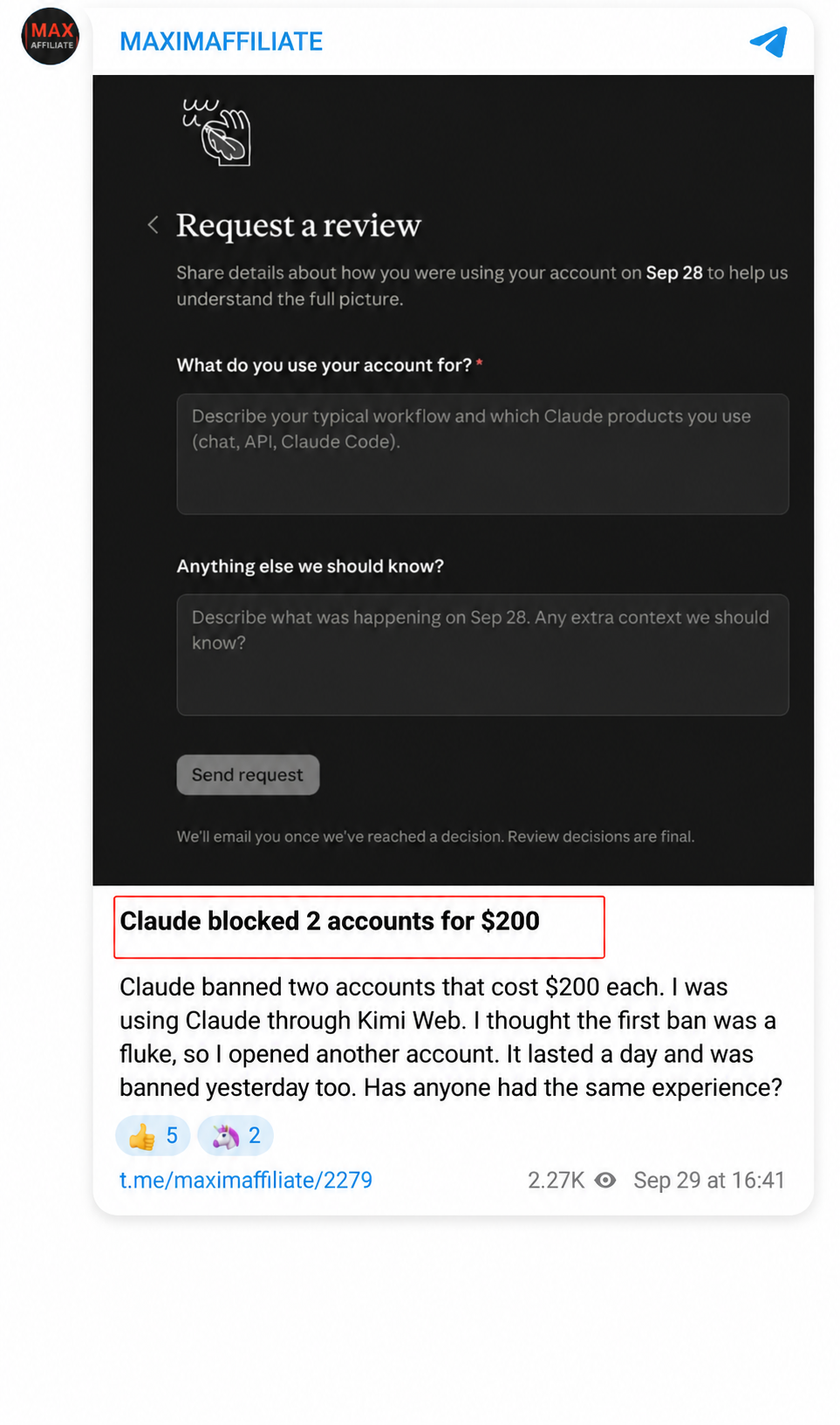
After a ban, only the appeal form remains: Anthropic calls its decision final
The last expense is the server, if the tool needs to run without your laptop: bot, monitoring, scheduled tasks. A rented server, VPS, from Russian hosts costs from $12 per month at Selectel (in Russian) and $0.39 per day including IP address at Beget (in Russian), about $12 for 30 days. A server for agents costs roughly $10–20 per month (in Russian).
Build Your First Tool in an Evening
Look for your first project within your own needs: pick a pain point you need to solve right now (in Russian). Set aside an evening for your first try: a simple site deployed to your own server takes about 4 hours (in Russian), and the first ten times everything will be slow.
- Pick one routine for 20–30 minutes a day. Checking new offers in the affiliate network, compiling stats from two dashboards into one table, checking if domains are alive. The sign of readiness—the result can be described in one phrase, for example: on my command, the agent collects new offers with price and GEO into a table. Running it every morning is the next step, and you’ll need a server for that.
- Get one agent for $20. Codex in ChatGPT Plus or Claude Code in Claude Pro. You can start without a terminal: Codex is built into the ChatGPT desktop app, Claude Code — in the Claude app. Set the mode so the agent asks for approval: in Codex, OpenAI recommends starting with “Ask for approval.” You’re ready when the agent is open in an empty folder for your future project and responds to your message.
- Keys go in a separate file. An API key is a password that lets the program access the service on your behalf. Anthropic compares it to a credit card number: whoever gets the key spends your money. Ask the agent to create a .env file with empty lines for keys, and enter the keys yourself in a text editor. In Claude Code, you can forbid the agent from reading this file in the settings. This step is done if there are no keys in the chat with the agent or in the code.
- Enable git. Git is your project’s version history, like save points: if the agent messes up files, you can roll back to a previous version. Ask the agent to initialize git in the folder and show the list of saved versions after each step. You’re ready when a new version appears in the list after every step.
- Write a technical brief using the template below. It must include the lines “Do not touch” and “Check.”
- Ask for a plan before any code. Enable plan mode — where the agent only writes a plan and doesn’t change anything — and ask for a detailed breakdown of what and why it will do (in Russian). The plan is ready when it’s divided into steps and each has a clear outcome.
- Go step by step and check manually. After the first step, pause and click through everything (in Russian) yourself.
I recommend starting with template briefs, and then, as you gain experience, adapting them to your needs. You can simplify some parts, giving the agent more freedom. But all such decisions should be made only after verifying the correctness of each step in practice.
Afterwards, you can create skills — essentially the same as a brief, a set of rules and algorithms that the agent follows from start to finish after a certain command or chat request. Then it will work more autonomously, delivering you only the finished result.
Below is a sample trial brief. It’s compiled from expert advice: the task is split into what to do, what format the result should be, and what restrictions apply (in Russian), the agent asks questions first (in Russian), and prohibitions are listed as a separate line.
Copy and fill in for your task:
| Task: what to do, in one phrase. Purpose: what routine this will replace and how I’ll know it’s improved. Data: where to get it (affiliate API, CSV table, website). Keys are stored in the .env file: you can’t read it, the program gets keys from there automatically; don’t write them in code or chat. Result: in what format (table, Telegram message, page) and with which fields. Do not touch: affiliate links, postbacks, tracker settings, workspaces, anything related to payments. Check: how you’ll make sure everything works, and what you’ll show me. Order: first ask clarifying questions, then outline the step-by-step plan, code only after my “yes”. |
Write the “Do not touch” line as a list: affiliate links, Keitaro, postbacks, URL structure, database, existing redirects (in Russian). The general “don’t break anything” doesn’t work.
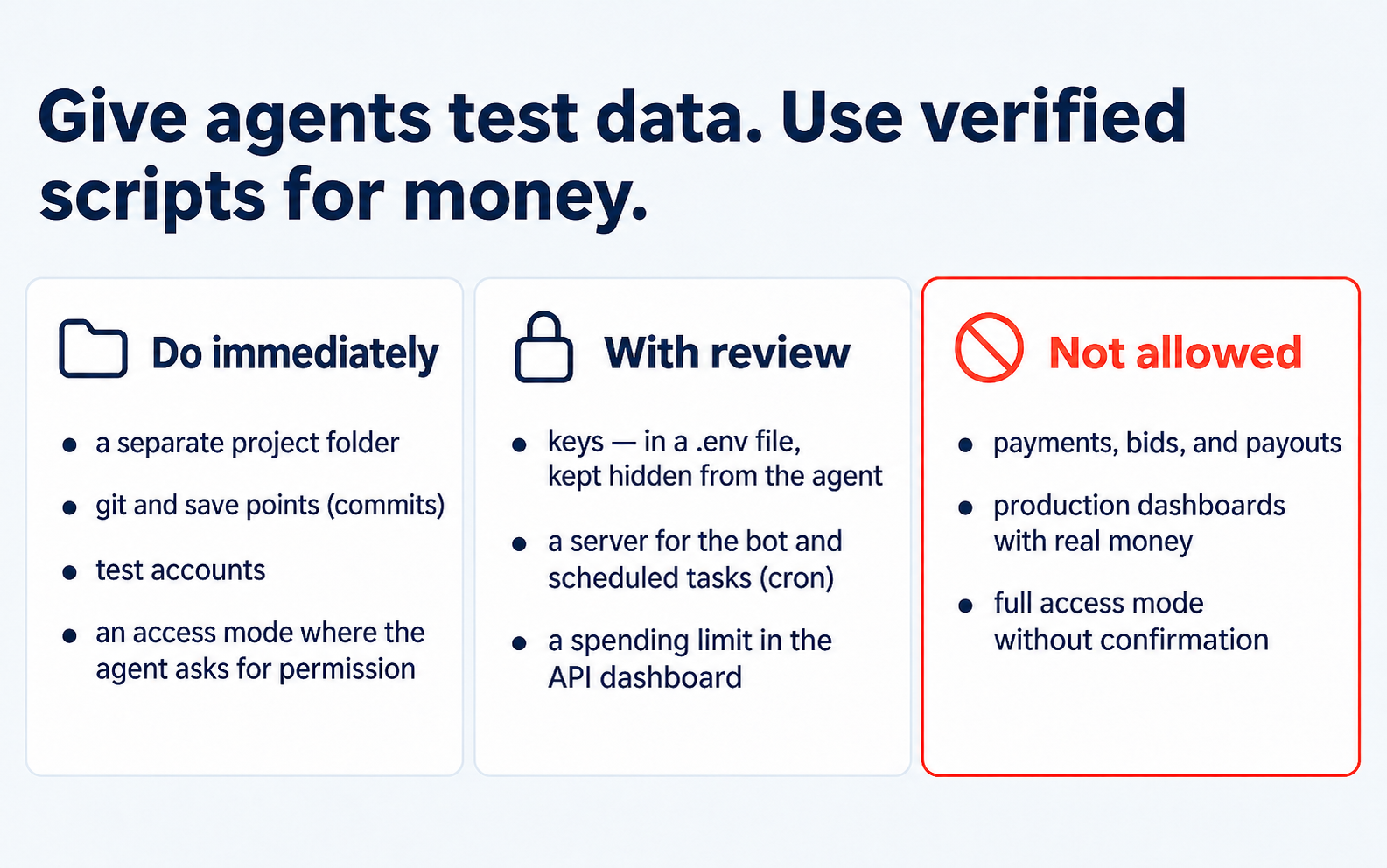
Access scheme for the first tool: restrictions in the task work only when dangerous actions are also blocked by agent settings
This is how the template looks when filled out — using the domain check task from the first step:
| Task: Check which domains on the list are reachable and save the results in a table. Purpose: I spend 20 minutes every morning checking domains by hand. I want to see which ones are down in about a minute. Data: Read domains.txt, with one domain per line. No credentials are needed. Result: Create result.csv with the domain, whether it is reachable (yes or no), the HTTP status code (such as 200 or 404), and the redirect destination, if any. Do not touch: Treat domains.txt as read-only. Do not register, renew, or purchase anything. Do not share the list. Check: Run the check on my list and show me the table. The reserved test hostname offline-test.invalid should be marked unreachable. Order: Ask clarifying questions first, then propose a step-by-step plan. Write code only after I approve it. |
I gave this task to the agent. First, he asked clarifying questions, then wrote out the plan, asked for permission before running the script, and finally showed the table. The check itself took less than three minutes.
If the agent goes somewhere you didn’t ask for at any step, stop him and add a restriction to the “Do not touch” line.
Common Pitfalls: Credentials, Costs, Usage Limits, and Suspensions
The agent says “done,” but nothing works. Molyanov split the task with the agent into 32 parts (in Russian): the agent spent two evenings doing them, running tests and reporting that everything was fine, but at the first launch not a single function worked. His conclusion: “First, a tiiiiny MVP, then add new features step by step.” MVP is the smallest working version; launch each step yourself.
The limit was gone in minutes. In “Seoshim Gembla,” a five-hour window once burned out in just one and a half minutes (in Russian). What to do: switch models — the agent has several; use the senior one for the project device, the junior for minor edits and texts. With “Seoshim Gembla,” token consumption dropped by more than 4 times (in Russian). I send some Codex tasks through Claude Code when limits fall below 80%.
The API bill is much higher than expected. Naumov tracked the cost of every step, but the model in the generator wasn’t the one Claude used for pricing (in Russian), and the bill jumped from $18 to $112.
A similar trap exists in Claude Code: if the Anthropic API key is set on the computer, the agent uses it and charges money at API rates, even though the subscription is paid.
What to do: set a spending limit in the API dashboard — Anthropic lets you set your own spending cap, and with OpenAI, after a hard limit, requests are simply rejected.
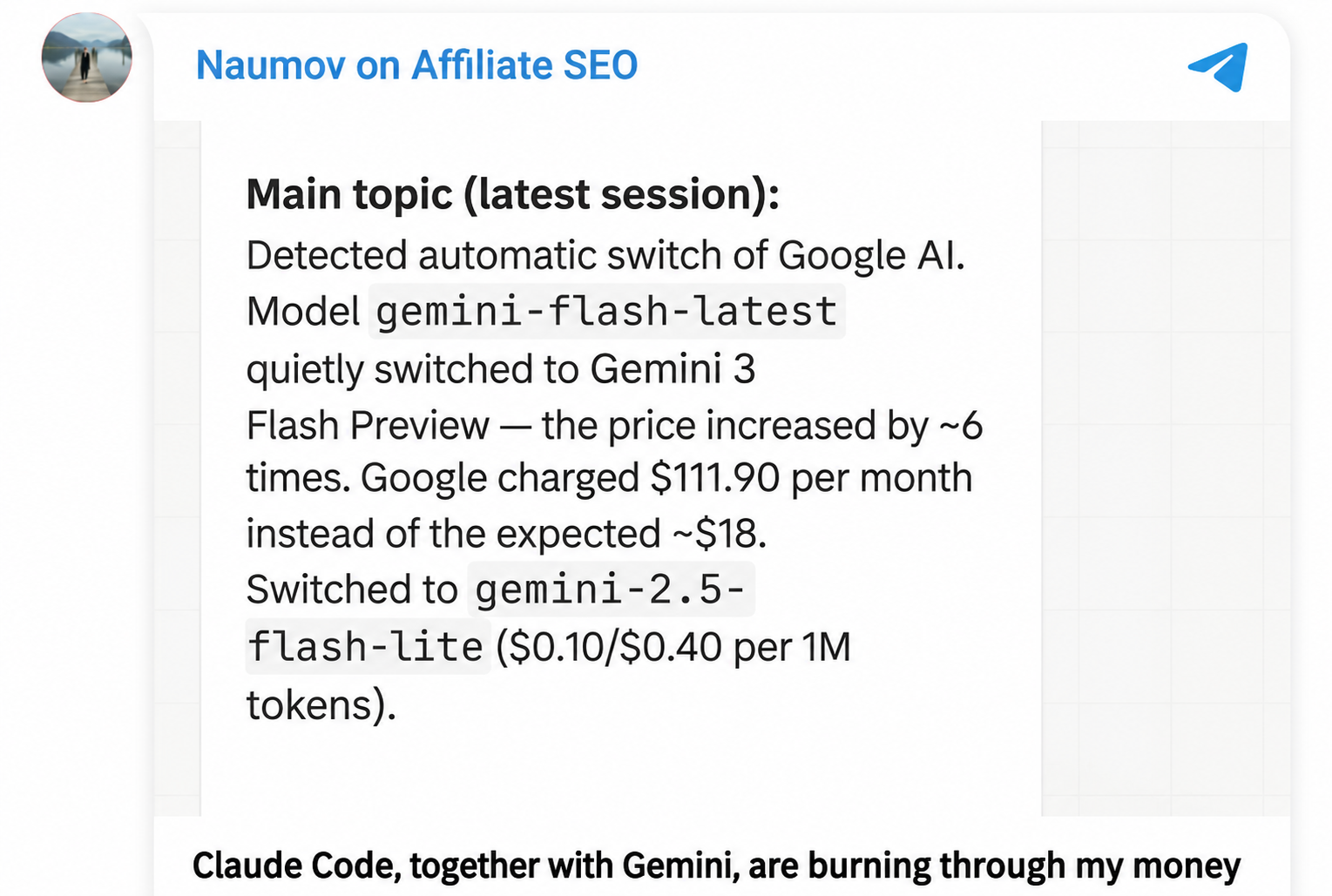
The model quietly switched to another, and the bill ended up six times higher than expected
The agent did what it wasn’t asked to. The “Seoshim Gembla” tracker worked flawlessly for over two months, then, as the author writes (in Russian), “SUDDENLY the script DECIDED to reinstall the tracker on 230+ sites”—against permissions. Since then, the author relies only on strict limiters.
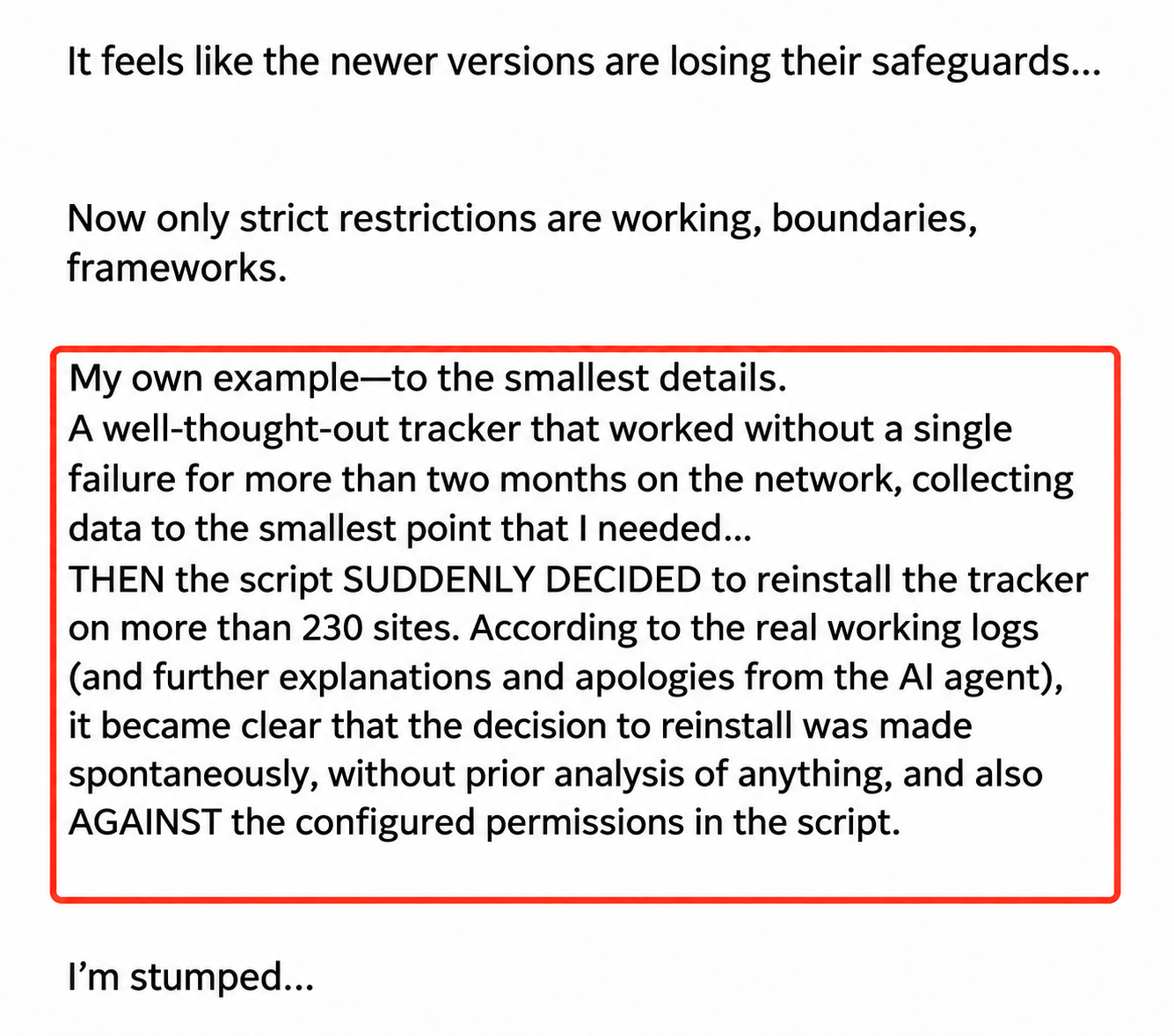
Post from “Seoshim Gembla”: the tracker worked flawlessly for over two months, then the agent suddenly started reinstalling it on 230+ sites
What to do: restrictions in the task description aren’t enough; risky actions are blocked by agent settings—don’t let it act on its own where mistakes are costly. The mode where Claude Code does everything itself, the documentation recommends enabling only in an isolated environment where there’s nothing to break, and full access mode in Codex OpenAI is explicitly marked as not recommended.
Error where the money is. After $2400 at the auction, Maxim switched everything to a regular script (in Russian). What to do: use test accounts for the agent (Molyanov created a separate account for bot tests (in Russian), Claude Code has full access to it), and payments, bids, and payouts—only through a script with a strict limit, reviewed by a developer before launch.
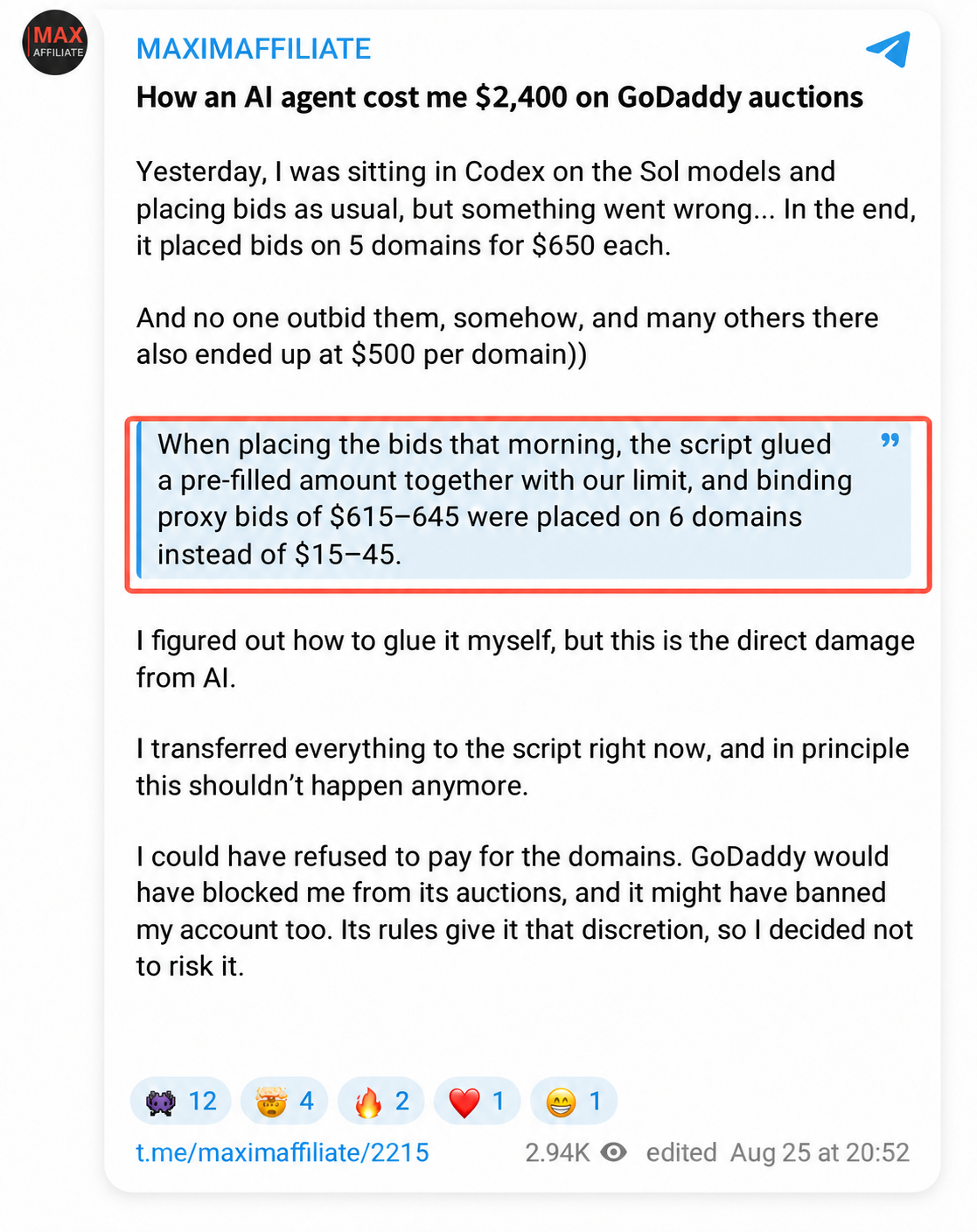
Maxim’s post from MAXIMAFFILIATE: the amount in the bid field merged with the limit, and instead of $15–45 for domains, bids went up to $615–645, and he was afraid to refuse the won lots
Key leaked. Molyanov’s Telegram bot, written in Codex, immediately dumped the API token into the logs (in Russian). The key ends up where it’s visible: in code, logs, chats, or public repositories.
What to do: keep keys in .env, closed off from the agent, and immediately reissue any leaked key. Also, ask the agent to check that .env and backups aren’t accessible via your site address (in Russian).
Account banned mid-project. After Vygalov’s account was banned, all the setup “turns into a pumpkin” (in Russian). What to do: keep code and instructions for the agent in your git, so after a ban you can continue with another agent: there’s no point tying yourself to one tool (in Russian).
When to Bring in a Developer
You need a developer when money, outside users and their data, or heavy traffic go through the tool. A prototype is about 20% of the work (in Russian): the other 80%, according to developer Daniil Vygalov, goes into bringing it to ready for production—where outsiders can safely use the tool.
The model doesn’t keep the whole system in mind and just continues the piece it sees, so almost any big project written by a single AI starts to fall apart over time: logic gets duplicated, the same thing is done four different ways, and hacks pile up on top of hacks. A non-developer struggles to spot this: they can’t check what they don’t understand, and then it suddenly breaks.
Custom code also gets attacked. The “Seo Gambling Tracker” was hit with SQL injections and password brute force (in Russian) attempts at the end of September, but no holes were found. Eleven days later, a night scan finally damaged the tracker (in Russian): vibe coding alone doesn’t protect anything.
Bring in a developer for at least a review if:
- money flows through the tool—bets, payouts, payments;
- it’s used by people outside your team or you’re selling it;
- it handles live traffic and speed matters, like a tracker or TDS;
- it stores other people’s data—leads, phone numbers, emails;
- it has an open admin panel online, or someone’s already tried to hack it.
For your first project, set aside an evening, pick one routine task you can verify yourself, and start with an agent on a $20 plan.

FAQ
A chatbot gives you code to run yourself. A coding agent can run it, read the error, and try a fix. Your job is to define the task and verify the result.
You can only try for free: free ChatGPT has a limited Codex, and OpenCode works with free models, but they're temporary. GigaChat is free, but it's a chat, and you run the code yourself. Claude Code isn't included in the free plan, so you need a subscription from $20/month for regular work.
It depends on the job. The affiliate marketers in this guide mainly use Claude Code and Codex. They use less expensive models for high-volume tasks like drafting copy.
Beginners from Russia are often advised to use Codex: you can register with a Google account. This doesn’t solve the access issue — OpenAI doesn’t officially support Russia. In terms of tasks, Codex and Claude Code are similar; practitioners do the same things on both, and full versions of both start at $20 per month.
Claude Code and Codex are not officially available in Russia: Russia is not on Anthropic’s country list, and OpenAI doesn’t include it in the API country list and warns about blocking access from unsupported locations. Cursor doesn’t have its own list, but Claude, GPT, and Gemini only work in it where the manufacturers allow. Officially in Russia, GigaChat, VibeCraft, Yandex’s Code Assistant, and Bitrix24 VibeCode are available.
You can start by building a tool for a task you already understand. Free videos and guides can help you keep up with changes to the tools.
Tokens are pieces of text used to measure what a model reads and writes. API pricing is generally quoted per million tokens. Subscriptions use time-based limits. Claude has a five-hour reset and a weekly cap. Codex in ChatGPT Plus also uses a five-hour window, and weekly usage limits may apply.

Comments (0)