

This could have been another roundup of ten AI tools for creating iGaming ads. But that would leave readers with a list of services and referral links, with little chance of putting the tools into practice.
Instead, we have built a practical guide. We will look at widely available tools and use concrete examples to show how to get the most out of them.
Why Use AI-Generated Creatives?
AI-generated creatives help you turn ideas into ads faster: get a subscription, use ChatGPT to write a detailed prompt, and generate a result. They also offer two advantages:
- Lower barriers to entry. You no longer need advanced photo editing or video production skills to create a first workable version. Describe what should appear in the frame, then refine the result.
- More scope for testing. Instead of 1–2 versions, you can quickly create several ads with different approaches, visuals, and points of emphasis. With strong competition and the changes brought by Andromeda, volume and variety matter more than visual polish alone.
The value of AI-generated creatives is that they make production faster, simpler, and more flexible. They help you test ideas, find effective approaches, and avoid spending too much on weak concepts, rather than replacing people entirely.
AI Tools for Static Creatives
Hundreds of AI tools can generate images, but two leading options are already widely accessible: NanoBanana and ChatGPT. Google’s image generator has a free basic version, while the OpenAI option discussed here requires a subscription.
Let’s see how both tools handled a straightforward task:sk:
| prompt photorealistic vertical facebook ad creative, 4:5 ratio, brazilian man 25-30 years old, attractive but realistic, casual streetwear, sitting in a modern dim room with neon red ambient light, focused and excited while playing Aviator on his smartphone, phone clearly visible in hand close to camera, realistic crash game interface on screen with a very high multiplier frozen at x120+, dynamic upward red flight graph, bright cashout button, intense game moment, cinematic composition, shallow depth of field, natural skin texture, realistic fingers and phone grip, premium mobile gambling atmosphere, sense of tension and anticipation, clean background, high contrast, ultra detailed, realistic lighting, social media advertising style, no extra objects, no clutter, visually clear focal point on the smartphone screen and player reaction, brazilian vibe, polished commercial photography, hyper realistic, premium quality negative prompt cartoon, illustration, low quality, blurry, overedited face, bad anatomy, extra fingers, broken hands, distorted phone, unreadable screen, fake ui, too much text, watermark, logo distortion, duplicate objects, messy background, low contrast, flat lighting, unrealistic skin, exaggerated expression, cheap looking ad, cropped phone, deformed screen |
To write the prompt, we gave ChatGPT a guide from the model developer’s blog. Practical developer guides like these are often called cookbooks. We also supplied information from this article. ChatGPT used those materials to tailor the prompt to NanoBanana’s capabilities.
NanoBanana
The generated image is shown below. Because we used the free tool, the images carry a logo in the bottom-right corner.
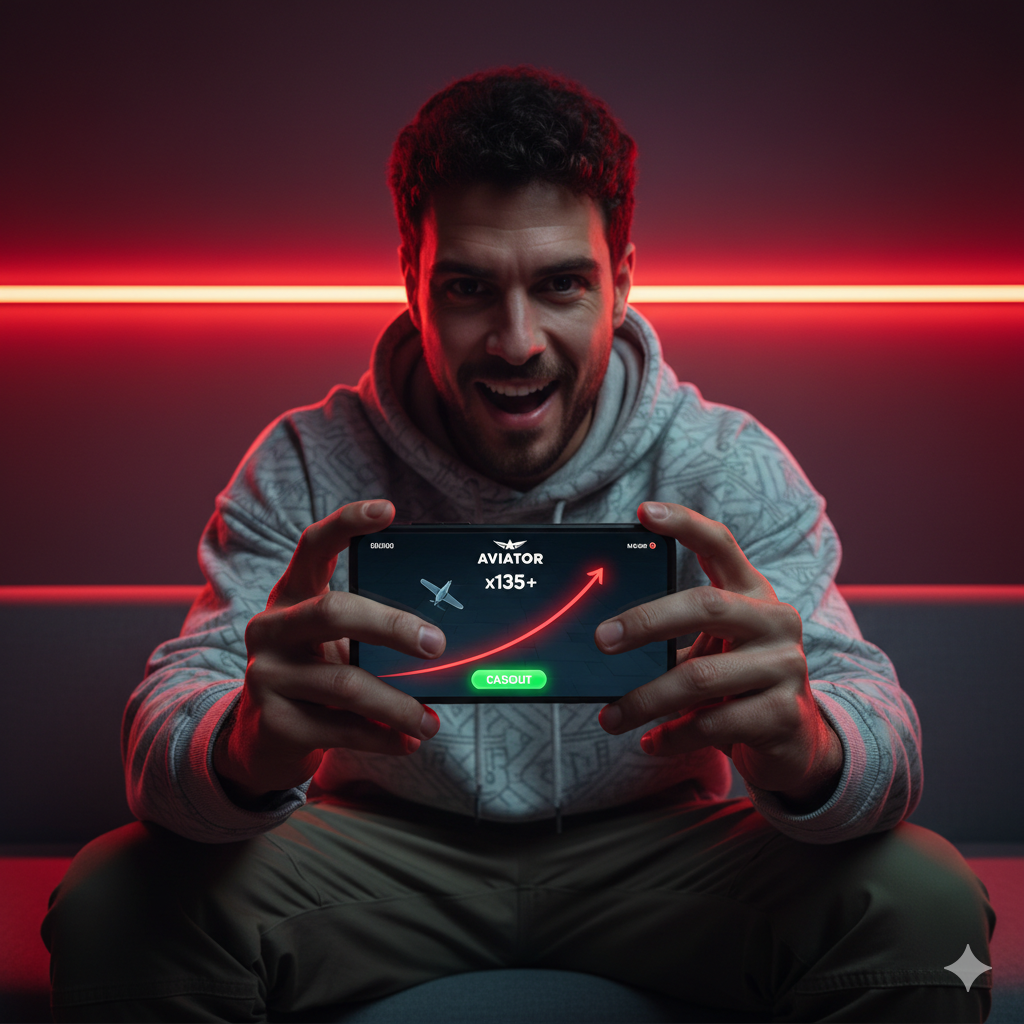
Generating a creative is straightforward. Next, we wanted to see how easily the tool could edit it. We asked it to remove the backgrounds from the Google Play and App Store badges and add them to the image.
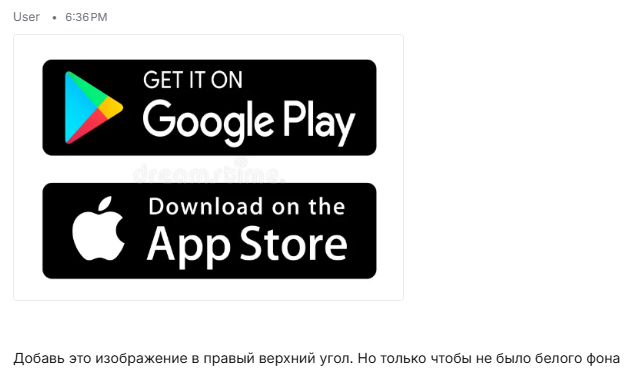
We provided no instructions on how Aviator should look. The AI generated and styled the game screen itself. It integrated both store badges into the image in less than a minute.
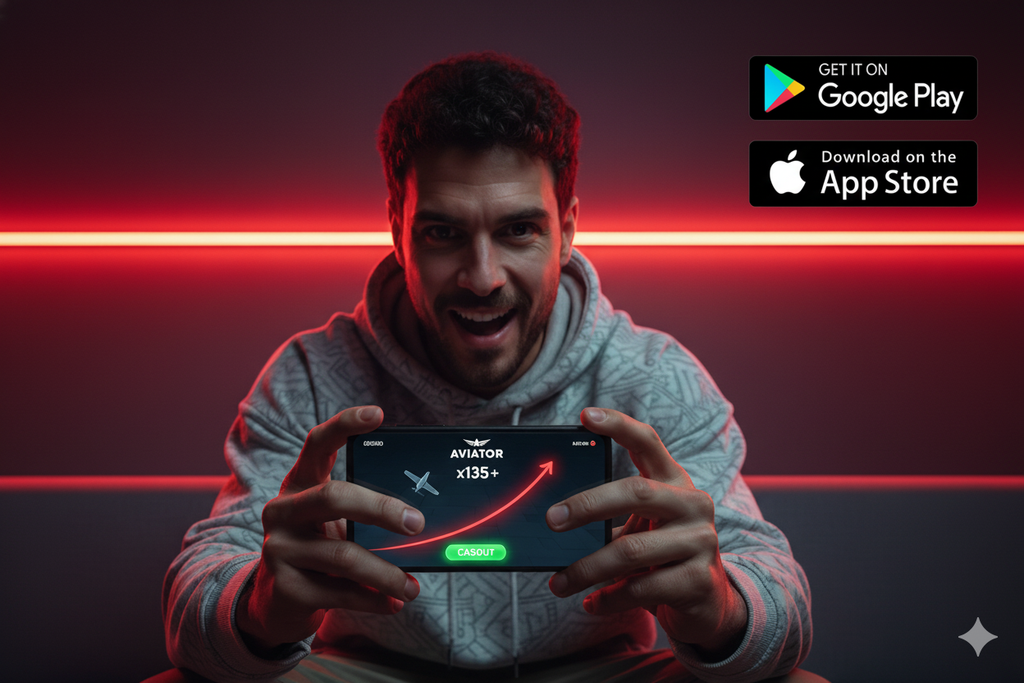
Next, we made the task harder by adding text. We gave no detailed language instructions and simply asked for text in “Brazilian,” meaning Brazilian Portuguese, the variety spoken in Brazil. The system understood the intended locale and produced Brazilian Portuguese rather than European Portuguese.
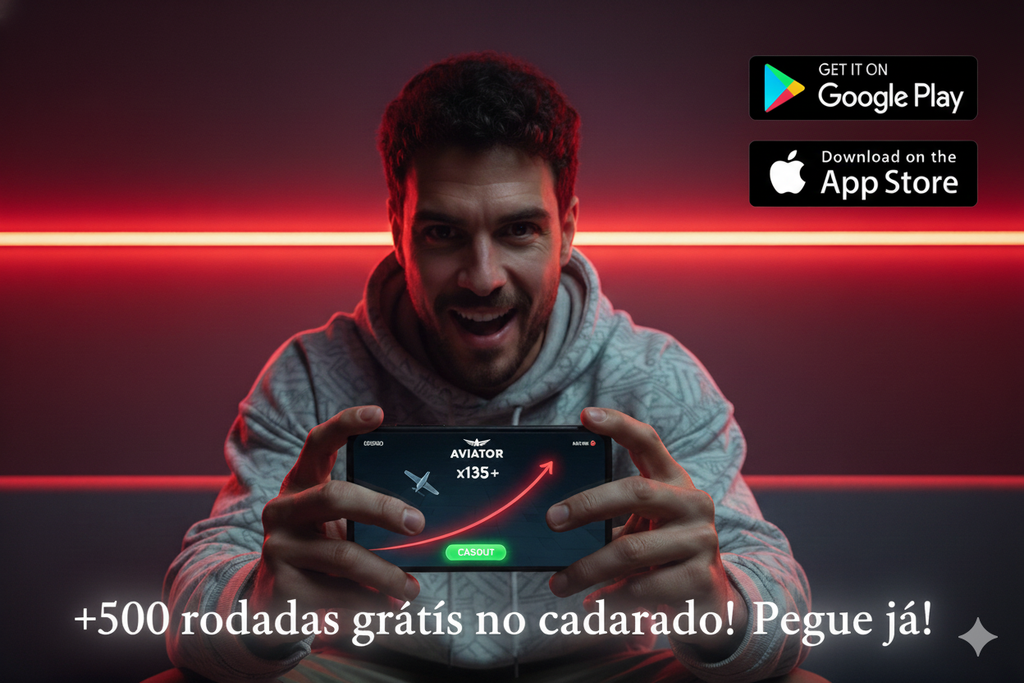
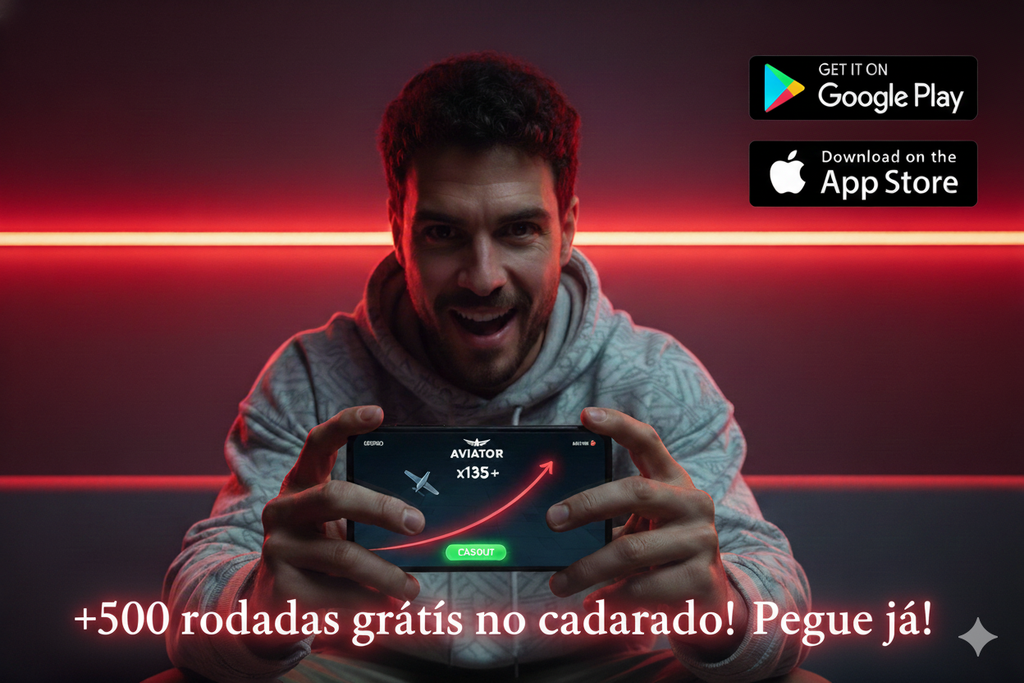
We were not happy with the design, so we asked for something more eye-catching. On balance, NanoBanana handled the task.
Next, we asked it to replace the man with a woman. At a glance, the result looked good, but a closer inspection revealed that the hands had not changed.
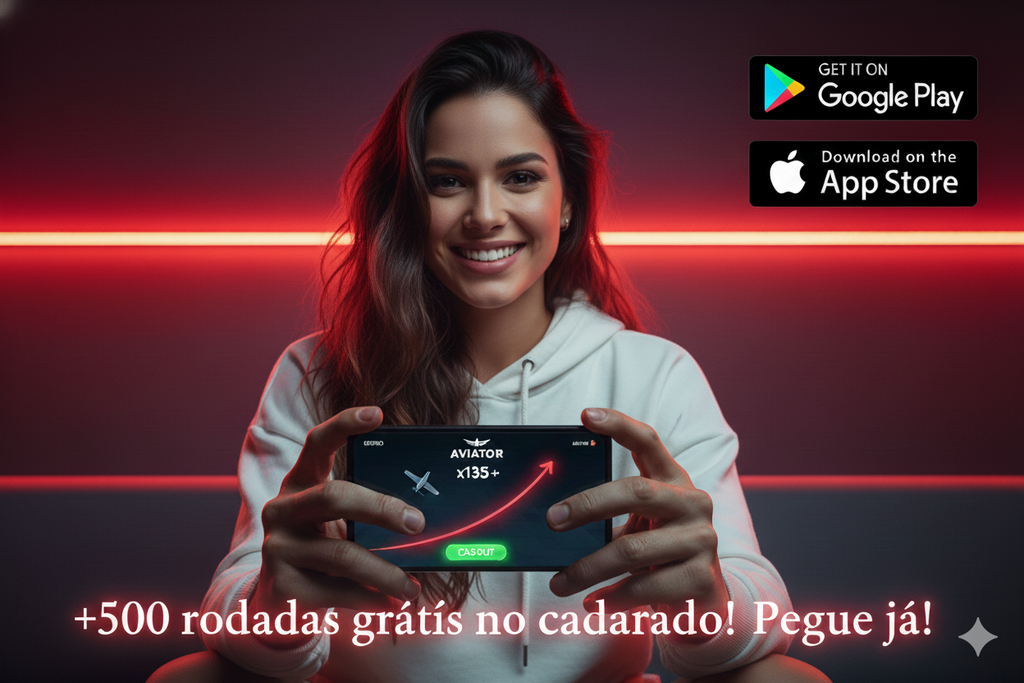
After 1–2 follow-up prompts asking for more feminine hands, the result looked believable.
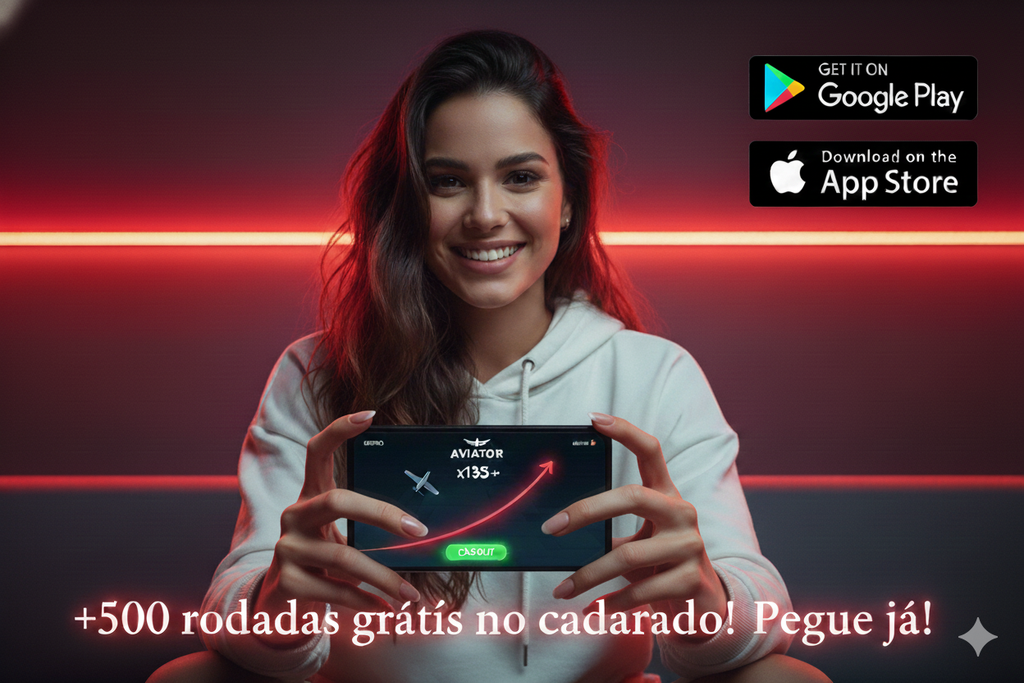
For the final step, we attached a screenshot of text from another creative and asked the tool to copy it onto the image, placing it naturally in the center.

The tool struggled with that task, but its capabilities are still useful for a free service. To get started, create a Google account, open Google AI Studio, select the free version of NanoBanana, and begin generating creatives.
ChatGPT
A ChatGPT subscription with the functionality used here costs $20 per month, although some websites offer cheaper access.
DALL·E 3 handles image generation in ChatGPT. We could not find a cookbook for it, so we submitted the same prompt we had used for NanoBanana. The result is shown below.
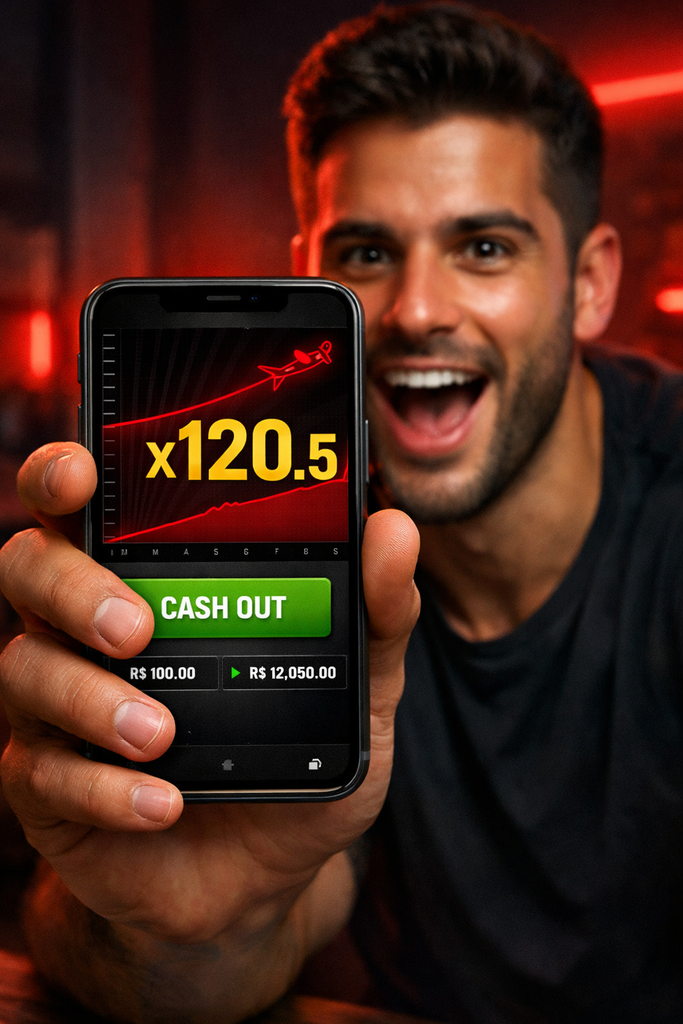
Notice that ChatGPT added R$, the symbol for the Brazilian real, without any instructions from us. It also successfully integrated the store badges.
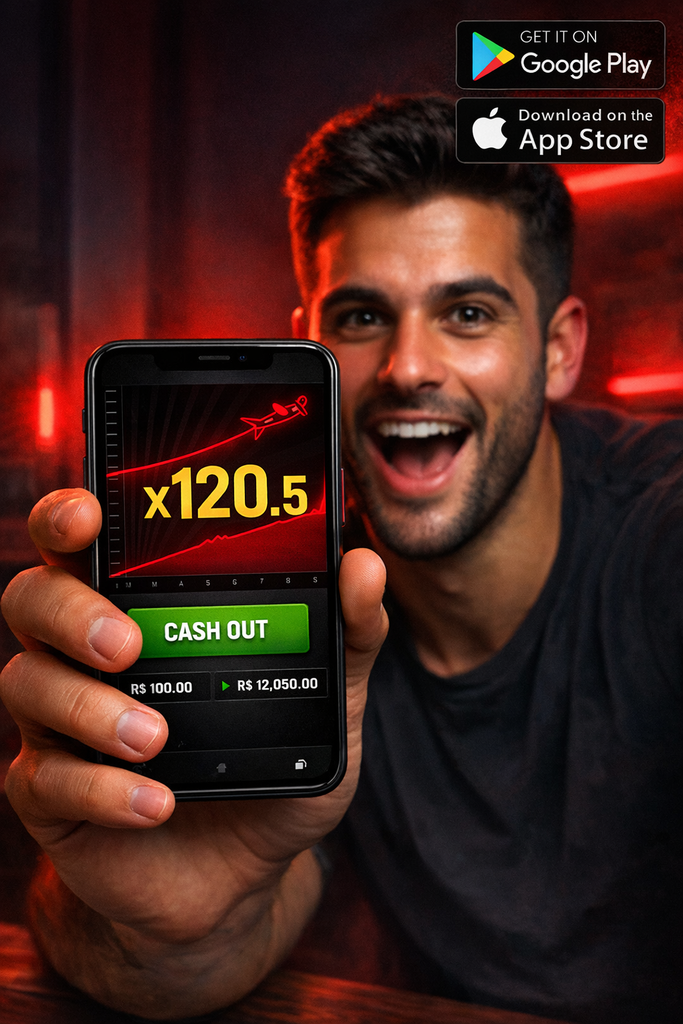
Next, we asked it to add the same message: “+500 free spins for signing up! Claim them now!” The output was in Spanish, and the translation was not entirely correct.
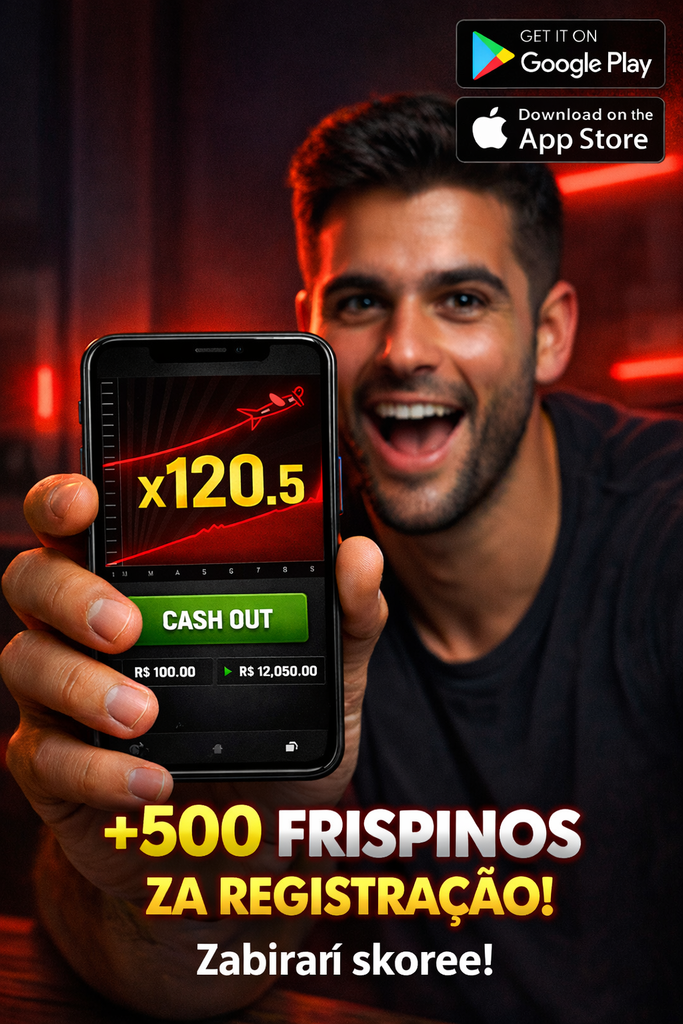
We then asked for a brighter, more eye-catching treatment of the text. ChatGPT produced two options:
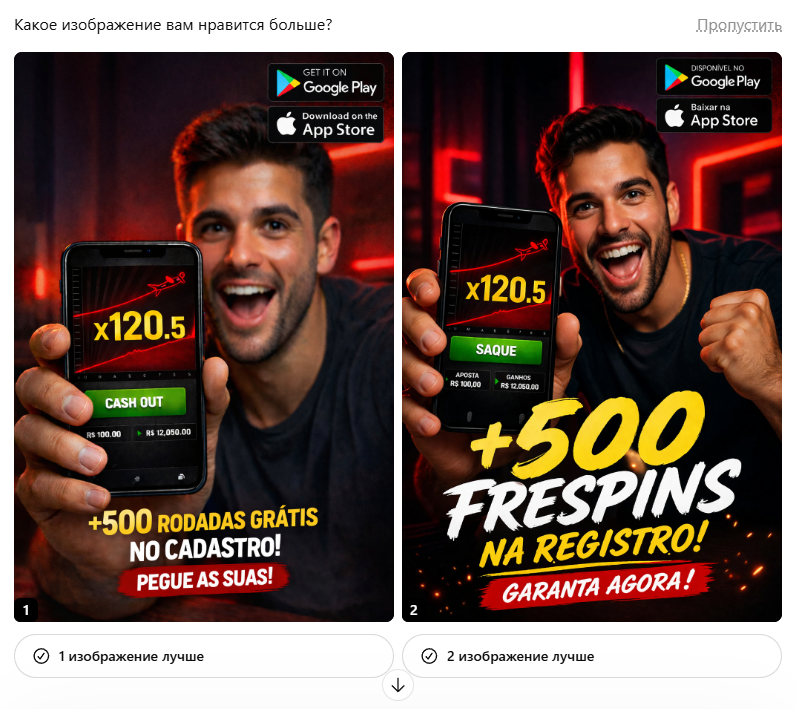

Next, we asked it to replace the male character with a woman. The result was good overall, apart from the masculine fingers and hairy hands.
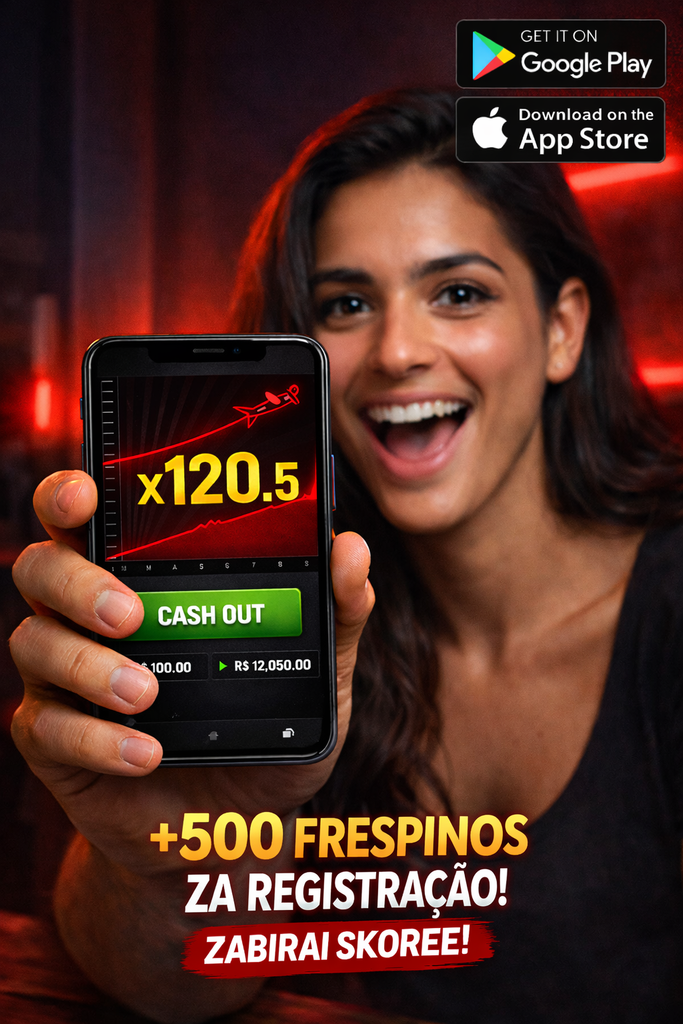
A couple of follow-up prompts produced feminine hands, but did not fix the translation.
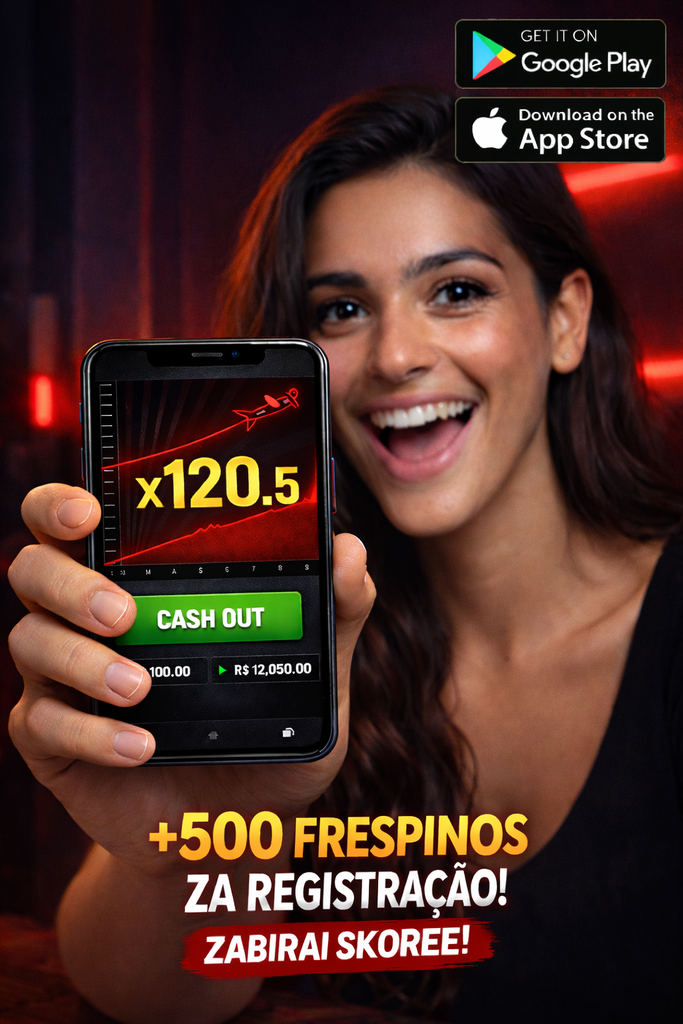
We therefore supplied the exact text to insert and obtained a creative suitable for testing.

Using ChatGPT and NanoBanana through your own accounts is the preferred approach here. Some services offer access to several AI models for $5–$10, but connect to those same models through APIs, sometimes via intermediaries. This can affect the output: an image may look polished while still containing odd details.
AI Models for Video Generation
For video, we will use Sora and Veo, established models from major developers. In our experience, they are capable of full production, unlike their Chinese counterparts. We will keep the same advertising concept while adapting the prompt to each model. For Sora, we will use the developer’s cookbook:
| prompt create a photorealistic vertical ad video, 9:16, 6–8 seconds, designed like a premium facebook mobile gambling ad for a brazilian audience. the main character is a young brazilian woman, 23–28 years old, naturally attractive, realistic face, warm tan skin, long dark brown hair, expressive eyes, subtle makeup, wearing a simple fitted black top. she must look like a real person from a commercial shoot, not like a model from a fashion campaign, and not exaggerated. her hand must look feminine: slim fingers, softer palm, elegant wrist, narrower forearm, smooth skin, neat beautiful manicure with short or medium natural nails, light nude polish. absolutely no masculine hand proportions, no rough knuckles, no thick fingers, no hairy arm. scene and atmosphere she is sitting in a dim modern room with a soft premium gambling vibe, warm dark background, blurred red neon accent lights, cinematic night atmosphere. the environment should feel realistic and expensive, like a real mobile ad shoot. no clutter, no random objects, no cheap background details. keep the background softly blurred so attention stays on the girl and the phone. video structure shot 1 — opening, 0.0–2.5 sec medium close-up. the girl is looking down at her smartphone with intense focus, holding it naturally in one hand near chest level. her face shows anticipation and concentration, like she is watching a live round in a crash game. the camera is slightly handheld but smooth, very subtle natural motion, realistic commercial style. soft cinematic lighting on her face, warm red highlights on hair and shoulders. she glances at the screen, eyes widen, lips part slightly as she realizes the multiplier is getting huge. shot 2 — emotional reaction, 2.5–4.2 sec her expression changes from concentration to genuine excitement. she smiles, then gives a surprised happy reaction as if the multiplier has reached a huge x. she quickly turns the smartphone toward the camera in one smooth natural motion, bringing the screen closer to lens. the movement must feel realistic, fluid, human, not robotic. the camera slightly pushes in as the phone comes forward. shot 3 — phone reveal hero shot, 4.2–6.2 sec the phone is now the main focal point, held close to camera in portrait orientation. screen is bright, sharp, readable, realistic, high contrast. show a crash-style game interface inspired by aviator aesthetics, with a dark interface, glowing red upward curve, small plane icon, and a huge multiplier around x120.5 prominently displayed in yellow. show a bright green action button similar to “SAQUE” / cash out, with realistic betting values in brazilian reais, such as R$100,00 and R$12.050,00. the phone must look like a real modern smartphone, correct reflections, clean bezel, correct perspective, no deformed edges, no broken interface, no unreadable nonsense. the girl remains visible behind the phone, softly blurred, smiling with excitement. text animation, 5.2–7.5 sec after the phone reveal, a large promo text flies in dynamically from below with impact, centered in the lower part of the frame, matching the style from the reference: top line in bold yellow brush-style lettering: +500 FREESPINS second line in bold white italic / brush block lettering: NA REGISTRO! third line on a red painted brush stroke banner in white bold text: GARANTA AGORA! the text should appear with strong energy, like a premium gambling promo animation: fast entrance, slight bounce, tiny sparks or glow accents, but still realistic enough for a social ad. the text must be large, centered at the bottom, highly readable, visually similar to a real edited ad. keep the typography expressive and aggressive, like a high-converting casino promo creative. visual style ultra realistic commercial cinematography, natural skin texture, accurate facial proportions, clean teeth, realistic mouth movement, realistic female hand anatomy, premium lighting, shallow depth of field, detailed smartphone reflections, cinematic contrast, red-and-black color palette, brazilian ad vibe, polished but believable. the mood is excitement, anticipation, big win energy, but grounded in realism. important realism requirements no cartoon look no ai-looking face no distorted hands no thick masculine fingers no extra fingers no merged fingers no warped phone no unreadable game screen no fake gibberish interface no plastic skin no overblown facial expression no random jewelry unless subtle no exaggerated body proportions no fake influencer aesthetic everything must feel like a real ad shoot for a mobile casino campaign negative prompt low quality, blurry, cartoon, anime, illustration, cgi look, plastic skin, uncanny face, distorted anatomy, masculine hand, hairy female arm, thick fingers, extra fingers, broken hand, warped phone, unreadable screen, gibberish text, malformed typography, duplicate limbs, cheap background, flat lighting, overexposed skin, robotic movement, stiff pose, awkward arm angle, deformed nails, ugly manicure, fake smile, overacting, low detail, low realism, bad perspective, floating objects, messy composition |
This prompt can be used with Sora, Sora 2, and Veo.
Sora and Sora 2
Sora is included at no additional charge with a ChatGPT Plus subscription. You can view the Sora result here.
The second version of Sora handled the task differently, and the first attempt was not particularly good.
The second clip looked much more like a usable ad.
Sora is a strong contender for the best video generation model, but its time is limited. Its developers recently announced that they were closing the product and would end API access on September 24, 2026.
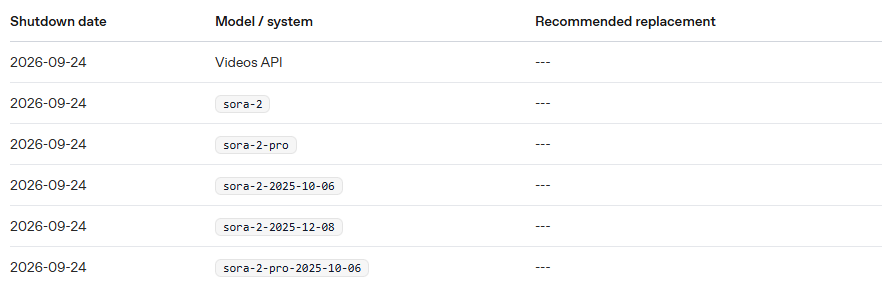
Later in the guide, we will explain how to use Sora without a monthly subscription or a complicated setup.
Veo
Veo also requires payment. Google previously allowed up to 10 free generations per day, but the workflow described here now requires a paid API key. To obtain one, link a payment card and add funds. If you do not have a suitable card, online services can provide one. The exchange rate may be unfavorable, but obtaining a card can take just 5–10 minutes.
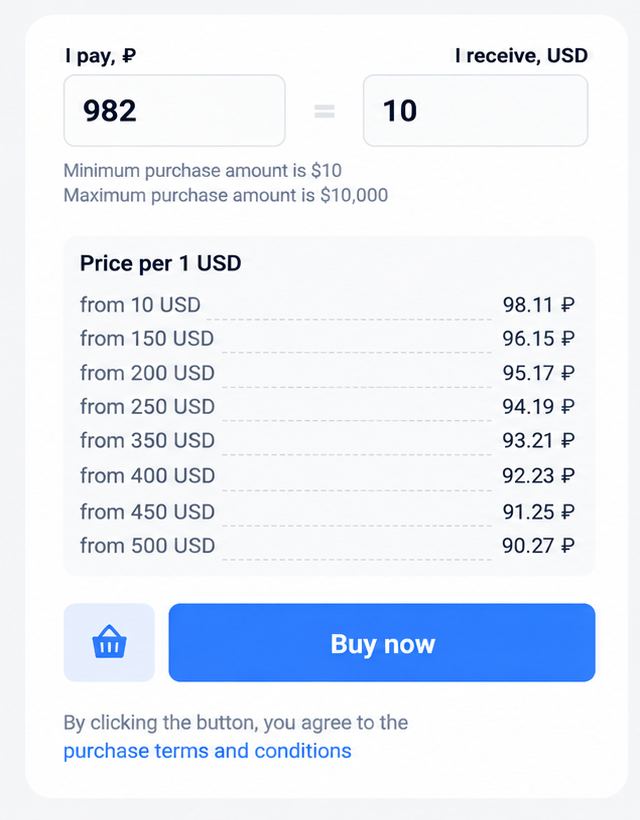
Veo is likely to reject overt gambling creatives and return an error. It refused to run our Sora prompt, so we made the wording more neutral:
| Create an ultra-realistic vertical commercial video for a Brazilian audience. Format: 9:16 vertical, 8 seconds, premium social-ad cinematography, realistic polished finish. Main character: A young Brazilian woman, 23–28 years old, naturally attractive and believable, warm tan skin, long dark brown hair, expressive eyes, subtle makeup, wearing a simple fitted black top. She must look like a real person from a premium commercial shoot, not like a fashion model, not exaggerated, not artificial. Her hand must look clearly feminine and realistic: slim fingers, elegant wrist, soft palm, smooth skin, neat short-to-medium natural nude manicure. No masculine proportions, no thick fingers, no rough knuckles, no extra fingers, no distorted hand anatomy. Setting: She is sitting in a dim modern interior with a premium night-time atmosphere. Warm dark background, soft red neon accents, cinematic shallow depth of field, realistic expensive ambiance. Background stays clean, softly blurred, no clutter, no distracting objects. Shot 1 — 0.0 to 2.7 sec: Medium close-up. She looks at her smartphone with focused anticipation, holding it naturally near chest level in one hand. Her expression suggests she is watching a fast-paced mobile game round reach an exciting moment. Subtle smooth handheld realism. Soft cinematic light on her face, warm red highlights on hair and shoulders. Her eyes widen slightly as the on-screen action intensifies. Shot 2 — 2.7 to 4.7 sec: Her expression shifts into genuine excitement. She smiles with happy surprise. In one smooth natural movement, she turns the smartphone toward the camera and brings it closer to the lens. The motion must feel human, fluid, elegant, believable, not robotic. The camera gently pushes in. Shot 3 — 4.7 to 8.0 sec: The phone becomes the hero object in portrait orientation, close to camera. The screen is bright, sharp, realistic and readable. Show a premium arcade-style flight game interface: dark UI, glowing red upward curve, small plane icon, and a dramatic high-score moment. Keep the interface sleek, energetic, and believable for a premium mobile game promo. The phone must look physically correct: realistic reflections, clean bezel, correct perspective, no warped edges, no broken interface, no gibberish. The woman remains visible behind the phone, softly blurred, smiling with excitement. Promo text overlay from 5.8 sec onward: Top line: SPECIAL BONUS Second line: NEW EVENT Third line on a red brush-stroke banner: PLAY NOW The promo text appears dynamically from below with strong premium ad energy, centered in the lower frame. Fast entrance, slight bounce, subtle glow accents, very readable, polished social-ad finish. Audio: Generate synchronized premium audio. Soft room ambience, subtle tension build in the first half, rising sound as the on-screen action grows, energetic reveal accent when the phone turns to camera, polished impact hit when the promo text appears. No voiceover. Visual style: Ultra-realistic commercial cinematography, natural skin texture, realistic facial proportions, premium lighting, shallow depth of field, crisp smartphone reflections, cinematic contrast, red-and-black palette, believable excitement, polished but realistic finish. Negative prompt: low quality, blurry, cartoon, anime, illustration, cgi, plastic skin, uncanny face, distorted anatomy, masculine hand, thick fingers, extra fingers, merged fingers, warped phone, unreadable screen, gibberish interface, malformed typography, duplicate limbs, cheap background, flat lighting, robotic movement, stiff pose, awkward arm angle, deformed nails, fake smile, overacting, messy composition |
You can view the generated video here.
How to Create Creatives Without a Monthly Subscription
OpenRouter was originally designed for developers accessing large language models through APIs. With a little setup, affiliates can use it too.
Its main advantage here is the option to add funds with cryptocurrency. Deposit USDC, create an API key, and use the models while your balance lasts. You can work directly from PowerShell.
After funding your account and creating an API key, enter the following commands in PowerShell. Start by setting up authorization for requests to OpenRouter.
| $env:OPENROUTER_API_KEY=’INSERT_NEW_KEY’ $headers = @{ Authorization = “Bearer $env:OPENROUTER_API_KEY” “Content-Type” = “application/json” } |
Next, retrieve and save the full list of video models:
| $all = Invoke-RestMethod -Method Get -Uri “https://openrouter.ai/api/v1/videos/models” -Headers $headers $all | ConvertTo-Json -Depth 10 | Set-Content .\video_models.json -Encoding UTF8 |
For easier reading, display the list as a table:
$all.data | Select-Object id,name | Format-Table -Auto
OpenRouter has a limited selection of video models, but enough to produce both test creatives and ads ready to run.
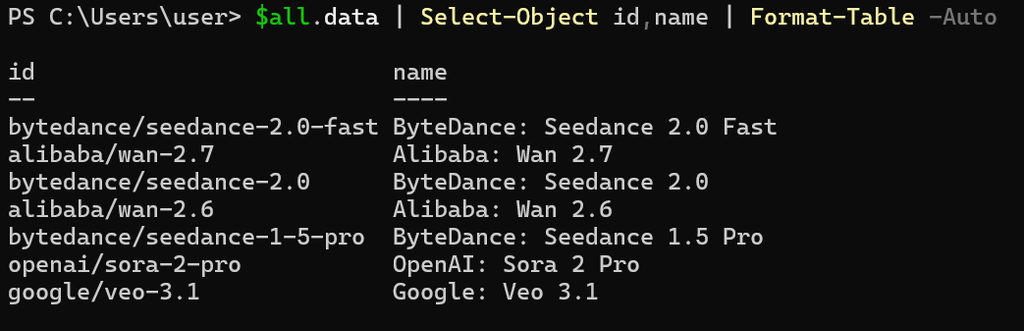
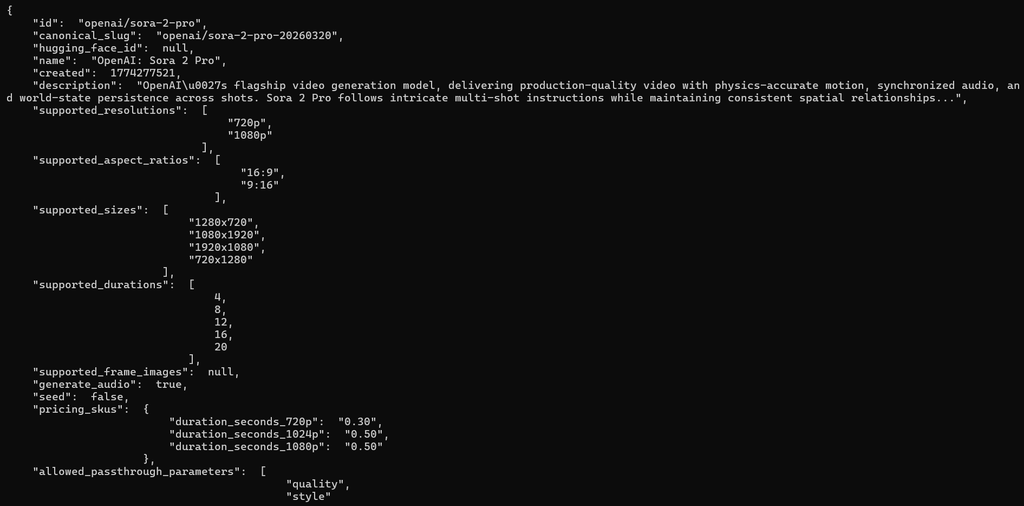
Once you have chosen a model, insert its ID into the command below. This retrieves the model’s requirements and configurable parameters.
| $modelId = “openai/sora-2-pro” $model = $all.data | Where-Object { $_.id -eq $modelId } $model | ConvertTo-Json -Depth 10 | Set-Content .\model_caps.json -Encoding UTF8 $model | ConvertTo-Json -Depth 10 |
Copy the output into ChatGPT so it can help write an effective prompt.
Next, prepare your prompt. The easiest approach is to store it in a variable, as shown below.
| $modelId = “openai/sora-2-pro” $prompt = @’ Create an ultra-realistic vertical commercial video, 9:16, 8 seconds, with premium mobile-ad cinematography for a Brazilian audience. Main subject: A young Brazilian woman, 23–28 years old, naturally attractive and believable, warm tan skin, long dark brown hair, expressive eyes, subtle makeup, wearing a simple fitted black top. She must look like a real person from a premium commercial shoot, not like a fashion model, not exaggerated, not artificial. Her hand must look clearly feminine and realistic: slim fingers, elegant wrist, soft palm, smooth skin, neat short-to-medium natural manicure with nude polish. No masculine proportions, no rough knuckles, no thick fingers, no extra fingers, no distorted hand anatomy. Setting: She is sitting in a dim, modern interior with a premium night-time mood. Warm dark background, soft red neon accents, cinematic shallow depth of field, expensive realistic ambiance. The background stays blurred and clean, with no clutter and no distracting objects. Shot 1 — 0.0 to 2.7 sec: Medium close-up. She is looking at her smartphone with intense focus, holding it naturally near chest level in one hand. Her expression shows concentration and anticipation, as if she is watching a live crash-style game round. Subtle handheld realism, very smooth commercial camera movement. Soft cinematic key light on her face, warm red highlights on hair and shoulders. Her eyes widen slightly and her lips part as she realizes the multiplier is rising dramatically. Shot 2 — 2.7 to 4.7 sec: Her expression shifts from tension to genuine excitement. She smiles and reacts with happy surprise. In one natural fluid movement, she turns the smartphone toward the camera, bringing it closer to the lens. The motion must feel human, elegant, believable, not robotic. The camera slightly pushes in during the move. Shot 3 — 4.7 to 8.0 sec: The phone becomes the visual hero in portrait orientation, close to camera. The screen is bright, sharp, realistic and clearly readable. Show a premium crash-style game interface inspired by aviator aesthetics: dark UI, glowing red upward curve, small plane icon, a very large multiplier around x120 prominently displayed, a bright green action button, and betting values in Brazilian reais. The phone must look physically correct: realistic reflections, clean bezel, correct perspective, no warped edges, no broken interface, no gibberish. The woman remains visible behind the phone, softly blurred, smiling with excitement. Promo text overlay — from 5.8 sec onward: Large dynamic promo text appears from below with strong ad energy, centered in the lower part of the frame. Top line: +500 FREESPINS. Second line: NO REGISTRO! Third line on a red brush-stroke banner: GARANTA AGORA! Audio: Add premium synchronized audio: soft room ambience, subtle UI tension buildup in the first half, a satisfying rising sound as the multiplier grows, a sharp energetic reveal accent when the phone turns to camera, and a polished commercial impact hit when the promo text appears. No voiceover. Visual style: Ultra-realistic commercial cinematography, natural skin texture, accurate facial proportions, realistic mouth and eye behavior, premium lighting, shallow depth of field, crisp smartphone reflections, cinematic contrast, red-and-black palette, Brazilian mobile-ad vibe, believable excitement, premium but realistic finish. Hard realism constraints: No cartoon look, no CGI look, no plastic skin, no uncanny face, no distorted anatomy, no extra fingers, no merged fingers, no thick masculine hand, no warped phone, no broken interface, no unreadable nonsense text, no fake influencer aesthetic, no exaggerated body proportions, no overacting, no cheap background. Negative prompt: low quality, blurry, cartoon, anime, illustration, cgi, plastic skin, uncanny face, distorted anatomy, masculine hand, thick fingers, hairy female arm, extra fingers, merged fingers, broken hand, warped phone, unreadable screen, gibberish interface, malformed typography, duplicate limbs, flat lighting, overexposed skin, robotic movement, stiff pose, awkward arm angle, deformed nails, ugly manicure, fake smile, overacting, messy composition ‘@ |
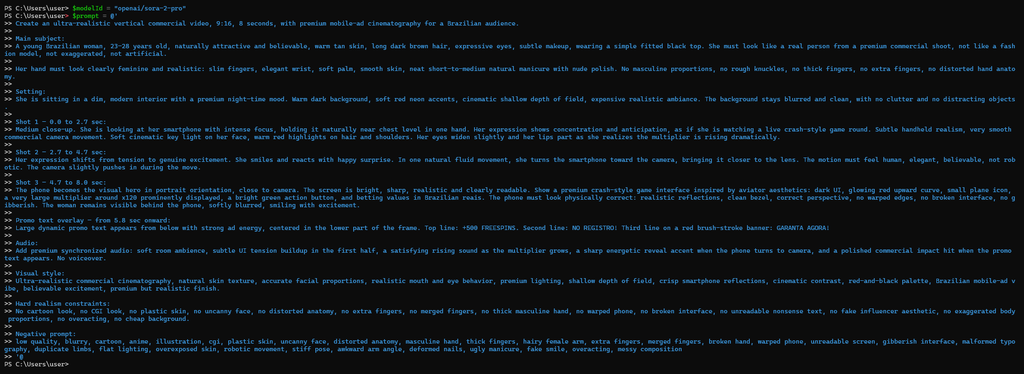
Now prepare the request with the prompt and the chosen parameters.
| $body = @{ model = $modelId prompt = $prompt aspect_ratio = “9:16” duration = 8 resolution = “1080p” generate_audio = $true } | ConvertTo-Json -Depth 5 |
The result should look like this:
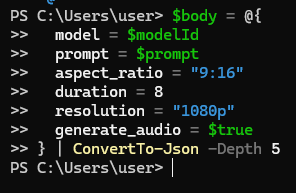
The next command returns the video generation status and an initial link for the job.
| $submit = Invoke-RestMethod -Method Post -Uri “https://openrouter.ai/api/v1/videos” -Headers $headers -Body $body $submit | ConvertTo-Json -Depth 10 |

Save that link in a variable so you can use it in the next step.
| $pollUrl = $submit.polling_url if ($pollUrl.StartsWith(“/”)) { $pollUrl = “https://openrouter.ai$pollUrl” } $pollUrl |
Run the following request and wait for the system to generate the clip.
| do { Start-Sleep -Seconds 5 $status = Invoke-RestMethod -Method Get -Uri $pollUrl -Headers $headers $status.status } while ($status.status -notin @(“completed”,”failed”)) $status | ConvertTo-Json -Depth 10 |
Wait for the generation status to show that the job has finished.
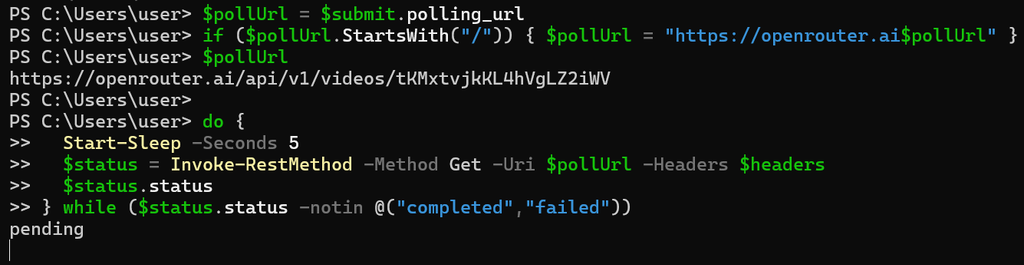
When generation is complete, a link to the video will appear in the terminal.
After completing this process once, you can combine the Sora 2 workflow into a single script:
| $env:OPENROUTER_API_KEY=’INSERT_YOUR_KEY’ $headers = @{ Authorization = “Bearer $env:OPENROUTER_API_KEY” “Content-Type” = “application/json” } $body = @{ model = “openai/sora-2-pro” prompt = @’ Create an ultra-realistic vertical commercial video for a Brazilian audience. Format: 9:16 vertical, 8 seconds, premium mobile-ad cinematography, realistic social ad quality. Main character: A young Brazilian woman, 23–28 years old, naturally attractive and believable, warm tan skin, long dark brown hair, expressive eyes, subtle makeup, wearing a simple fitted black top. She must look like a real person from a premium commercial shoot, not like a fashion model, not exaggerated, not artificial. Her hand must look clearly feminine and realistic: slim fingers, elegant wrist, soft palm, smooth skin, neat short-to-medium natural nude manicure. No masculine proportions, no thick fingers, no rough knuckles, no extra fingers, no distorted hand anatomy. Setting: She is sitting in a dim modern interior with a premium night-time atmosphere. Warm dark background, soft red neon accents, cinematic shallow depth of field, realistic expensive ambiance. Background stays clean, softly blurred, no clutter, no distracting objects. Shot 1 — 0.0 to 2.7 sec: Medium close-up. She looks at her smartphone with intense focus, holding it naturally near chest level in one hand. Her expression shows anticipation, as if she is watching a live crash-style game round. Subtle smooth handheld realism. Soft cinematic light on her face, warm red highlights on hair and shoulders. Her eyes widen slightly as the multiplier rises dramatically. Shot 2 — 2.7 to 4.7 sec: Her expression shifts into genuine excitement. She smiles with happy surprise. In one smooth natural movement, she turns the smartphone toward the camera and brings it closer to the lens. The motion must feel human, fluid, elegant, believable, not robotic. The camera gently pushes in. Shot 3 — 4.7 to 8.0 sec: The phone becomes the hero object in portrait orientation, close to camera. The screen is bright, sharp, realistic and readable. Show a premium crash-style game interface inspired by aviator aesthetics: dark UI, glowing red upward curve, small plane icon, a huge multiplier around x120, a bright green action button, and betting values in Brazilian reais. The phone must look physically correct: realistic reflections, clean bezel, correct perspective, no warped edges, no broken interface, no gibberish. The woman remains visible behind the phone, softly blurred, smiling with excitement. Promo text overlay from 5.8 sec onward: Top line: +500 FREESPINS Second line: NO REGISTRO! Third line on a red brush-stroke banner: GARANTA AGORA! The promo text appears dynamically from below with strong premium ad energy, centered in the lower frame. Fast entrance, slight bounce, subtle glow accents, very readable, polished social-ad finish. Audio: Generate synchronized premium audio. Soft room ambience, subtle tension build in the first half, rising sound as the multiplier grows, energetic reveal accent when the phone turns to camera, polished impact hit when the promo text appears. No voiceover. Visual style: Ultra-realistic commercial cinematography, natural skin texture, realistic facial proportions, premium lighting, shallow depth of field, crisp smartphone reflections, cinematic contrast, red-and-black palette, believable excitement, polished but realistic finish. Negative prompt: low quality, blurry, cartoon, anime, illustration, cgi, plastic skin, uncanny face, distorted anatomy, masculine hand, thick fingers, hairy female arm, extra fingers, merged fingers, warped phone, unreadable screen, gibberish interface, malformed typography, duplicate limbs, cheap background, flat lighting, robotic movement, stiff pose, awkward arm angle, deformed nails, fake smile, overacting, messy composition ‘@ aspect_ratio = “9:16” duration = 8 resolution = “1080p” generate_audio = $true } | ConvertTo-Json -Depth 6 $submit = Invoke-RestMethod -Method Post -Uri “https://openrouter.ai/api/v1/videos” -Headers $headers -Body $body $submit | ConvertTo-Json -Depth 10 | Tee-Object -FilePath .\submit.json $pollUrl = $submit.polling_url if ($pollUrl.StartsWith(“/”)) { $pollUrl = “https://openrouter.ai$pollUrl” } do { Start-Sleep -Seconds 5 $status = Invoke-RestMethod -Method Get -Uri $pollUrl -Headers $headers $status | ConvertTo-Json -Depth 10 | Set-Content .\status.json -Encoding UTF8 $status.status } while ($status.status -notin @(“completed”,”failed”)) if ($status.status -eq “completed”) { $contentUrl = $status.unsigned_urls[0] $contentUrl | Set-Content .\content_url.txt -Encoding UTF8 curl.exe -L “$contentUrl” -H “Authorization: Bearer $env:OPENROUTER_API_KEY” –output result.mp4 Get-Item .\result.mp4 | Select-Object Name,Length start .\result.mp4 } else { $status | ConvertTo-Json -Depth 10 } |
The script runs through the preceding steps and opens the video as soon as it is ready. Download it promptly, as it will not remain on the server for long. Alternatively, open your OpenRouter account, go to the logs tab, select the generation job, and download the video there.
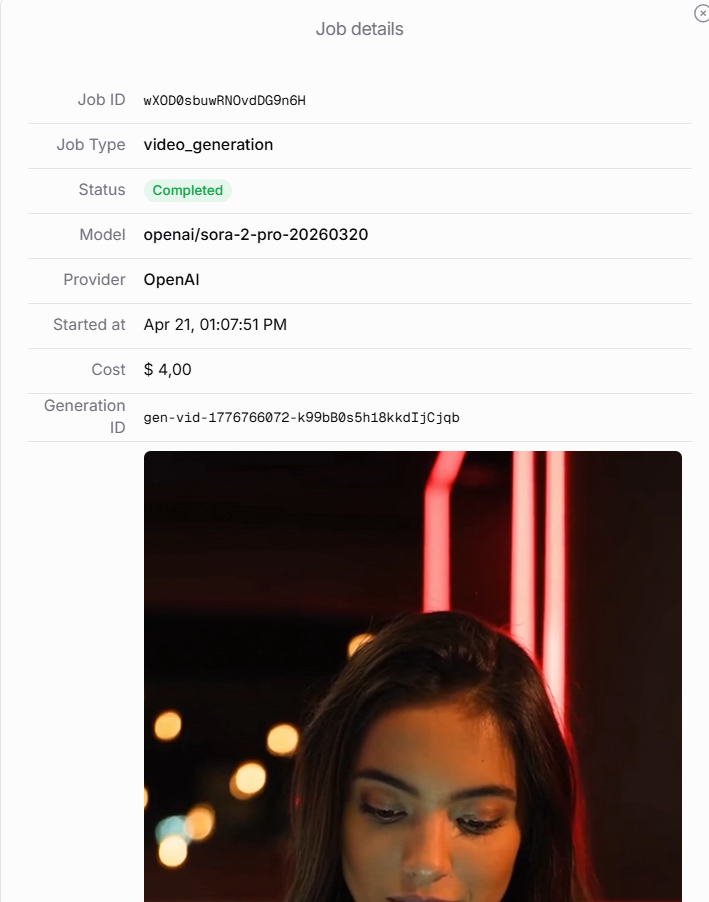
Below is a more neutral prompt for Veo, combined with the commands needed to generate a creative in one run:
| $headers = @{ Authorization = “Bearer $env:OPENROUTER_API_KEY” “Content-Type” = “application/json” } $modelId = “google/veo-3.1” $prompt = @’ Create an ultra-realistic vertical commercial video for a Brazilian audience. Format: 9:16 vertical, 8 seconds, premium social-ad cinematography, realistic polished finish. Main character: A young Brazilian woman, 23–28 years old, naturally attractive and believable, warm tan skin, long dark brown hair, expressive eyes, subtle makeup, wearing a simple fitted black top. She must look like a real person from a premium commercial shoot, not like a fashion model, not exaggerated, not artificial. Her hand must look clearly feminine and realistic: slim fingers, elegant wrist, soft palm, smooth skin, neat short-to-medium natural nude manicure. No masculine proportions, no thick fingers, no rough knuckles, no extra fingers, no distorted hand anatomy. Setting: She is sitting in a dim modern interior with a premium night-time atmosphere. Warm dark background, soft red neon accents, cinematic shallow depth of field, realistic expensive ambiance. Background stays clean, softly blurred, no clutter, no distracting objects. Shot 1 — 0.0 to 2.7 sec: Medium close-up. She looks at her smartphone with focused anticipation, holding it naturally near chest level in one hand. Her expression suggests she is watching a fast-paced mobile game round reach an exciting moment. Subtle smooth handheld realism. Soft cinematic light on her face, warm red highlights on hair and shoulders. Her eyes widen slightly as the on-screen action intensifies. Shot 2 — 2.7 to 4.7 sec: Her expression shifts into genuine excitement. She smiles with happy surprise. In one smooth natural movement, she turns the smartphone toward the camera and brings it closer to the lens. The motion must feel human, fluid, elegant, believable, not robotic. The camera gently pushes in. Shot 3 — 4.7 to 8.0 sec: The phone becomes the hero object in portrait orientation, close to camera. The screen is bright, sharp, realistic and readable. Show a premium arcade-style flight game interface: dark UI, glowing red upward curve, small plane icon, and a dramatic high-score moment. Keep the interface sleek, energetic, and believable for a premium mobile game promo. The phone must look physically correct: realistic reflections, clean bezel, correct perspective, no warped edges, no broken interface, no gibberish. The woman remains visible behind the phone, softly blurred, smiling with excitement. Promo text overlay from 5.8 sec onward: Top line: SPECIAL BONUS Second line: NEW EVENT Third line on a red brush-stroke banner: PLAY NOW The promo text appears dynamically from below with strong premium ad energy, centered in the lower frame. Fast entrance, slight bounce, subtle glow accents, very readable, polished social-ad finish. Audio: Generate synchronized premium audio. Soft room ambience, subtle tension build in the first half, rising sound as the on-screen action grows, energetic reveal accent when the phone turns to camera, polished impact hit when the promo text appears. No voiceover. Visual style: Ultra-realistic commercial cinematography, natural skin texture, realistic facial proportions, premium lighting, shallow depth of field, crisp smartphone reflections, cinematic contrast, red-and-black palette, believable excitement, polished but realistic finish. Negative prompt: low quality, blurry, cartoon, anime, illustration, cgi, plastic skin, uncanny face, distorted anatomy, masculine hand, thick fingers, extra fingers, merged fingers, warped phone, unreadable screen, gibberish interface, malformed typography, duplicate limbs, cheap background, flat lighting, robotic movement, stiff pose, awkward arm angle, deformed nails, fake smile, overacting, messy composition ‘@ $body = @{ model = $modelId prompt = $prompt aspect_ratio = “9:16” duration = 8 resolution = “720p” generate_audio = $true } | ConvertTo-Json -Depth 6 $submit = Invoke-RestMethod -Method Post -Uri “https://openrouter.ai/api/v1/videos” -Headers $headers -Body $body $submit | ConvertTo-Json -Depth 10 | Tee-Object -FilePath .\submit.json $pollUrl = $submit.polling_url if ($pollUrl.StartsWith(“/”)) { $pollUrl = “https://openrouter.ai$pollUrl” } do { Start-Sleep -Seconds 5 $status = Invoke-RestMethod -Method Get -Uri $pollUrl -Headers $headers $status | ConvertTo-Json -Depth 10 | Set-Content .\status.json -Encoding UTF8 $status.status } while ($status.status -notin @(“completed”,”failed”)) $status | ConvertTo-Json -Depth 10 if ($status.status -eq “completed”) { $contentUrl = $status.unsigned_urls[0] $contentUrl | Set-Content .\content_url.txt -Encoding UTF8 curl.exe -L “$contentUrl” -H “Authorization: Bearer $env:OPENROUTER_API_KEY” –output veo_result.mp4 Get-Item .\veo_result.mp4 | Select-Object Name,Length start .\veo_result.mp4 } else { “Generation failed” } |
Videos remain on the server for only one day before being deleted. This PowerShell workflow does not let you edit them or use them as references, so plan your prompt carefully before generating.
Conclusion
Since 2024, AI has been more than a novelty for generating pictures. For affiliates, it is a practical tool for producing static ads, testing ideas, and creating videos without lengthy production from scratch. Good results still depend on a clear prompt, the right model, and the ability to refine a creative manually when needed.
For quick, straightforward tasks, use accessible tools such as ChatGPT and NanoBanana. For more flexible testing and video production, OpenRouter with Sora or Veo offers greater control over the workflow. The advantage is a repeatable creative production process: from an idea and a first draft to an ad ready for testing or launch.

Comments (0)