


When Pasha was just starting his career, it was convenient for him to track all his stats right in Google Sheets: one source, about 5–6 creatives, and even fewer offers. But as soon as he launched traffic, his perfect plan fell apart. Facebook showed 800 clicks, the PWA service counted 630 visits, and the affiliate network reported 27 registrations and five deposits. Pasha opens Google Sheets and tries in vain to figure out which creative actually brought in the money.

To keep analytics from turning into a crash investigation, you need a tracker. It connects the source, click, landing, offer, and conversion into a single system and displays everything on one dashboard.
By 2026, the market is flooded with trackers, but we’ll look at the most popular and advanced one – Keitaro. We’ll break down how Keitaro works, how much it costs to run, and when a dedicated server is truly useful versus when it’s unnecessary.
What Is a Tracker and Why Do Affiliates Need One?
A tracker is software that records clicks on referral links and ties them to users’ subsequent actions. For example, when a lead clicks an ad, the tracker creates a click ID and saves the passed parameters: campaign, ad, traffic source, keyword, device, country, and other tags. This way, all the data is collected in one place and you don’t have to hunt for it in spreadsheets.
Next, the system sends the user to the right landing page or offer. If the person installs an app, registers, submits a lead, or makes a deposit, the affiliate network sends the tracker a conversion notification. This feature is called postback.
As a result, the buyer can track the entire funnel:
Traffic source → campaign → ad set → creative → landing → offer → event → payout.
If you don’t use a tracker, it’s much harder to build a complete path from the first click to the target event. For example, Facebook only knows about impressions and clicks, but not whether the affiliate program paid for specific traffic, unless you set it up separately. In this case, there’s a risk of scaling a funnel that won’t pay off in the long run.
Self-hosted or Cloud Tracker: What Should Beginners Choose?
All trackers fall into two types: self-hosted and cloud-based. Let’s briefly go over the differences.
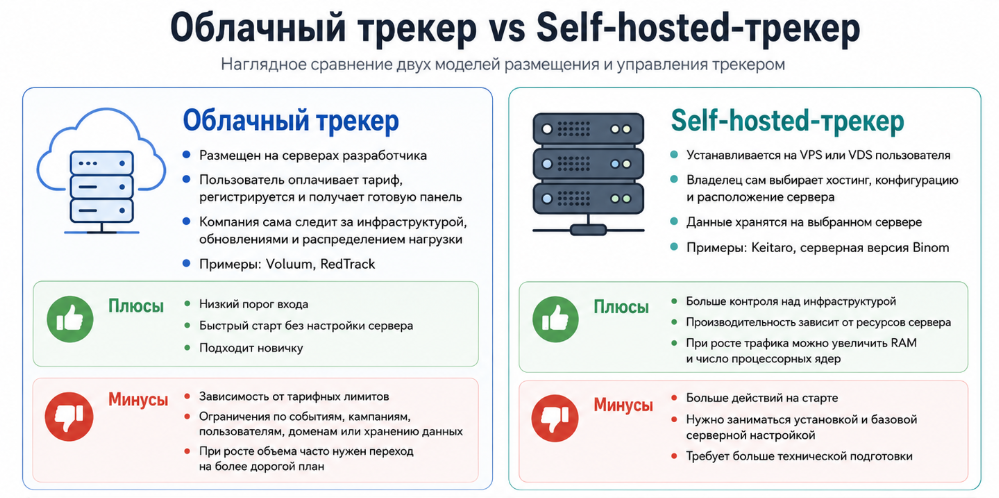
If an affiliate is just starting out and doesn’t know about SSH or installing packages, it’s better to choose a cloud tracker. Cloud solutions are also preferable when your traffic volume isn’t in the millions of events.
For everyone who has tested more than one funnel and is ready to move forward, we recommend self-hosted – Keitaro.
“Keitaro requires a dedicated VPS. Of course, this takes a small extra step during setup, but the benefits far outweigh the initial effort. Users get full control over their data, unmatched privacy, and most importantly, they don’t have to overpay for events like with subscription-based cloud trackers. This means that when you start scaling your campaigns and achieving bigger results, nothing holds you back or eats into your profits,” – Ivan Rud, CMO Keitaro.
The days when you had to manually install a tracker on a VPS are long gone. Now there are two options: either give your tracker manager access to the server so they can handle everything, or ask ChatGPT for help. I asked it to help me choose a hosting provider, gave it a link to the tracker documentation, and simply followed the instructions.
Keitaro – what is this product
Keitaro is a popular self-hosted tracker for analyzing online advertising. Its era began back in early 2009, but it became well-known in the affiliate community closer to 2014–2015, when affiliate marketing started to gain traction. Today, it’s a full-fledged analytics tool with tons of integrations: install the software on a VPS and connect almost any affiliate network or service in just one click.
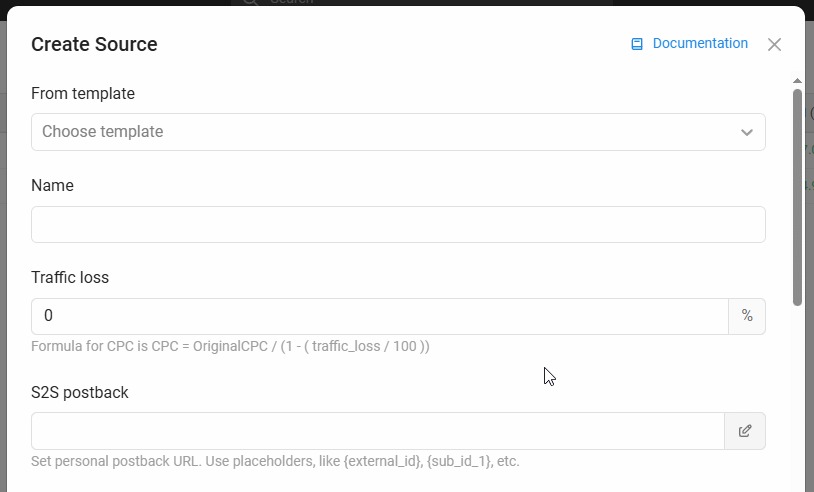
Keitaro’s pricing may feel steep for beginners, but the features fully justify the cost.
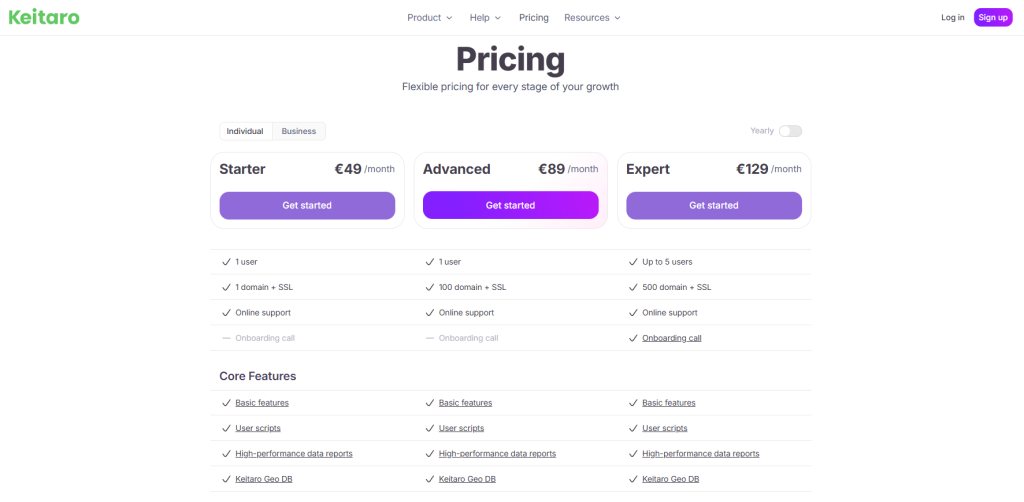
The tracker collects information about clicks across dozens of parameters, builds reports, runs A/B tests, and can even cloak traffic. The service also supports S2S postbacks, simultaneous work with multiple offers, and API management.
Keitaro features: what the tracker can do
If you tried to describe all of Keitaro’s features, you’d end up with another volume of ‘War and Peace.’ Some teams even have dedicated specialists who only handle Keitaro integration and detailed setup.
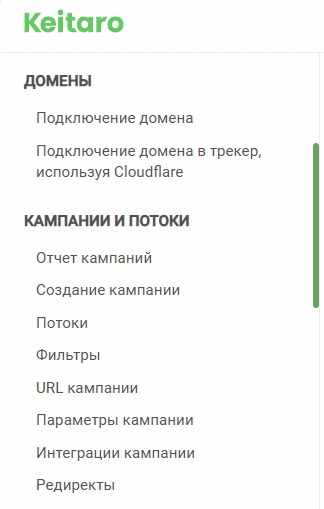
We’re not aiming to turn this material into an exhaustive manual, so let’s briefly cover the main features.
Click and conversion tracking
Keitaro logs every incoming click on an affiliate link and saves the parameters that the ad source passes in the link. These can include campaign ID, ad group and creative, placement, keyword, or custom sub-tags.

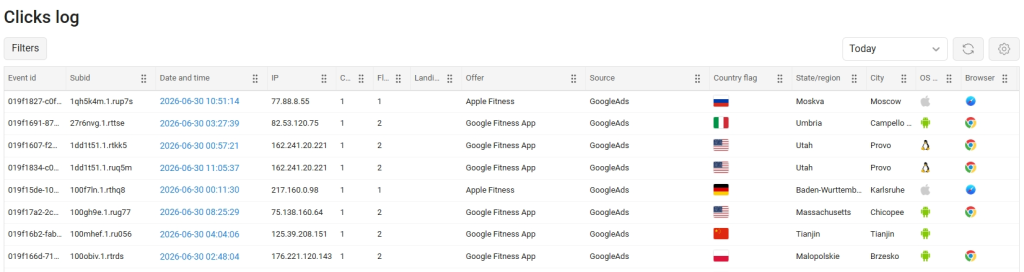
To link a click to a conversion, the tracker creates a unique click ID, which is sent to the affiliate program along with the user. When a target action occurs, such as a deposit, the affiliate network returns this identifier via postback. Thanks to this, the affiliate immediately knows whether their traffic is being paid for or not. The process looks like this: the user clicks on the ad and is assigned ID abc123. Three hours later, they make a deposit. If everything is correct, the affiliate network sends Keitaro a request with the ID, event status, payout, and currency. The tracker then finds the click with ID abc123 and adds the conversion to it. In the stats, clicks look like this:
The following lead statuses are available by default: Lead, Sale, Rejected, Trash Registration, and Deposit.
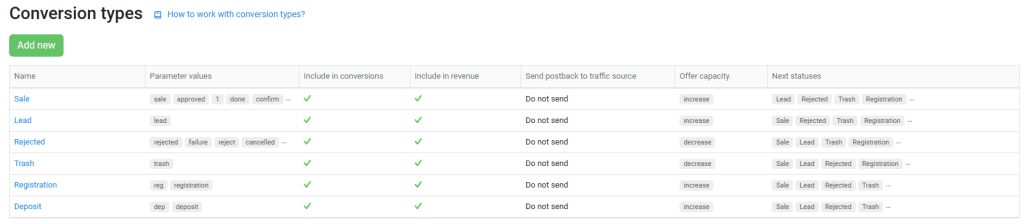
This way, the affiliate sees not only the final stage of the funnel but also the effectiveness of its intermediate steps.
Campaigns, flows, and rules
A campaign in Keitaro combines traffic source settings, launch links, and traffic distribution schemes. Within it, an affiliate creates three types of flows:
- Intercepting flow is checked by Keitaro first. It’s used for special conditions: a specific device, GEO, link parameter, or tag;
- Regular flow handles the main audience that matches the set filters;
- Fallback flow receives clicks that didn’t match previous rules. It works as a backup: if a user doesn’t fit any main route, the tracker sends them here.
Filters can be set by country, region, language, device, browser, OS, ISP, connection type, and parameter values. Streams let you manage multiple scenarios within a single campaign. Without them, you’d have to create a separate link for almost every combination of GEO, device, and offer.
Split Testing
Keitaro can automatically distribute traffic between streams, landers, and offers. For each scenario, you set a weight as a percentage:
- lander A – 50%;
- lander B – 30%;
- lander C – 20%.
Once enough data is collected, the buyer compares CR, EPC, ROI, and other key metrics, then disables the weaker option and redirects the audience to the best funnel.
In addition, Keitaro lets you test more than just page design. The buyer can add offers, affiliate networks, page opening methods, or localized funnel versions to different streams as needed. This makes it easy to see where the problem is: the creative, the lander, or the product itself.
Cloaking
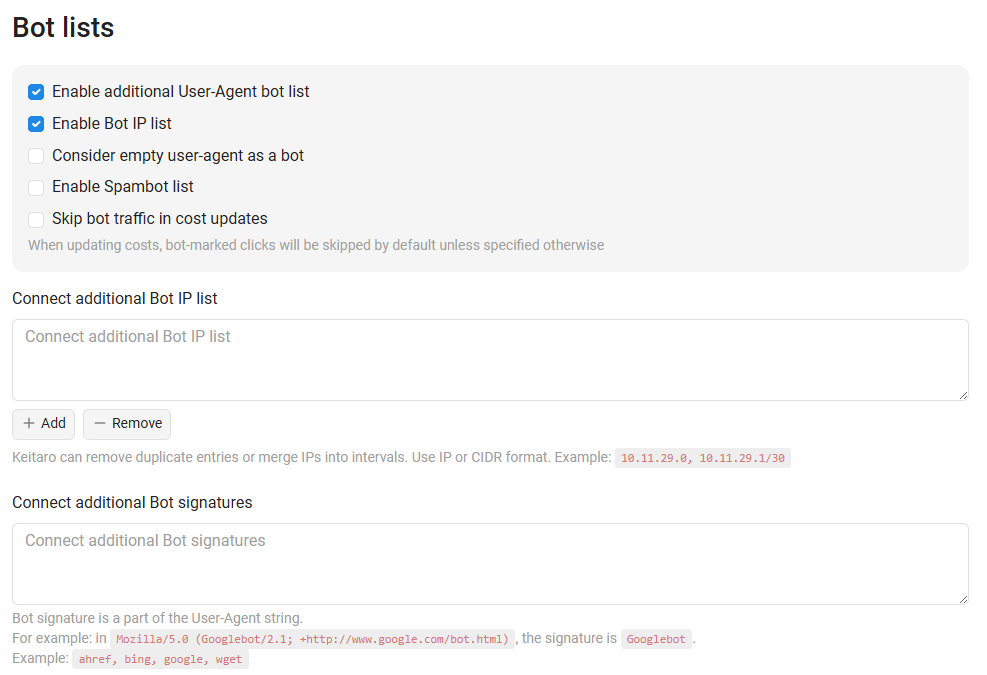
Cloaking is a topic that deserves its own article. In Keitaro, it’s built on streams, filters, and different traffic distribution scenarios. In the tracker, the affiliate sets up landers for moderation and for the real audience. There’s a feature for adding lists with bot characteristics.
Reports and Analytics
Keitaro generates reports by campaigns, sources, streams, landers, offers, countries, devices, and passed parameters. An arbitrage specialist can start with the overall campaign result and then drill down to a specific ad and offer.
Such a report helps you spot that the campaign as a whole is profitable, but almost all the profit comes from a single creative on Android. Without this breakdown, the buyer might keep paying for iOS traffic that just drains the budget.
If standard metrics aren’t enough, you can create your own with custom calculation formulas.
Auto-Optimization
The tracker’s algorithms can perform actions based on set rules. Stream monitoring checks landers and offers on a schedule. If a page stops responding or lacks the required element, the tracker can:
- disable the stream;
- replace the URL;
- fetch a new link from an external source;
- send a webhook;
- leave the event without automatic action.
The minimum check interval is one minute, but this feature isn’t available on the basic plan. The tracker can also automatically disable ineffective directions and protect the budget from being drained if the arbitrage specialist sets limits. This is a useful feature, but at the start, it’s better to manage things manually: one incorrect rule, and the system will strictly follow it, even if it obviously drives ROI negative.
Integrations
One of the main features affiliates love about Keitaro: ready-made templates for traffic sources and affiliate networks. A template contains the parameters and macros needed to pass click ID, costs, payouts, and statuses. For example, Keitaro has direct integrations with Facebook, Google Ads, and TikTok, which help send conversions back to ad networks and pull in spend data. You can also connect Cloudflare and Namecheap for domain management if you’re working with SEO.
In iGaming, where traffic is usually directed to apps, a PWA rental service is often placed between the ad platform and Keitaro. In this case, the PWA service can act as the source within the tracker, since it passes its own click ID and app parameters.
API
Keitaro offers both Click API and Admin API. These aren’t the most in-demand features for beginners, but it’s important to keep them in mind:
- Click API. This feature allows you to launch a campaign remotely. It’s used when the site or landing page is not on the same server as the tracker. This includes integrations via KClient PHP, JavaScript, and WordPress;
- Admin API. Provides programmatic access to admin functions. For example, you can create campaigns, change flows, get reports, and connect Keitaro with your team’s internal services. However, Admin API is only available on Expert, Team, and Enterprise plans.
In the future, when an affiliate has a team, the API can be used to automate campaign creation, data export, link updates, and other routine processes.
How to Install Keitaro: Technical Requirements and Process
What You Need to Install
Keitaro requires a separate VPS or VDS to run. Standard web hosting won’t work here. If you don’t want to deal with setup, you can use services offered directly by Keitaro.
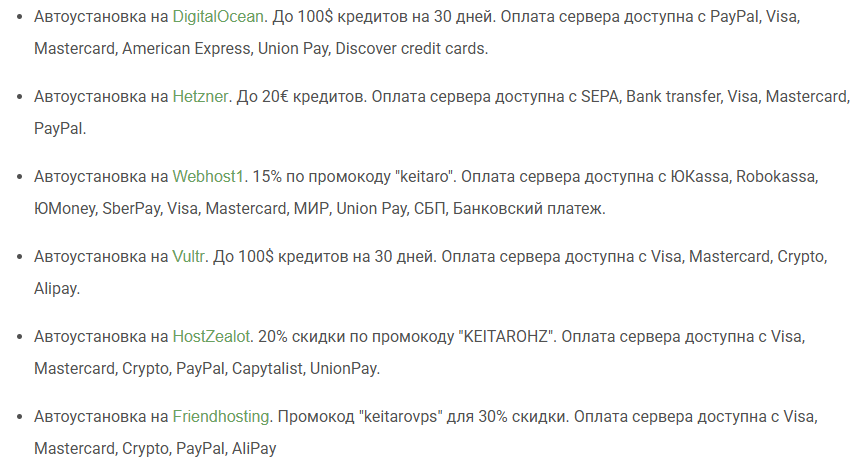
The minimum server performance is shown in the screenshot below:
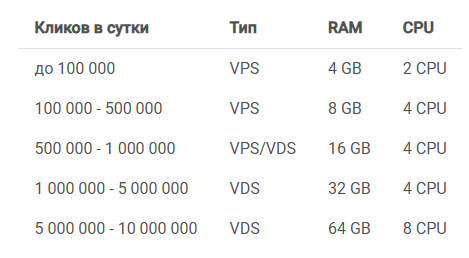
It’s important to understand that these are approximate guidelines, not guaranteed software performance. Frequent API requests and heavy reports increase the load, so developers recommend choosing a server with extra capacity for such cases.
You’ll also need a domain for installation. It should be connected to the server’s IP and have an SSL certificate issued so the working link opens via HTTPS. This way, the tracker can act as a full-fledged intermediary between the referral link and the landing page.
Actual Cost of Ownership
Remember, Keitaro is a server-based tracker. So, an affiliate pays not only for the subscription, but also for the server, domain, and backups if needed.
For example, the minimum Starter plan with annual payment is €40 ($45.7) per month. A Hetzner server with 2 vCPU, 4 GB RAM, and a 40 GB SSD meets the basic requirements and costs €7.9 ($9.03) per month.


We’re not factoring in possible taxes and fees, so we’ll leave the numbers as is. Add a domain, for example, a .com from NameCheap. For new users – $6.79.
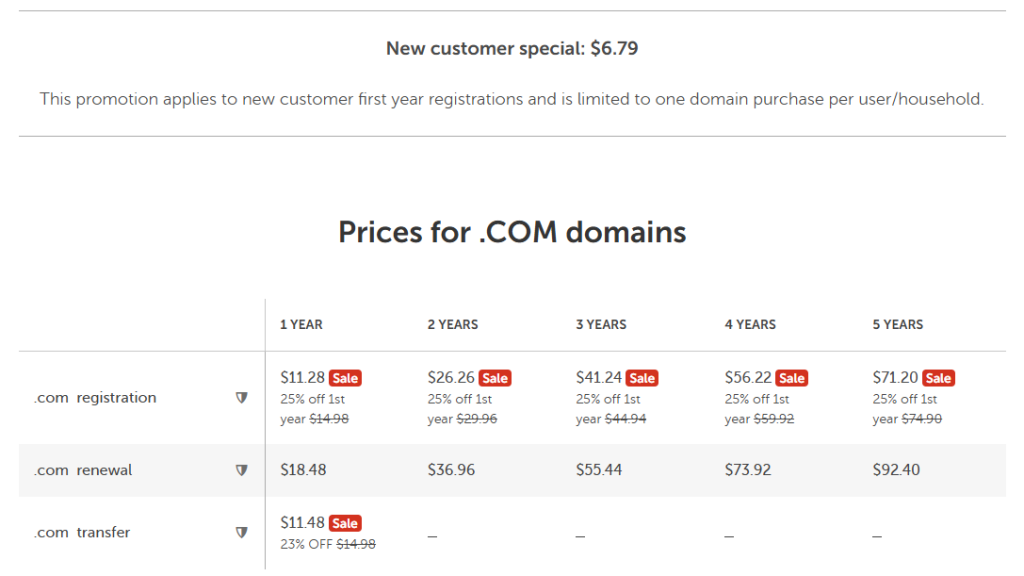
Total: $45.7 for the subscription + $9.03 for VPS + $6.79 for the domain = $61.52 for the first month. After that, subtract the domain fee and you get $54.73 per month for stable use.
Is It Hard to Install?
If an affiliate knows how to ask questions to ChatGPT or any other neural network, installing the tracker is easy. AI can help you find a provider near your target GEO, choose the right hardware, and walk you through installation step by step via regular cmd. Keitaro offers an even simpler way: use a partner VPS and set everything up in a couple of clicks.
If you do everything manually, the process will take some time, but not too much. To set up the Keitaro tracker with a provider without integration, you need to:
- order a clean server;
- connect to it via SSH;
- run the installation script;
- activate the license;
- link the domain;
- set up SSL;
- check updates and backups.
The installation itself doesn’t require an engineering degree. Most issues for beginners arise around it: wrong operating system, OpenVZ instead of KVM, DNS errors, or closed ports. However, all these problems can be solved instantly if you ask Gemini or ChatGPT to help you anticipate them.
Keitaro Pricing in 2026
In 2026, the team offers 5 plans: 3 for personal use and 2 for business.
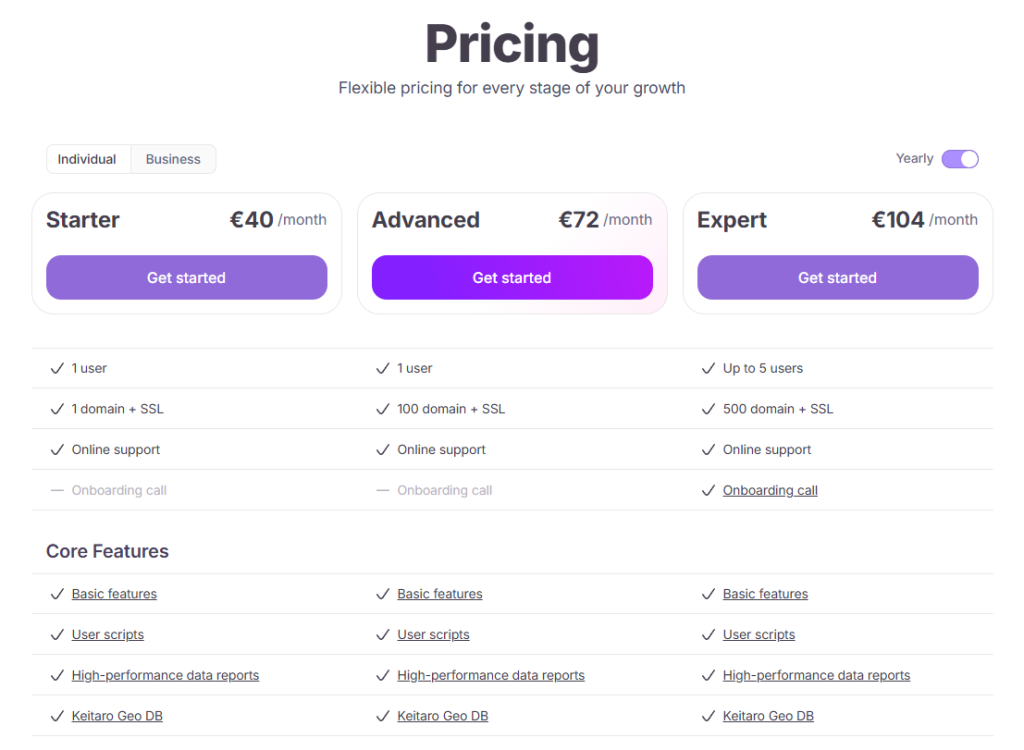
There’s no point for a beginner to choose the Business plans, but they might be useful in the future.
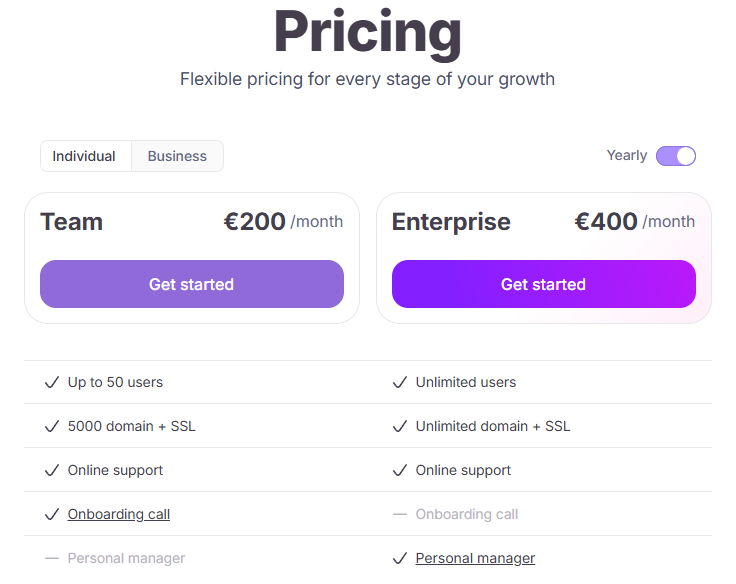
The main limitation of the Starter plan is one domain. This is enough for a first project, but if you regularly change domains or work with several GEOs, the plan quickly becomes restrictive. Advanced is designed for one user but allows up to 100 domains. For most solo buyers, this is the most balanced option. Expert supports up to five users and 500 domains. At this level, you get features important for automation and teamwork, including Admin API and flow monitoring.
Team and Enterprise add more users, domains, and integrations, as well as an activity log, branding, and personal support.
Keitaro vs Competitors: Honest Comparison
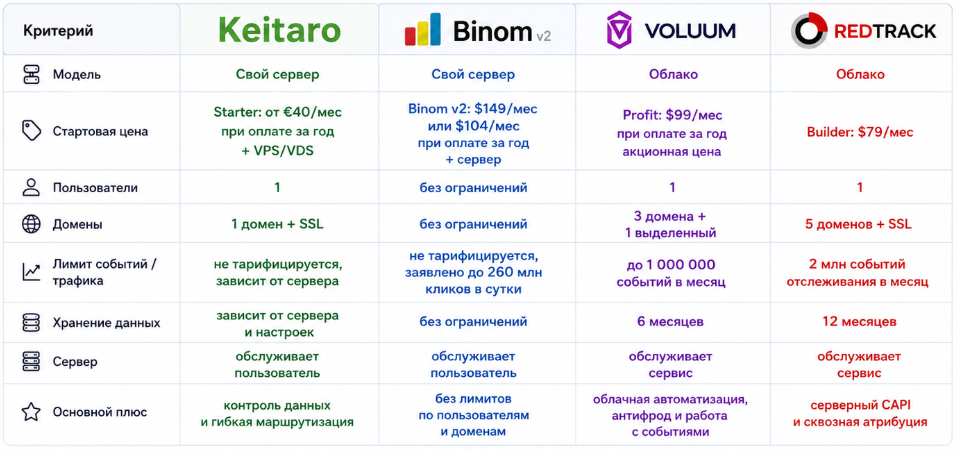
Keitaro’s closest competitor in terms of operation is Binom. Both trackers can be installed on your own server, neither charges per processed click, and both are designed for high volumes.
Binom v2 costs more upfront, but doesn’t split users and domains across plans. Buyers can test the tracker for two weeks and get a refund if needed. That’s why Keitaro is more cost-effective for solo buyers who don’t need dozens of employees. It’s more convenient to start with Starter or Advanced, and then move up as you grow.
Voluum is more focused on cloud automation. Its plans take into account events, active campaigns, domains, and data retention period. Users pay more for not managing a server and for having campaign management tools in a single dashboard.
RedTrack also works as a cloud service and focuses on attribution, integrations with ad platforms, and e-commerce. This is an option for those who don’t need their own VPS.
Everyone chooses the tracker that suits them best. Complete beginners will find it easier to start with cloud trackers, but at scale, you’ll have to maintain not just all the infrastructure like accounts, proxies, and payment solutions. You’ll also incur costs for event tracking in the tracker.
Keitaro Pros and Cons
When it comes to Keitaro’s advantages, there are plenty:
- data is stored on the affiliate’s server;
- the number of clicks is not limited by the license;
- you can choose the VPS location and capacity;
- flexible flows and filters;
- split testing for landers and offers;
- local pages and built-in editor;
- ready-made templates for sources and affiliate networks;
- S2S postbacks and multiple conversion types;
- integrations with Facebook, Google Ads, and TikTok;
- Click API and Admin API.
But there are also some downsides:
- the server must be paid for separately;
- the affiliate is responsible for infrastructure uptime;
- Starter is limited to one domain;
- Admin API and flow monitoring are not available on all plans;
- as traffic grows, you’ll need to upgrade your VPS;
- Keitaro does not replace a full-featured bid management tool;
- beginners need to understand DNS, SSL, and basic server setup;
- there is no free permanent plan.
Who Keitaro Is For: Final Recommendations
To sum up, there are several scenarios for using Keitaro:
- Beginner with a single test campaign. In this case, a separate server-based tracker isn’t always necessary. If your budget is $200–300 and the affiliate network provides clear stats, you can start with a simpler tool. Otherwise, you’ll spend the first week setting up the server instead of testing the offer.
- Solo buyer with several funnels. The Advanced plan is a safe bet here. The Starter’s one-domain limit quickly becomes a problem when working with multiple GEOs, sources, or projects. But at scale, you won’t have analytics issues.
- Small team up to 5 people. Here, the Expert plan is worth considering: 5 users, Admin API, and flow monitoring let you distribute access and automate some routine tasks.
- Media buying department. Team and Enterprise are definitely the right fit. Here, the value comes not just from limits, but also from roles, activity logs, a wide range of integrations, and centralized analytics.
Keitaro is the right choice when you need data control, high traffic volume, and complex routing. If your main goal is to launch a single campaign without server management, a cloud tracker will be easier.

FAQ
Keitaro is a self-hosted tracker for analyzing advertising traffic. It records clicks and conversions, links them into a single system, and allows you to evaluate campaign performance down to the level of creative and source.
Keitaro is installed on your own VPS or VDS, so all infrastructure and data are under the affiliate's control. In cloud solutions, the server side and maintenance are handled by the service, and the user works through a ready-made platform.
The basic Starter plan costs about €40 per month with annual payment. You also need a VPS server (on average €7–10 per month) and a domain (~$6–10 per year). As a result, basic usage costs around $50–65 per month, not including backups and additional services.
Installation is possible via auto-installation with supported hosts or by following the instructions. The main difficulties usually arise not during installation, but when setting up the domain, DNS records, and SSL certificate.
A postback is a request from an affiliate network to the tracker after a user completes a target action. It transmits the click ID, conversion status, payout, and currency, allowing you to accurately link clicks and revenue.
Keitaro distributes traffic through flows and filters (GEO, device, IP, parameters, and other conditions). These mechanics allow you to segment the audience and direct it to different pages.
Yes. Keitaro supports passing campaign parameters and integrations with ad platforms, including sending conversion data back to ad accounts.
Both solutions are self-hosted trackers. Keitaro is often chosen for its lower entry threshold and flexible pricing, while Binom is preferred for having no user or domain limits based on plan.
There is no permanent free plan.
A basic VPS (2 vCPU and 4 GB RAM) can handle up to ~100,000 clicks per day. Actual load depends on reports, API requests, and overall server configuration.

Comments (0)