


In 2026, SEO is no longer just about optimizing pages for Google or Yandex. To stay profitable, you now have to fight for your website’s visibility across different platforms: Bing, ChatGPT, Alisa, AI Overviews, and so on.
Many SEO specialists think neural networks will instantly handle search optimization. But the results depend heavily on how the webmaster thinks. In this article, we’ll break down how to build your own SEO machine, organize AI workflows, and roughly how much it will cost.
What SEO Looks Like in 2026 and Why You Can’t Do Without AI
When affiliates worked only with Google or Yandex, things were much simpler: there were case studies, developer notes, and niche forums. Now, sticking to just classic search engines makes little sense. As of January 2025, in more than two-thirds of cases, users solve their problems with AI-generated answers, not classic search results.
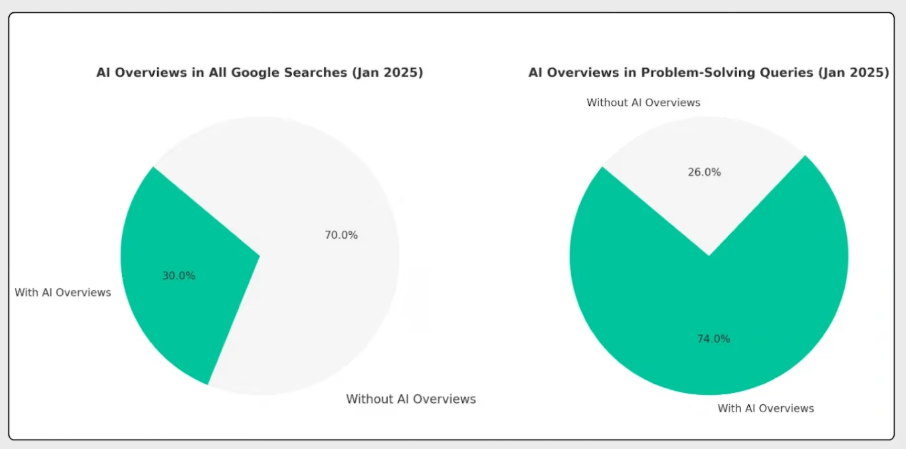
The logic is simple: why manually sift through hundreds of pages when a neural network can analyze all the information and give a structured answer better than any article?
This situation forces SEOs to rethink their approach and keep at least three key points in mind:
Users search for information everywhere. Search used to be very linear: a user would go to Google or Yandex, type a short query, open a couple of sites, and look for the answer. Basically, all the competition was just for ranking positions. But now, this model no longer works. A user might ask ChatGPT and get an instant answer without visiting any site, or go to YouTube to watch a video. Plus, some leads will use a voice assistant and solve their problem with zero-click.
Keywords are no longer a priority. Before AI, one of the main tasks for any SEO was to create detailed content briefs specifying the number of keyword insertions. For years, this approach delivered steady results, but it’s quickly becoming outdated. Neural networks can analyze not just keywords, but user intent. For example, you could previously target queries like “Apartment for a family in Los Angeles,” adapt your pages for those keywords, and get traffic. Oleg Shestakov discussed this in a podcast series about modern SEO.
With AI, user queries are increasingly like prompts, turning the same request into something like “Find a good place to live in Los Angeles for a family of three, close to the subway and a kindergarten with a preparatory group.” Finding a site that even minimally matches such a query is nearly impossible. This forces SEOs to dive deeper into lead intent and think through what needs to be covered in an article to fully address it.
WordPress and Tilda are no longer must-haves. For a long time, both CMSs were considered the “gold standard” for search optimization. To scale up, you even had to hire freelancers and spend money on it.

But this approach took a lot of time and effort: you could waste a month on a niche that turned out to be unpromising. With a tool like Claude, however, you can streamline landing page creation and hypothesis testing, cutting test times down to just a few days.
To understand how AI search works, let’s give a brief explanation. Previously, algorithms analyzed keywords: if a user searched for a car, the results would show sites where those words appeared most often. It was believed this increased the chances of solving the user’s problem.
AI search works differently. It takes the query and converts it into an embedding—a numerical vector that reflects the meaning of the text. You can imagine this vector as a point in space. The system then compares this embedding with the embeddings of other texts, such as pages, paragraphs, and documents. The similarity between them is determined by the angle between the vectors: the smaller the angle, the closer the meanings.
This idea is important for building an SEO machine, because you can use the same principle to analyze competitors and understand which topics and entities are truly relevant to the query and which are unnecessary.
What an AI-Based SEO Machine Includes
Currently, an SEO specialist can build their own pipeline for analyzing search results and competitors, creating content, page layout, and publishing. We’ll look at the detailed structure of an SEO machine below, but first let’s break down the general concept:

- Research. Analyzing search results, competitors, and intent. At this stage, you determine what the user actually needs and which pages already address that query.
- Outline. Forming the structure of the article or page. Here you set the logic of the material: which sections will be included, which questions need to be covered, and in what order.
- Content. Generating and refining the text. AI writes a draft, which then goes through review, editing, and optimization for the specific intent.
- Templates. Creating universal page structures. This allows you to avoid building each page from scratch and to scale effective solutions.
- Publishing. The final stage, where pages are automatically assembled and published online—most often via cloud solutions and without unnecessary CMS.
Now let’s move on to building the SEO machine and take a closer look at each stage.
How to Effectively Automate SEO with Neural Networks
The main task for an affiliate at the SEO machine setup stage is to build an effective system tailored to their own goals and resources. Both variables differ for everyone, so we’ll focus on basic functionality at a reasonable cost.
We recommend going through this process manually the first time to understand what results to expect from the neural network. After that, you can automate the process.
Building a Research System
The first step is to set up an analytics system. It consists of two layers: creating tables and gathering sources. First, you need to record the data, then collect as much information as possible from search results, competitors, and related platforms.
How to create a table. First of all, every SEO specialist decides for themselves what their table will look like. For convenience, we suggest this option, created in just a couple of minutes with ChatGPT.
How to collect sources. Now you need to figure out where the relevant intents are. To do this, take the main query and go to Google. The main task at this stage is not just to open a few sites, but to understand how the search engine itself breaks down the topic and what sub-intents it identifies. To do this:
- First, capture the basic SERP. Open the first 10–20 sites and add them to the table. You need to record not only the URL, but also the page type, structure, and the general approach to covering the topic;
- Next, deepen the analysis with “People also ask.” Here, expand on 5–10 questions, copying them as they are. These are ready-made intent formulations from Google itself;
- After that, analyze the bottom of the first page. These results add to the picture and help you see related directions that are also connected to the main topic;
- The next step is to add additional sources. Use site:reddit.com search to analyze discussions and real user questions. At the same time, open relevant YouTube videos and note recurring topics, pain points, and phrases. To save time, you can download subtitles using a special service.
If the affiliate already has a money site, analyze data from Google Search Console separately. You need to take real queries that already have impressions and clicks. As a result, you get not just a list of links, but a full set of intents, questions, and directions within the topic. Later, all this can be automated using parsers, raw text exports, and semantic analysis with AI.
After this, you need to structure the collected data. It’s important not to overcomplicate the structure, but still keep the logic. On the SERP sheet in the table, each row corresponds to a separate page. Here, enter the query, URL, title, page type, and a brief description of the content. On the Questions sheet, each row is for a separate question. On this sheet, specify the wording, source, topic, and a brief explanation of the intent. On the Competitors sheet, add key page elements: URL, titles, structure (H2/H3), presence of tables, FAQ, and other blocks, as well as strengths and weaknesses. On the Content Map sheet, gather the final structure. Each row contains the topic, subtopic, specific question, and the format of the future block—text, list, table, or FAQ.
If, after filling out the table, it becomes clear which questions repeat, which blocks are mandatory, and where there are gaps in the SERP, then the system is built correctly. But if you end up with just a list of links without structure or insights, it means the analytics stage wasn’t done very well.
Break the text into chunks
Once you have your sources and topic map in front of you, you need to prepare the text for further analysis and embedding work. To do this, the text is split into chunks—separate semantic fragments that the system will treat as independent units.
We recommend starting by breaking down the structure first, then the text itself. Begin by dividing the text into logical blocks: H2 and H3 headings, paragraphs, lists, FAQs, and tables. If a fragment contains several different ideas, it should be split up.
When creating a chunk, it’s important to make it optimal in size. It should be short enough to avoid mixing different topics, but long enough to preserve context. In practice, we recommend this approach: one chunk = one paragraph, subpoint, or answer to a question. Sections that are too long should be split into several parts, but it’s important not to break up tables, lists, or coherent logical structures.
Each chunk should be recorded along with its context: indicate the heading it belongs to, its order in the document, and the source. This is necessary so that during further analysis, you can not only find similar fragments but also understand where they came from and what role they play in the text. As a result, you get a set of clean, structured fragments, where each chunk is a separate unit of meaning.
Choosing models for creating embeddings
Once we have the chunks, they need to be converted into embeddings. This is necessary so that the AI works not with words, but with the vectors it is used to. The accuracy with which the system finds semantic matches and compares content depends directly on this.
The choice of model for creating embeddings is not universal. It primarily depends on the tasks, data volume, and quality requirements. From experience, we can recommend three options:
- text-embedding-3-small from OpenAI. The best option for getting started and handling large-scale tasks. It provides good quality at a low cost, processes large volumes of text quickly, and is suitable for most SEO tasks: clustering, finding similar chunks, and competitor analysis;
- text-embedding-3-large from OpenAI. Used when maximum accuracy is needed and you already have an analytics base. It better captures complex semantic relationships, making it suitable for deep intent analysis, complex niches, and precise semantic clustering. The downside is higher cost and load.
- all-MiniLM-L6-v2. A good option for local work and minimizing costs. It works quickly, doesn’t require API payments, and is suitable for tests, MVPs, and small projects. However, it is inferior in quality to more advanced models, especially on complex texts, but is considered the most economical option.
For convenience, we’ve put together a small table to help you quickly understand when and which model to use.
Important: if you start working with one model, continue using it until the end of the project. The reason is that each model generates embeddings in its own way. This means that all-Mini will not understand embeddings from text-embedding-3.
Creating an outline
Once you have gathered your sources and prepared your chunks, you can start building the outline—the structure of your future content. This is not a creative stage, but a mechanical process based on the data you have already collected. At this point, your task is to take all the identified intents and arrange them in a logical sequence.
To properly build the outline, take the table with questions and the topic map, and group all the questions by meaning. Next, highlight 3–6 major clusters—these will become your future H2s. For example, if the topic is about house foundations, separate sections might be choosing the type, mistakes, cost, site preparation, and so on.
Now, within each cluster, break down the questions into subpoints. It’s important not just to list everything, but to arrange them in order: from simple to complex. Start with an explanation, then move to details, and finally cover specific cases and exceptions. These subpoints become your H3s.
After that, check the structure for duplicates. It’s common for the same question to appear in different wording—such elements should be combined into a single block. If you skip this, the text will become bloated and lose focus. Once this is done, determine the format for each block. This should be based on search results and intent, not just intuition. If competitors are using tables everywhere, it means users expect a comparison. But if there are FAQs in the results, you need to add a question block as well.
The second-to-last step is checking for completeness. Take the original list of questions and compare it with the outline: each intent should be covered by a separate block. If there’s a question that doesn’t fit anywhere, the structure is incorrect and needs to be redone. After this, check the outline for logic. The blocks should follow a natural sequence: first an introduction to the topic, then the basics, then a deep dive, and only after that—additional details and FAQ.
In the final stage, compare your outline with the content that ranks at the top of search results. If your structure is weaker or covers fewer questions than your competitors, improve it. If it covers the same intents but does so more thoroughly or conveniently, your outline is ready. As a result, you get not just an article plan, but a precise map of future content, built on real search data and user behavior.
Writing and Reviewing Texts
After assembling the outline, start generating the text. It’s important to understand that the neural network should not write the entire article in one go: this leads to lost structure, repetition, and broken logic. It’s better to work in chunks, where each outline block (H2 or H3) is generated as a standalone fragment. Provide a specific question, block format, and, if needed, competitor chunks collected during analysis. This way, you get text that directly addresses the right intent instead of spreading thin over the topic.
To create texts efficiently, it’s best to use ChatGPT and Claude together. For example, ChatGPT can build the outline, while Claude writes the text step by step in the desired style. This costs literally pennies: for $1, you can generate about 50,000 English words. That’s roughly 80 A4 pages in 12-point font. But for those who don’t want to deal with Claude and its console, there’s an alternative option, which already has a case study.
Before generating, set clear constraints: block length, style, level of detail, and format—such as list, table, or explanation. The more precisely you define the parameters, the fewer edits will be needed later. After that, review the text. First, check the meaning: does the block answer the question, is there any fluff or logical gaps? If the block doesn’t meet the intent, rewrite it from scratch rather than editing on top.
Next, conduct a factual check. Double-check all specific data, numbers, and statements, because neural networks can generate plausible but incorrect information. Neural networks learn from data produced by other neural networks, which leads to hallucinations looping in the system.
At the final stage, assemble all chunks into a single piece and do a quick final coherence check: does the text read logically, are there any jumps between blocks, and is the main narrative thread intact? As a result, you get not just generated text, but a structured piece where each block addresses a specific intent and contributes to the overall goal of the page.
Building a Template Library
After an affiliate has produced a few pieces, they’ll notice the same blocks, formats, and logic keep recurring. Instead of building the structure from scratch for every article, it’s more convenient to create a template library. Start by identifying repeating elements: introductions, explanatory sections, comparisons, error lists, checklists, FAQs, tables, and conclusions. In any niche, there’s a limited set of such blocks, and they can be standardized.
Next, don’t copy texts—define the framework for each template: what parts it consists of, in what order information is presented, and what problem it solves. For example, a comparison block always includes criteria, a table, and a brief conclusion, while an error block covers the problem, consequences, and solution.
Immediately link templates to intents: selection, explanation, comparison, problem-solving. This not only speeds up writing, but also systematically covers user queries.
Then add 1–2 successful examples from existing materials to each template for quick reference. Now, when generating, you won’t need to write the task from scratch: just take a ready-made template and fill in the required content. This way, you’ll save time, reduce errors, and make the results more consistent.
Publishing via Cloud
Once the text is ready, the goal is not just to post it on the site, but to do it quickly, at scale, and without unnecessary manual work.
The pipeline can be set up via API integration or automation tools: for example, n8n or a simple script that takes the data (text, title, description, URL) and sends it to the publishing system. As a result, new pages can go live by the dozens without human involvement. For cloud hosting, static hosts and edge platforms are most commonly used: Cloudflare Pages, Vercel, or similar services. They allow you to roll out changes quickly at a relatively low cost.
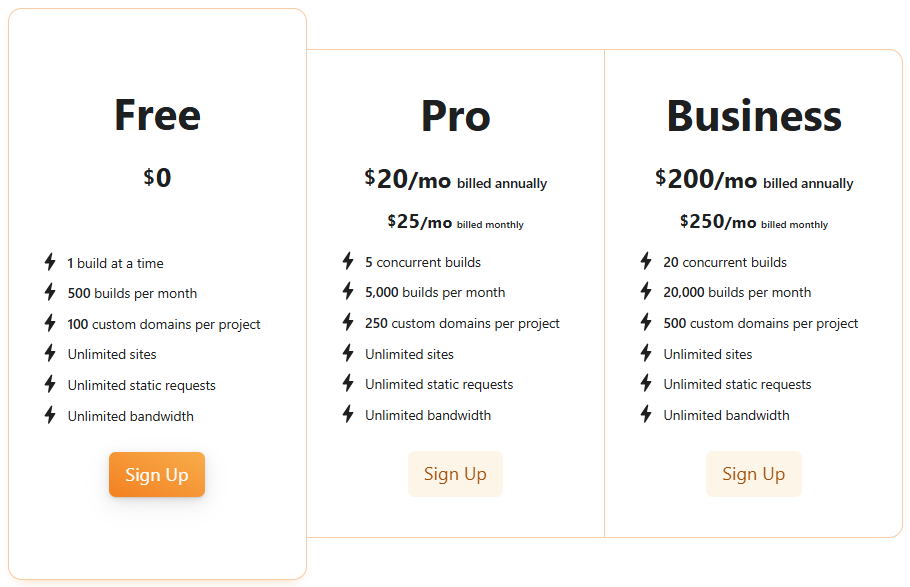
As a result, publishing is no longer a bottleneck. Instead of manual work, you get a conveyor where new pages are created and deployed automatically, and the SEO machine starts working as a full-fledged system.
SEO Machine Cost in 2026
Now let’s break down the most important part — how much it will cost to automate this kind of work. To save you time, we’ve put together a summary table of estimated expenses for 100 sites.
The largest expense item is domains, but you can’t save on them with AI. Here’s a small life hack: on GitHub, there’s a tool that allows you to cut LLM API costs by up to 92% from the original price. Thanks to this, designing a system for your needs will cost next to nothing.
Conclusion
SEO in 2026 is no longer a set of scattered actions but becomes a system. The winners are not those who write texts or collect semantics, but those who can build a system: quickly analyze search results, structure data, and scale content without losing quality.
Simply put, a basic SEO machine today is built from specific elements:
- AI agent for research: n8n paired with SerpAPI or simple SERP parsing via API;
- analytics table in Google Sheets or Excel;
- embedding model, for example, text-embedding-3-small as a basic option or all-MiniLM-L6-v2 for local work;
- neural network for outline creation, such as ChatGPT;
- neural network for text — Claude;
- template base: your own templates in Notion or Google Docs;
- site publishing via Cloudflare Pages, Vercel, or similar cloud solutions through API or n8n.
Neural networks allow you to automate routine tasks, speed up hypothesis testing, and work with volumes that were previously inaccessible. At the same time, the key factor is not the tool itself, but the approach to using it.
As a result, the SEO machine becomes not just a way to get traffic, but a full-fledged tool for systematic growth. And the sooner you build such infrastructure, the higher your chances of ranking in the new search model.

Comments (0)