


Meet Alex. On Monday, he decided to get into affiliate marketing. On Tuesday, he saw the budget needed to get started comfortably on Facebook*. By Wednesday, he realized he wasn’t ready to spend that much on something he knew so little about. That’s how Ilya ended up on YouTube Shorts, which beginners tend to associate with a simple idea: “Copy trends, throw together short clips, and rake in traffic without spending a thing.”

That idea is only half true. Ilya won’t pay for video impressions, but he will invest time in finding ideas, editing, choosing accounts, analyzing results, and building a funnel. If our hero picks a poor offer or pushes too far against moderation rules, the best-case scenario is that his videos simply get no views. In the worst case, he’ll lose potential profit, the video, the account, and just as much time as he would working with Facebook*.
There really is money to be made on YouTube Shorts, and today we’ll explain how a beginner can earn it.
Why YouTube Shorts Is Popular in Affiliate Marketing
In 2025, YouTube CEO Neal Mohan announced that YouTube Shorts averages 200 billion views per day. Most viewers are from India, the US, and Brazil, but the platform also has a huge audience in other GEOs.
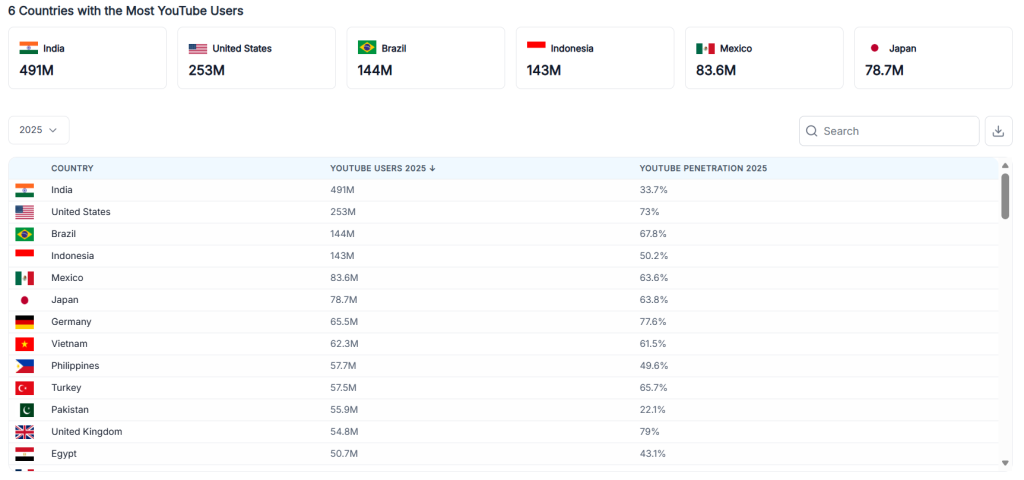
Affiliates can find traffic on YouTube for any offer and any country. The vast majority of viewers prefer entertainment content, which works equally well in any language.

In an ad account, you buy impressions. On Shorts, you have to earn them first. But a successful video can keep attracting organic traffic after publication, and a single channel can draw traffic from recommendations, search, its channel page, and related videos all at once.
Still, you can’t say that YouTube Shorts is easier or harder than paid traffic sources. Facebook*, Google Ads, and other major platforms still require basic affiliate skills: making creatives, planning targeting and placements, allocating budgets, and so on. Andromeda, Gemini, and other in-house neural networks already handle some of these challenges. Shorts requires more creativity in finding ideas and putting videos together: if a user watches a video again and again, likes it, or shares it with friends, the system keeps promoting it. Otherwise, the video stops being recommended and ends up on the scrap heap.
When—or if—Ilya gets tired of driving affiliate traffic, he can switch to a white-hat model: the YouTube Partner Program. Through the official program, you can earn money from videos on any permitted topic, even funny cats. Earnings will be lower, but you won’t have to worry about bans and can consistently upload videos across a network of channels. You won’t need to think about a funnel either: users watch videos, and YouTube pays for the views.
Verticals for YouTube
We’ll look at specific YouTube Shorts niches in the next section. For now, here’s an important principle for beginners choosing a niche: start with the monetization model.
- Traditional affiliate marketing. You need an offer that can spark interest in a couple of seconds or be explained in a minute. Dating, adult, and gambling offers fit this criterion, for example, while high-ticket crypto investments and insurance are less suitable.
- YouTube Partner Program. The platform doesn’t specify exactly how much it will pay per 1,000 views, because payouts depend on the viewers’ GEOs and the value of the video’s topic. For example, finding and retaining an audience for luxury goods is objectively difficult. But that audience can be shown ads from expensive brands that have paid YouTube for promotion, allowing the channel owner to earn more.
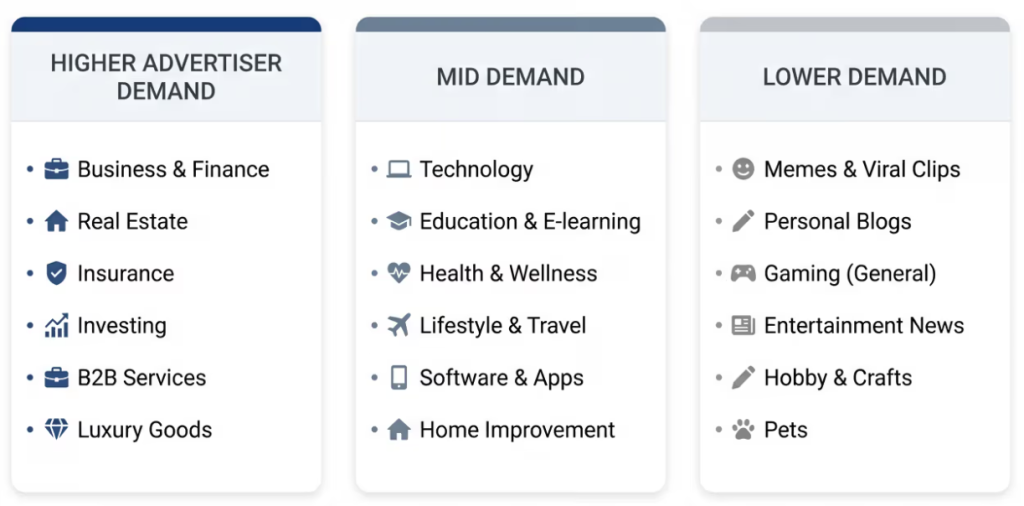
Overall, the ideal path for a beginner looks like this: start with white-hat niches such as humor or animals to understand how an engaging Short is structured, then move into gray-area niches.
Best Verticals for Affiliate Marketing with YouTube Shorts
At first, the best vertical is one where a beginner can come up with 30 different storylines, earn nothing from them, and still come up with 30 more. The logic is simple: if an affiliate discovered YouTube Shorts yesterday, read a couple of guides today, uploaded a few videos, and expects guaranteed earnings, organic traffic isn’t for them. You’ll have to test plenty of ideas, angles, and hooks that nobody writes about for free. And you’ll be doing almost all of it on enthusiasm alone. For example, some course-selling grifters keep telling beginners to get into AI videos, claiming it’s easy money. With a tool like n8n, you can build a production line that churns out similar videos featuring animals, dramatic stories, and so on. The idea sounds tempting, but few of them mention that the platform has been keeping a close eye on this niche for a year now.
For beginners who aren’t ready to give up, the following niches are the most promising.
Software and utilities. This vertical is convenient because you can show the product’s value directly on screen: how to trade stocks, find a girlfriend through an app, clean up your phone, and so on.
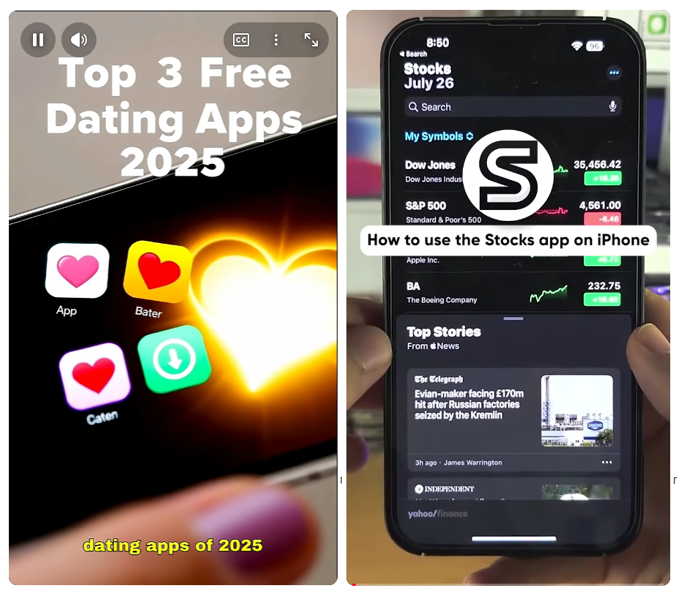
Users are usually directed either to a long-form video or to the link in the channel profile. Whichever route the affiliate chooses, the traffic can then be sent to a landing page with a PWA or to an app store. When choosing an offer, look for a wow factor. The less time it takes to get a result after downloading the app, the better your chances of attracting traffic.
Physical products and e-commerce. Here, the product does most of the work: an unboxing, a test at home, a comparison of two models, or a demonstration of a problem is usually clear without a long introduction. A beginner can shoot a video on their phone, show the product in a real-life scenario, then direct the viewer to a review, storefront, or product page.
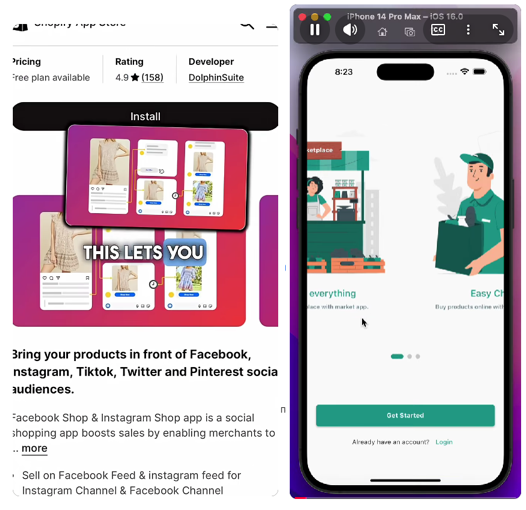
The product can also be digital. For example, selling ChatGPT subscriptions was popular for a while. Creators showed how to buy a plan quickly with crypto on a marketplace, then shared their referral link.
Education and digital products. A short video can provide a mini-lesson, explain a common mistake, or show a specific solution to a common problem. To start, you could choose HR or AI services that don’t need to be installed on a device. You can direct the viewer to a full guide, a review, or straight to a landing page.

The principle is the same as in other niches: the faster a user gets a result with no prior knowledge, the greater the chance of conversion.
Dating. Anyone who hasn’t seen a dating ad has probably never been online. As long as you avoid explicit photos and videos that direct viewers to adult offers, there won’t be moderation issues. In practice, even very basic creatives convert.
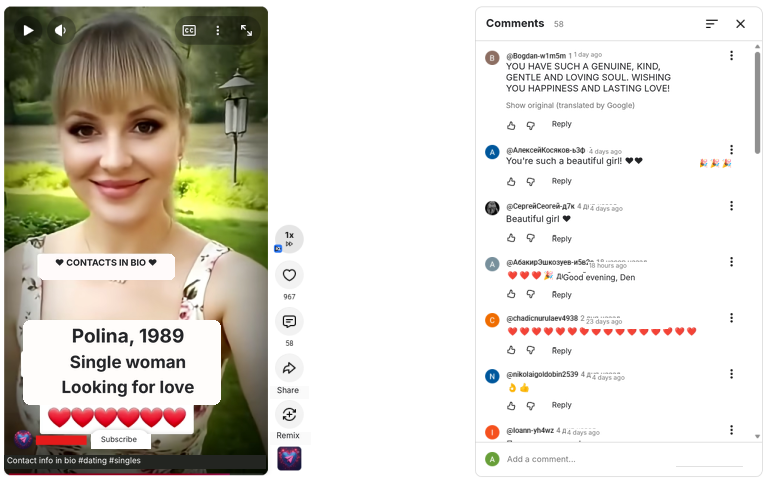
Payouts are higher in adult, but getting the content through moderation is harder. Thanks to AI algorithms, YouTube spots explicit content much faster than before.
Gambling and betting. The main iGaming approach hasn’t changed in quite a while: a streamer, popular or otherwise, spins slots, hits a jackpot or a big win, and reacts excitedly on camera.

To find reference videos, simply search YouTube for keywords such as “max win,” “max bet,” “jackpot,” or “big win.”
How to Drive Traffic from YouTube
Start with a testable hypothesis rather than buying ten accounts. A good setup for your first test is: 1 offer, 1 GEO, 1 audience segment, 3 creative formats, and 1 landing page variant. If you spread yourself across too many offers, after 50 videos you’ll discover that 50 different ideas… produced 50 different results. Here’s an effective workflow:
- Choose an offer and get YouTube approved as a traffic source by your manager. You need to be certain that you can send traffic directly from YouTube Shorts, know whether you can replace the referral link with a promo code, and confirm whether you’re allowed to use the brand’s logo and name. Otherwise, choose another offer.
- Describe the viewer in one sentence: who they are, what they already know, and what problem they want to solve right now. Without this, you won’t be able to structure the video properly. For example, for Betano in Brazil, this could be a man aged 18+ who already knows the brand and is interested in football betting, but hasn’t registered yet and wants to know how to top up his account quickly through Pix and place his first bet on a smartphone. This hypothesis makes it easier for the media buyer to choose a storyline: instead of reviewing the entire app, show the journey from registration to deposit in 20–30 seconds.
- Collect 20–30 reference videos on YouTube using keywords from your vertical. Record not just views, but also the opening frame, duration, storyline, CTA, and publication date. There are even dedicated tools for finding trends, although they’re usually paid. As a free alternative, you can install the vidIQ extension. It helps you filter for videos that quickly started trending. We’ll cover the extension in more detail below.
- Prepare three different angles: an offer demonstration, a win story or UGC, or a reaction, as well as a breakdown of a common mistake. During testing, change elements one at a time to avoid confusion.
- Set up your funnel and analytics. If you’re driving traffic to a link, use a link-shortening service with a UTM tag and track YouTube clicks separately from other sources. If you’re using a promo code, use a different code for each angle.
How to Find Topics People Are Already Watching
There’s no need to reinvent the wheel when you’re starting out. Everything that interests your audience has already been filmed, and people keep filming it every day. So let’s look at two options: free and paid.
Free. There’s a tool called vidIQ that provides more detailed statistics for YouTube videos, including Shorts. This isn’t an ad, so we won’t include a link.
You can use its features both in your account dashboard and directly on YouTube.
To find video ideas, sign in to YouTube with a clean account and search for a keyword relevant to your vertical. The tool will immediately show approximate statistics for the search results for that keyword.
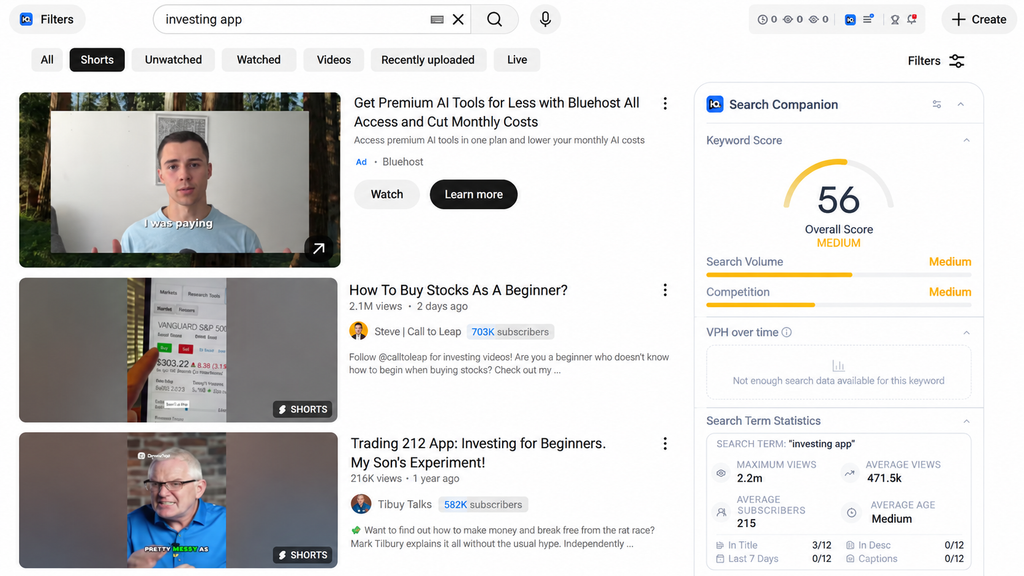
There’s a filter button to the left of the search bar. Click it to open an interface with various search parameters.
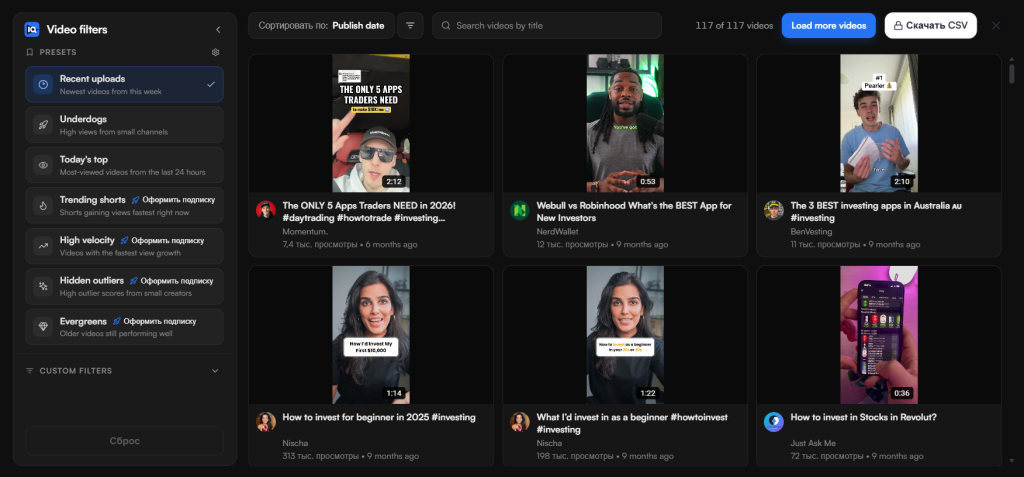
Most filters, including those for Shorts, are available on paid plans. But there’s another way: visit channels belonging to creators who are at the top now or were at the top a while ago, open their Shorts, and access the filters again.
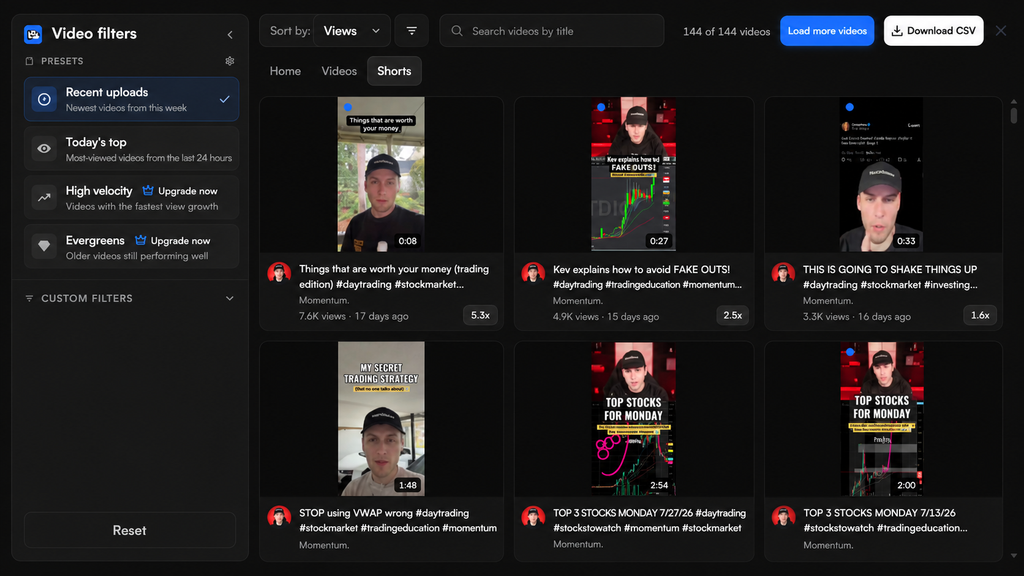
This way, you can find reference videos for free and get a better understanding of what’s working with audiences right now.
Paid. There are also plenty of tools for analyzing trends and finding videos that are taking off. They provide detailed statistics too, but typically cost around $50–60.
These are even simpler to use: enter a keyword, let the built-in AI suggest similar keywords, search for videos, and filter by views.
Preparing Accounts
Before uploading, decide what kind of account you need: a clean, newly registered account or a channel with a suitable history. We recommend starting with new accounts, but if your budget allows, purchased accounts can also be useful.
How to Choose Accounts to Buy
Finding a good channel on a marketplace is tricky because not every seller is honest. You might be sold anything from an unused email account with a channel attached or an aged account to a channel with videos or an established project with subscribers. Ideally, buying a channel should give you both an audience and the algorithms’ attention within your vertical. An account from 2012 with no activity gives you a nice date in the “About” section, but that’s where its advantages end.
To reduce the risk of wasting money on junk, stick to the analytics. First, open YouTube Studio yourself or ask the seller to open it, and review the data for the past 90 and 365 days. What matters is the viewers’ countries and languages, traffic sources, subscriber growth, and the videos that brought in most of the audience. For example, a channel with 30,000 subscribers might be relying on one viral video from three years ago.
Look at the audience’s GEOs separately. A channel with traffic from India won’t be much help if you need sports betting fans from Spain, even if it used to get millions of views. Also check the share of returning viewers and the latest uploads. If views remain stable but subscriber numbers jump by several thousand in a day, you may be looking at a channel with artificially inflated numbers.
Use the seller’s screenshots only for an initial review. Carry out the final check through an assigned role in YouTube Studio: the platform lets you grant access to a channel without sharing the account password and assign the appropriate permission level. This lets you see the actual date ranges, traffic sources, and restrictions.
Next, open the sections covering violations and copyright. Check for active warnings, strikes, Content ID claims, deleted videos, and feature restrictions. If a channel receives three warnings, the system deletes it along with all its content.
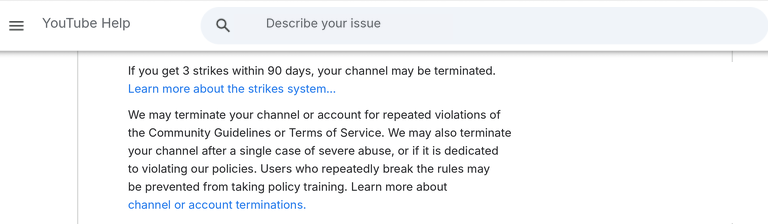
Ideally, you should see the following:
- The audience matches your intended vertical and GEO.
- The channel has no history of serious restrictions or questionable content.
- The statistics can be verified inside YouTube Studio.
If the seller offers only an old registration date and a screenshot of subscriber numbers, treat the deal as buying an unknown history.
How to Register New Accounts
Create a separate Google account for a new channel. Phone numbers for this are inexpensive.
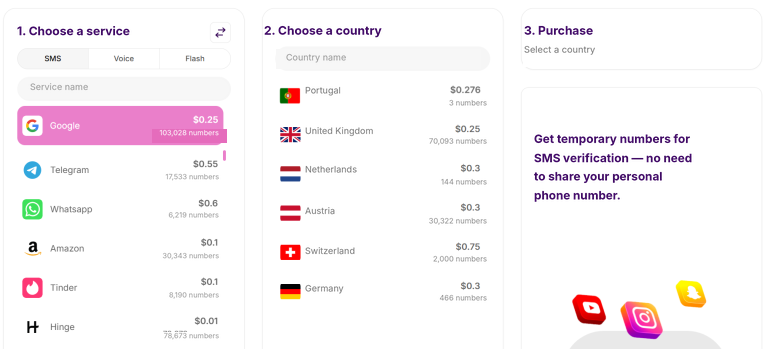
Ideally, enable two-step verification right away, add backup recovery methods, and set up the channel with a name, profile picture, and description.
Next, prepare a week’s worth of starter content. For the first test, put together 5–7 videos on one topic so that, after watching a successful Short, viewers can open the profile and watch more. A single random video gives you almost no data: you can’t tell whether the problem lies with the account, the storyline, the opening seconds, or your chosen audience.
One week is enough to gain some initial experience. In your analytics, track:
- How many viewers chose to watch rather than swipe away.
- The point at which the main drop-off begins.
- What percentage of the video viewers watch.
- Whether viewers watch it again.
- Which countries the impressions come from.
- Whether viewers visit the profile.
- Which storylines generate subscriptions and clicks.
At first, one clip a day is enough to leave time for gathering analytics and preparing new videos.
A workable launch process for a new account looks like this:
Create an account → set up the channel → prepare a batch of videos → run the first tests → analyze the audience’s response → scale the storylines that work.
Consistency is the key. Remember, YouTube Shorts gets more than 200 billion views every day, so sooner or later a media buyer will get either the traffic they want or invaluable experience.
How to Warm Up YouTube Channels Properly
Warming up a channel has always been a bit like folk medicine: on day one, watch cat videos; on day two, subscribe to creators; two hours later, start leaving likes—and then YouTube’s algorithms will initiate you into the cult of YouTube Shorts. Every affiliate has their own experience, so there’s no consensus on account age or warming up. Some creators look for channels that have been sitting idle for several months; others start uploading immediately from a new account. In an interview with FB-Killa (in Russian), an expert says outright that he creates an account on a clean IP and starts publishing videos immediately:
| There’s no need to reinvent the wheel with accounts. There’s no such thing as warming up, registering in stages, or anything like that. Register an account on a clean IP and get straight to work. I only run a few accounts for the long term. I don’t have any upload farms. I think they’re a waste of time. The percentage of dead accounts on YouTube is very high. So uploading to hundreds of accounts a day doesn’t make sense. Hoping that at least 20 percent of them will turn out to be alive and bring in a trickle of traffic—that’s not for me. |
YouTube explicitly advises creators to “follow your audience” rather than try to please the algorithm. That means tracking viewers’ reactions and adapting videos to their tastes, then letting the system do the rest.
Boosting Engagement Signals
You can find private tools for artificially boosting engagement signals on forums and in Telegram chats, but finding a decent publicly available option is almost impossible. YouTube belongs to Google, so the same neural networks capable of quickly detecting fraud operate on the platform.
To boost engagement signals, it’s safer to take a different route: behave like a real person and publish Shorts within a single niche without trying to send users off the platform. It’s far more effective to analyze the niche, formulate hypotheses, and make 1 video than to rush out 10 clips without any analysis. The algorithms will then test different audience segments until they find a relevant one.
Warming Up with White-Hat Videos
White-hat videos are less about warming up and more about understanding your audience’s needs. On YouTube, affiliates can direct viewers from Shorts to long-form videos. This can bring you closer to joining the platform’s official partner program and help you understand what your audience likes more quickly. Shorts usually disappear from the feed quickly, while long-form videos can bring in traffic for years and build trust in the channel.
Creatives for Affiliate Marketing on YouTube
Viewers only choose Shorts based on thumbnails at the beginning of a session, when they first open YouTube. These are usually trending videos, and getting into the trends when you’re just starting out is almost impossible. Users are more likely to discover your video in the feed, where only the opening seconds can hold their attention.
But you need to find the right balance. If the opening line promises a “secret way to win every time” and the rest is just ordinary slot footage, the viewer leaves. A good hook quickly establishes a conflict: “Why you’ll never lose weight without sweets,” “These bookmakers won’t pay out your winnings,” “Testing a product that promises to replace five devices.”
Preparing Creatives
Before making a good creative, decide on the video’s length. There’s no universal duration for every niche, but here are some rough guidelines:
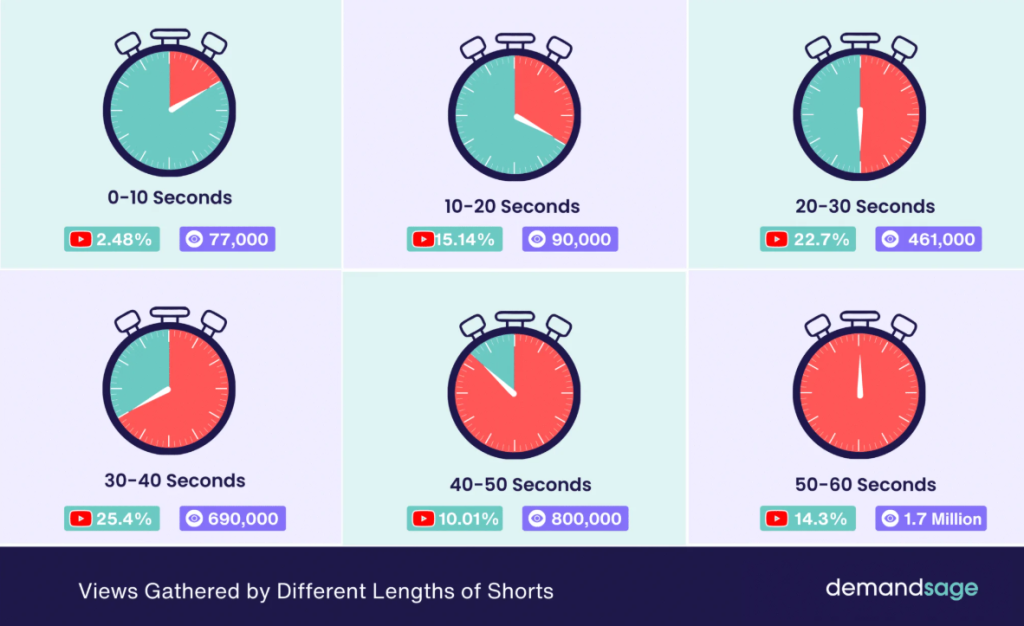
If you plan to make compilations from other people’s content, here’s a small practical tip: first, put all the source clips on your editing timeline, one after another. Then export the video and upload it to YouTube for an initial check. If the system lets it through, you can go ahead with the full edit. If it doesn’t, you’ll see a notification like this:
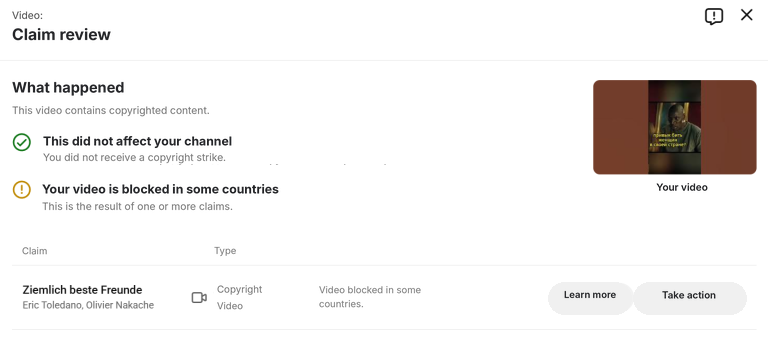
YouTube won’t let you publish that clip. This saves you 30–50 minutes of editing and lets you test another hypothesis.
After publication, don’t delete a video just because it hasn’t made it into recommendations within an hour: 1,000 views on a cat video and 1,000 views on a crypto investment clip represent different audiences and different spending levels. That’s why comparing a series of videos and the performance of the funnel as a whole is more useful than judging a single attempt.
Examples and Case Studies
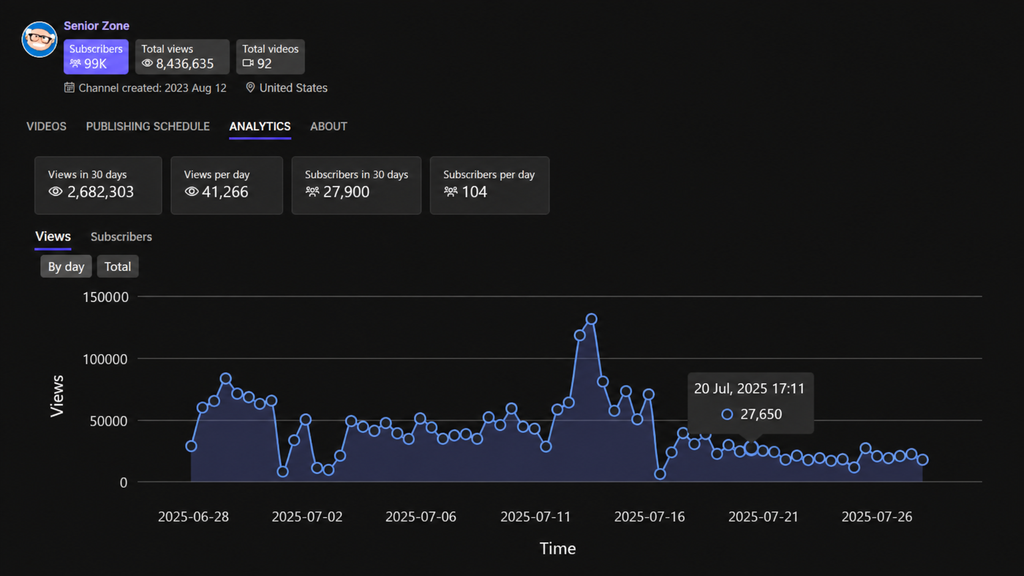
We couldn’t find any recent case studies of organic YouTube traffic used for traditional affiliate marketing. But we’ll share a network of channels getting millions of views from content that takes a couple of minutes to make, even without AI. Here are the channels:
The channels are new; only one is just over a year old. Yet together, they’ve already accumulated more than 370 million views. Subtract the 30 million views needed to join the YouTube Partner Program, and that leaves 340 million views. At a rate of at least $0.05 per 1,000 views, the profit came to $16,500. The videos are taken from the internet with almost no changes; the music stays the same, as does the editing. In Adobe Premiere, a popular video editor, you can create a template for these clips in an hour. After that, it takes 10 minutes to insert new source footage, apply the effects, and get the clip ready to publish.Which Metrics to Track
In YouTube Studio, start with four metrics: Shown in feed, the share of viewers who chose to watch, average view duration, and average percentage viewed. These show where a video stops converting effectively: it isn’t being shown, viewers immediately swipe away, or they leave halfway through.
Then combine your content analytics with your affiliate program statistics. Be sure to track profile visits, clicks to an intermediate page, registrations, confirmed leads, FTD, EPC, and revenue per thousand engaged views. A video with 30,000 views and five deposits is clearly more effective than a million entertainment views with no click-throughs.
At a minimum, your test spreadsheet should include the date, channel, GEO, offer, format, hook, duration, feed impressions, share of viewers who chose to watch, average percentage viewed, clicks, leads, approvals, and costs. Without it, affiliate marketing on YouTube Shorts quickly turns into a collection of gut feelings: “This video seemed to take off, but that one didn’t, for some reason.”
Useful Tips for Driving Affiliate Traffic Through YouTube
We browsed affiliate forums and put together a short list of useful tips for beginners:
- Start with one channel and one vertical. Only move to a network of channels once you have experience and understand how it all works.
- Get the source approved before uploading. Like any organic traffic source, Shorts often produces unpredictable results, which advertisers aren’t too keen on. This is especially true in gambling, where an advertiser needs a very specific member of their target audience rather than a random visitor who makes one deposit.
- Build your own asset. When working with organic traffic, you can and should create a website, Telegram channel, mailing list, or subscriber base. A video may get banned or drop out of recommendations, but a loyal audience can be monetized again through another offer without extra effort.
- Check your content on a phone. Buttons, subtitles, and important elements can be obscured by the app’s interface. For example, subtitles that are perfectly centered at the bottom in CapCut may disappear under the subscribe button in Shorts.
- Set stopping criteria. Trends emerge and die out dozens of times within a single day. Decide in advance how many videos and how much money you’re willing to spend before abandoning a hypothesis. With organic traffic, your budget consists of time, nerves, and motivation rather than money.
Conclusion
Organic traffic from YouTube Shorts lets beginners test hypotheses without paying for every impression, but that’s the only sense in which this source is free. Affiliates pay for views with their time: finding ideas, preparing videos, analyzing retention, and building a funnel that leads to the offer.
Start with one GEO, one product, and a few creative formats. Be sure to get the source approved by your affiliate network, publish a series of original Shorts, and connect channel metrics with clicks, registrations, and confirmed actions.
In your first tests, aim to understand the process rather than rack up millions of views. You need to know which storylines hold the audience’s attention, where viewers come from, and how much money each thousand engaged views brings in. Once you have those answers, Shorts becomes a traffic source you can scale and automate rather than a lottery.

FAQ
Conditionally free traffic means organic views for which the creator does not pay YouTube directly. Primarily, affiliates invest their time in producing videos, farming accounts, editing, and planning the funnel.
Yes. A new account can publish Shorts right after creation, but it will take time to grow.
Yes, until you see the first results. If after 20–30 videos the channel doesn’t get reach, you can either change the topic or create a new account.
A new account gives you a transparent history and full control from the start. A purchased channel may offer a ready audience, stats, and unlocked features, but you also inherit its GEO, possible violations, and questionable rights to the content.
For your first test, choose a pace that lets you maintain quality and analyze results. At first, posting 1–2 clips a day is enough, but do it consistently. YouTube likes regularity and predictability, not randomness.
URLs in Shorts descriptions and comments are not clickable. So, use links in the channel profile or direct viewers to a related long-form video.
YouTube rules prohibit this, so first collect trending references and try to create something similar but better. For example, add more transitions, animations, choose more relevant music, and so on.
You can, but only after making them unique. If a successful competitor appears, it's more profitable to track their posts in Reels or TikTok and then upload them to YouTube.
To earn ad revenue, a channel needs 1,000 subscribers and 10 million Shorts views in the last 90 days. Once these requirements are met, the user applies, the system approves, and payouts are credited.
In analytics, track the share of users who continue watching, average watch time, and view percentage. In the funnel, add profile visits, clicks, registrations, FTD, EPC, confirmed revenue, and expenses. The main final metric is the bundle's ROI, not the number of views.

Comments (0)