


The affiliate had been running nutra offers on Facebook for two years. He used proven antidetect tools, accounts, cloaking, but one Tuesday, six ad accounts were banned at once. The problem wasn’t the offer or the creative—the platform’s policy had changed. Turnover was frozen, the team had no tasks, and the affiliate manager was pushing for a new launch.
At that moment, the media buyer remembered Google Ads. He had always avoided this source, thinking the traffic was expensive and bans were frequent. That’s true, but the traffic quality is so high that almost all affiliate programs accept it, and in many GEOs, the volumes surpass Facebook.
This article will break down how to run nutra offers through Google Ads in 2026—from account creation to scaling.
Creating a Google Ads Account
The account is a basic consumable for a buyer, and Google scrutinizes it closely. The system reads the digital fingerprint of the profile: which sites the owner visited, where they logged in via Google, and whether the email is real. If you attach a payment method to a “bare” profile with no history, you’ll almost instantly get banned, since the algorithm sees it as a suspicious payment. In 2026, there are three working approaches to accounts.
Self-registered Accounts with Manual Farming
This is the cheapest but slowest route. Expect to warm up one profile for two to three weeks. The goal at this stage is simple—to convince Google that a real user, not a bot created for draining, is behind the account.
Register a Gmail address, set a real photo in the profile, and specify an address that matches your proxy’s GEO. Next, you need to build up real-user cookies for the profile. Visit marketplaces, add items to the cart, ask support questions, upload a couple of files to Google Drive, create a YouTube channel, and link it to the account via “linked accounts.” Every action is another confirmation to the system that it’s dealing with a real person.
Create the ad account closer to day 5–7, and don’t attach a card before day 12–15: an early payment method on an empty profile almost always triggers a ban. The first campaign should run on a whitehat landing with a daily budget of $5–10. This is needed to process and confirm the first billing.
Renting Agency Accounts
In this scheme, you don’t own the ad account; a third-party service provides it and keeps it under their agency manager account. In return, you get high trust right away, more lenient moderation, and a personal manager who handles support issues. The price for these features is a 10–15% commission on every top-up, and you usually need a deposit of $500–1000 to get started. Remember the risks: if you run gray offers and get banned, no one will refund your remaining balance.
Buying Aged Accounts with Spend
These are profiles with a history of running whitehat campaigns. Google already trusts them: both the payment method and ad spend have been verified for a while, so these accounts pass moderation faster.
Such accounts react to GEO changes. If you used to run traffic to Germany with a German card, and then linked a payment method from another country, you’ll get banned instantly. You can’t switch things up abruptly either: deleting old campaigns and launching gray offers head-on won’t work. First, repeat your previous activity pattern, run traffic to a white landing for a while, and only after a few days gradually switch to gray offers.
Account Warming Tactics
It’s crucial to warm up accounts continuously, assembly-line style. Some profiles will get banned right away, others will mature in parallel. Without a steady flow, you’ll face downtime and traffic drops. Ideally, you should have at least 30 accounts running, but the more, the better.
The key rule is to farm differently every time. Google’s AI learns and remembers each buyer’s style. If you create a hundred accounts using the same template and one gets banned for violations, the whole network—including clean profiles—can go down. You need to maximize anonymity and regularly rotate domains, pre-landers, CTA texts, headlines, images, and more.
Google also bans based on hardware, so the technical minimum is:
- anti-detect browser;
- mobile or residential proxies with strict GEO matching;
- the “one account — one domain” rule, and the domain must be top-level.
The warming itself is a neutral white campaign. For the first 5–7 days, run traffic to a white article on a fresh domain. This also boosts the domain’s trust (you can check it, for example, via Web of Trust).
After launching your first campaign, let the account rest for a week. Bans can still hit during these days, and if you start running anything right away, you’ll get banned instantly. According to top affiliates, a week-long pause is a must.
Campaign Setup and Targeting
Let’s look at the classic search launch scheme. It’s the easiest way for beginners to start.
First, you’ll see the “smart” setup wizard. This mode is for regular businesses, and you can’t set up a campaign with manual bid control here.
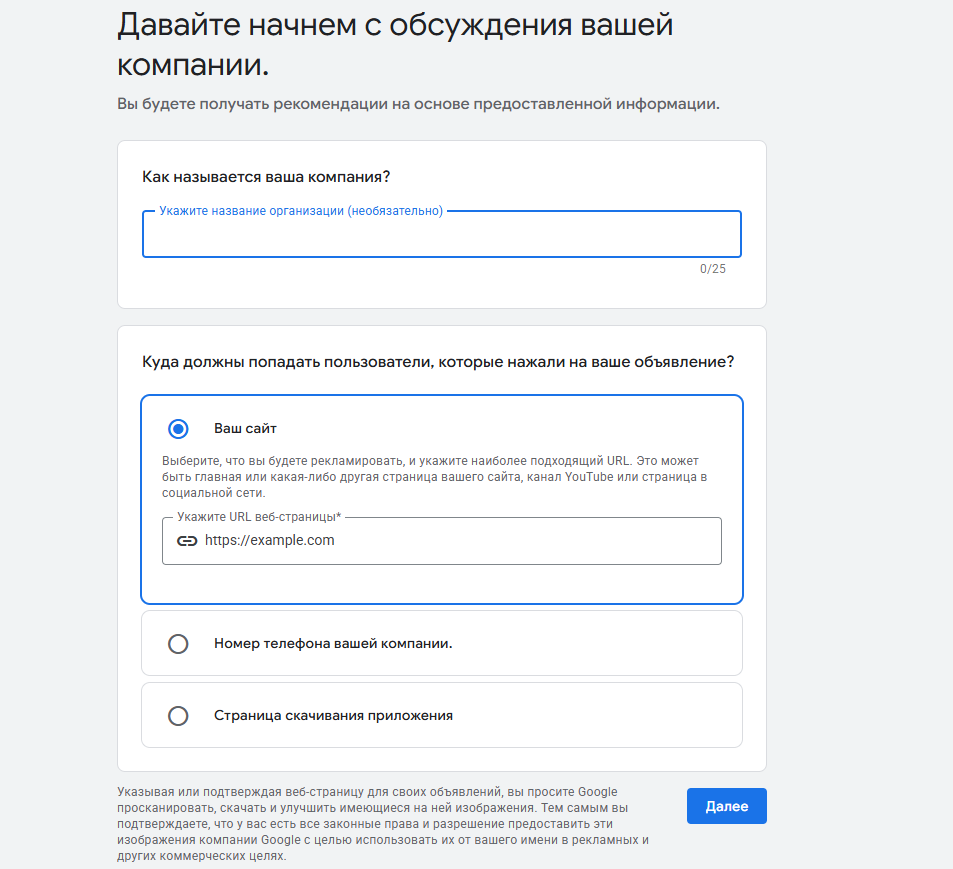
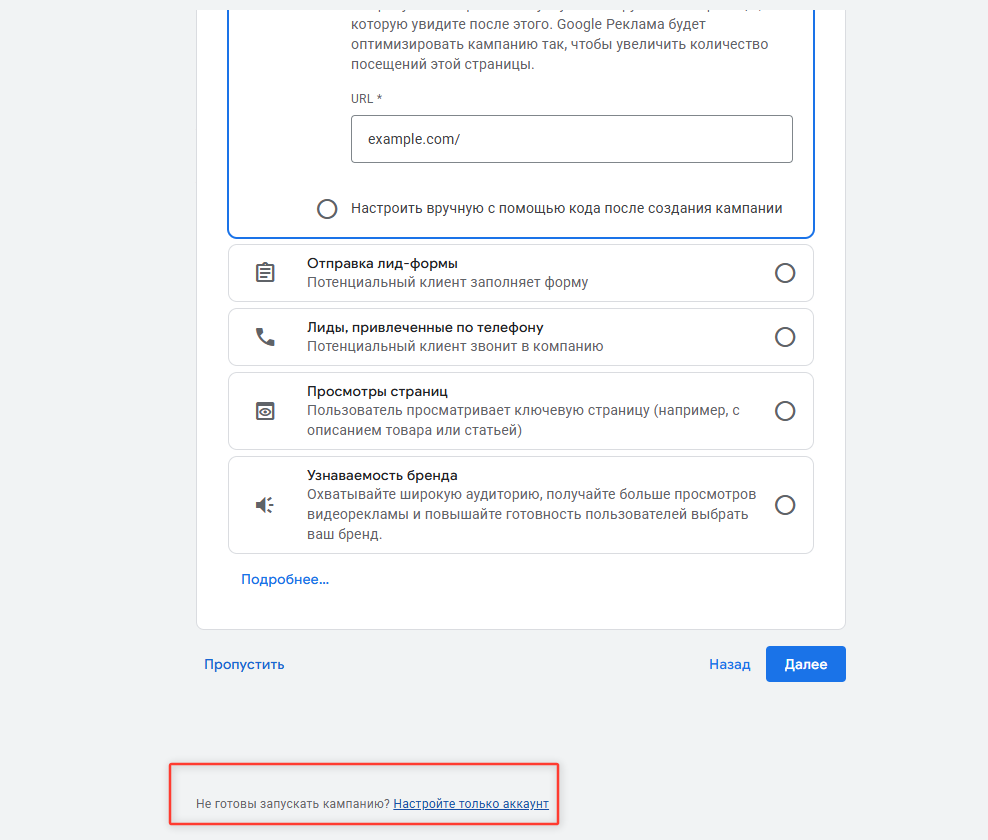
Next, you need to exit the “smart” wizard and switch to manual mode. In the “Enter the URL of your website” field, enter any address—your future landing will do—click “Next,” and go through a couple of steps until you reach the “Choose a goal for this campaign” screen.
At the very bottom of this screen, there’s a subtle link: “Not ready to launch a campaign? Set up only the account”—this is your entry to expert mode. Click it and you’ll go straight to account setup, skipping campaign creation.
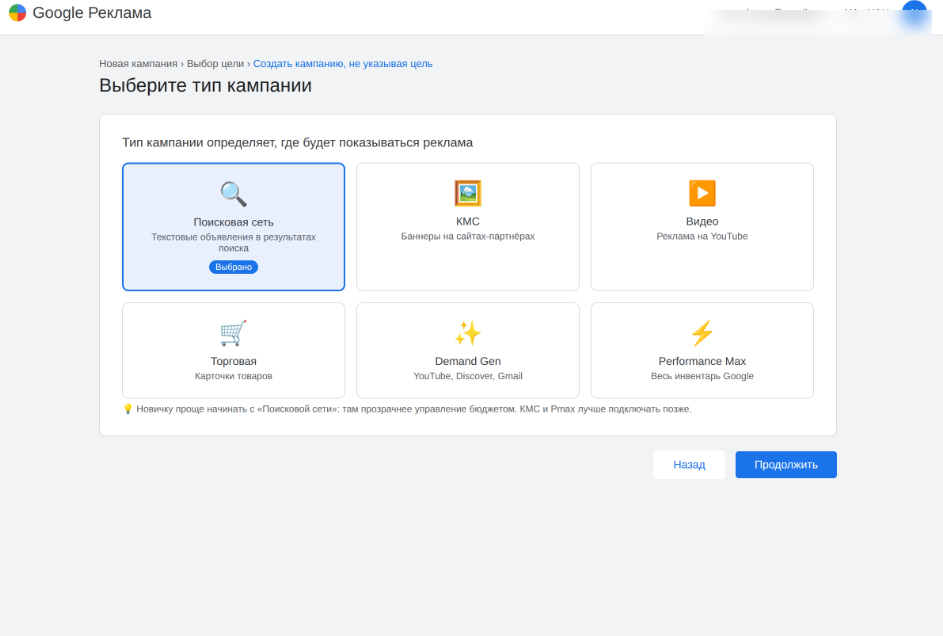
The next step is to set GEO, time zone, and currency. Be careful with the currency: you set it once and Google won’t let you change it later. Next, we build the campaign: select “Create a campaign without a goal’s guidance,” and choose “Search Network” as the type. Beginners should avoid Display Network — budget management there is more complicated and it’s easier to burn through your money.
The daily budget should be lower at the start — $10-50. Uncheck “Display Network,” leave only “Search Network,” and set broad targeting: the whole country, with the option “people in or regularly in your targeted locations.”
Previously, the effectiveness of a setup was judged by the first few hours of traffic — if leads started coming in, you could scale up. In 2026, that won’t work anymore. The algorithm is tuned for a long ramp-up, and during the first one to three days the campaign is learning, steadily eating up your budget in the red. If you turn off the ad set on the first day, you’ll just pay for the system’s lesson out of your own pocket without getting a single quality lead.
While the campaign is in learning, any interference with the settings — changing the bid, limit, or keywords — throws off the algorithm and it has to relearn from scratch. You can avoid problems by increasing the budget in small steps, $1-2 per day, and adding new keywords one or two at a time. Raising the budget sharply and dumping in a dozen keywords at once is the fastest way to get banned for suspicious activity.
Audience setup
Running nutra through regular search in 2026 is an expensive game. Auctions are overheated, and moderation blocks creatives for headlines before you even get impressions. The main workaround is Demand Gen. This is a campaign format where Google shows ads to people the algorithm selects based on interests and recent actions. Ads appear in YouTube recommendations and Shorts, the Discover feed, and the Promotions tab in Gmail.
You’re not waiting for a user’s query — you catch them by behavior and show a native banner or video. For nutra, this is a top tool: these formats don’t have headlines with trigger words that search gets stuck on, and moderation is softer on visuals. As a result, gray setups last longer and are more stable.
The Demand Gen base shows ads to those who recently searched for queries relevant to your offer. So you’re retargeting and bringing the person back to purchase via YouTube or email.
Queries in the segment are basically your lead’s portrait, so using broad words like “health” or “doctor” is pointless. They’ll bring a ton of empty impressions and waste your budget on med students and hypochondriacs. It’s better to sort keywords by intent. Let’s break it down with a joint offer example:
- Hot (ready to pay): “buy knee brace,” “joint ointment price,” “knee support reviews.” If someone is searching for a specific item, they’ve acknowledged the problem and are ready to spend money.
- Symptoms (seeking relief): “knees cracking,” “knee hurts when bending,” “joints ache when the weather changes.” The pain is there, but the person hasn’t decided on a solution yet — this is the best audience to convert with creative ads.
- Medical specifics (deep into the topic): “arthrosis stage 2,” “how to reduce joint inflammation.” These queries filter out random users and attract those who are seriously dealing with the issue.
The author of the “Not Your Traffic” channel recommends grouping three keywords into one audience. For example, if you’re promoting a blood pressure remedy, phrases related to hypertension are one audience, those about blood pressure monitors are another, and headaches are a third. Leave the optimized targeting box checked if the audience size is small. Even with 3,000–5,000 queries per month, Google’s AI will pull in leads thanks to auto strategies.
Working with Keywords and Ad Copy
Queries with the product name, like “EcoSlim buy,” are usually forbidden by affiliate rules and put you in direct competition with the advertiser. Focus not on the brand, but on the user’s pain point and the solution they’re seeking.
Group keywords by intent, not by frequency. It’s better to segment keywords by how ready someone is to buy — by intent, not just by “high-frequency” or “low-frequency.”
Top of the funnel — problem and informational queries: “how to lose weight without dieting,” “fat burning products.” Traffic here is cheaper but colder — the person is just exploring. Send this traffic to a pre-landing page to warm up your audience.
Bottom of the funnel — transactional queries: “buy weight loss pills,” “price,” “order.” More expensive, but with a high CR — the user is ready to pay, card in hand. This traffic can go straight to the landing page.
Choose the match type. The match type determines how broadly Google shows your ads:
- Exact — [weight loss pills price]. Shown only for this query and close variations. Most targeted traffic, but narrow reach.
- Phrase — “how to lose weight without dieting.” The query contains your phrase in full, with words before or after. The best starting point for nutra offers.
- Broad — lose weight fast. Maximum reach, but your ad can easily show for “how to make a dog lose weight fast.” Use with caution and only with a well-developed negative keyword list.
Clean traffic with negative keywords. In nutra, negative keywords are crucial. Without them, you pay for junk. Exclude all irrelevant traffic:
- other products — creams, massagers, sports nutrition if you’re selling pills;
- negative — “scam,” “fraud,” “rip-off”;
- freebie seekers — “free,” “forum,” “download”;
- other GEOs and competitor brands.
Start with a list of 100–300 words and update it daily using the search terms report.
Boost CTR. Fill in every field Google offers: extensions, callouts, additional links. The higher your click-through rate, the cheaper your auctions and the wider your reach.
Passing moderation with text. Stay away from trigger phrases. In the nutra context, don’t write “lose N kg in N days,” don’t mention diseases, don’t bring up doctors, and don’t promise 100% results. Such CTAs will get you banned.
Focus on everyday results, not the treatment process. “Joint pain medication” sounds medical, while “climb stairs without pain” is about daily life, and moderation is more lenient with this approach.
The same principle applies to weight loss: instead of “weight loss product,” write something like “fit into your favorite jeans again.” Don’t copy the same wording across different accounts: Google sees repeated texts as a clear sign that one person is behind all the accounts.
Cloaking and anti-detect browsers
Cloaking is software that loads two different landings under the same address. It shows a harmless white landing to Google bots and moderators, while real visitors are redirected to the gray offer. If you’re running white e-commerce offers that pass checks easily, you don’t need cloaking. But in nutra, gambling, betting, and finance, it’s essential.
How the scheme works
The pre-landing is placed on a trusted first-level domain and must not violate Google’s rules. Everyone lands here: both bot moderators and real users. Traffic splitting happens on click—cloaking triggers when a visitor clicks the button linking to the product.
Bots stay on the white page, while real traffic goes to the actual landing. Ideally, both audiences should stay within the same domain—this raises fewer suspicions.
Why you need an anti-detect browser
Google reads your device fingerprint and uses it to link your accounts. If you create multiple accounts from one computer and the algorithm detects it, a ban on one will take down all of them.
An anti-detect browser changes your fingerprint and keeps profiles isolated from each other. For Google, each profile looks like a separate device, and there’s no visible connection between accounts.
Don’t skimp on proxies
Use residential or mobile proxies, and match the GEO strictly to the account and campaign GEO. If you need a new IP for a repeat login, pick the same city.
Don’t try to save money on proxies. Google scrutinizes them closely, and a cheap, flagged IP will get your account banned before you even start spending budget.
Cloaking services
Among proven solutions tailored for Google, affiliates mention CLOAK IT, Adspect, and Keitaro. Adspect has its own white page generator and a “moderation” mode, where all traffic goes to the white page, while in normal mode only bots are sent there.
Your white page should read as a natural continuation of the creative. The topic of the page must match what the user saw in the ad. If you’re promoting a weight loss offer, publish content about healthy eating on the landing page, sell fitness programs or sports equipment. And just being “useful” isn’t enough: the site needs a clear commercial section—rates, pricing, order form. Empty blogs with no purpose won’t be trusted by Google in 2026 and will get banned.
Creative Examples for Google Ads
Google analyzes the image pixel by pixel and detects both medical undertones and attempts at manipulation. If it spots this, your campaign will be banned right after launch. The creative’s job is to hint at a solution without directly breaking Google rules. Affiliates use three approaches.
Teaser approach. Built purely on curiosity. The image features something you can’t immediately identify: a blurry liquid of unnatural color, mysterious ointments, containers with strange contents. The viewer is hooked by the question, “What is this and why?” This approach quickly gets added to Google’s pattern database: as soon as AI recognizes the bundle, ads start getting rejected across all accounts.

News approach. Mimics a frame from a news broadcast. For example, an anchor in the studio with a “Breaking News” banner on top. This targets an older audience. For them, a TV-style presentation automatically means “this can be trusted.” Bots see this image as a regular news story.

Intent-based visual. Show the body area targeted by the offer, but without medical specifics. Joint offer—a close-up of a knee or a hand being massaged. Varicose veins offer—a view of the calves. Hair loss offer—a close-up of the crown or back of the head. The method is always the same: clear, visual, and without a single direct medical marker that moderation could flag.

There’s a separate set of things that trigger manual moderation or an instant ban. This concerns what is actually depicted in the creative.
- Text on images. The algorithm is triggered even by disguised text, including letter substitutions.

- Manipulative elements. Arrows, outlines, and drawn “Buy” buttons are seen by Google as attempts to manipulate attention and such creatives get cut.

- Medical markers. X-rays, red spots on joints, and other obvious signs of illness directly indicate medical content, which triggers the algorithms.

- Excessive nudity. This significantly limits reach, so be careful with explicit photos.

- “Before and after” format. Such collages are prohibited in nutra. This is one of the most common reasons for creative rejection.

Analyzing creatives in Google Cloud Vision
Before uploading, it’s useful to see your creative through Google’s algorithms. This way, you’ll spot in advance what moderation might flag. You’ll need the Google Cloud Vision tool, in the See how computer vision works block. Upload your creative or pre-lander image here and review the report. The two most important parameters are:
- Spoof. This indicator shows the level of clickbait. The more segments of the scale are filled, the higher the chance that Google will consider your image deceptive. Such an ad is unlikely to make it to impressions.
- Safe Search. This indicator shows how safe your creative is for search. The AI assigns probabilities for the categories Adult, Medical, Violence, and Racy. If the Medical scale is filled, you’re almost guaranteed to get blocked for violating platform policies. Racy and Adult alone don’t always lead to a ban, but Google will limit your reach and remove you from impressions for solvent audiences.
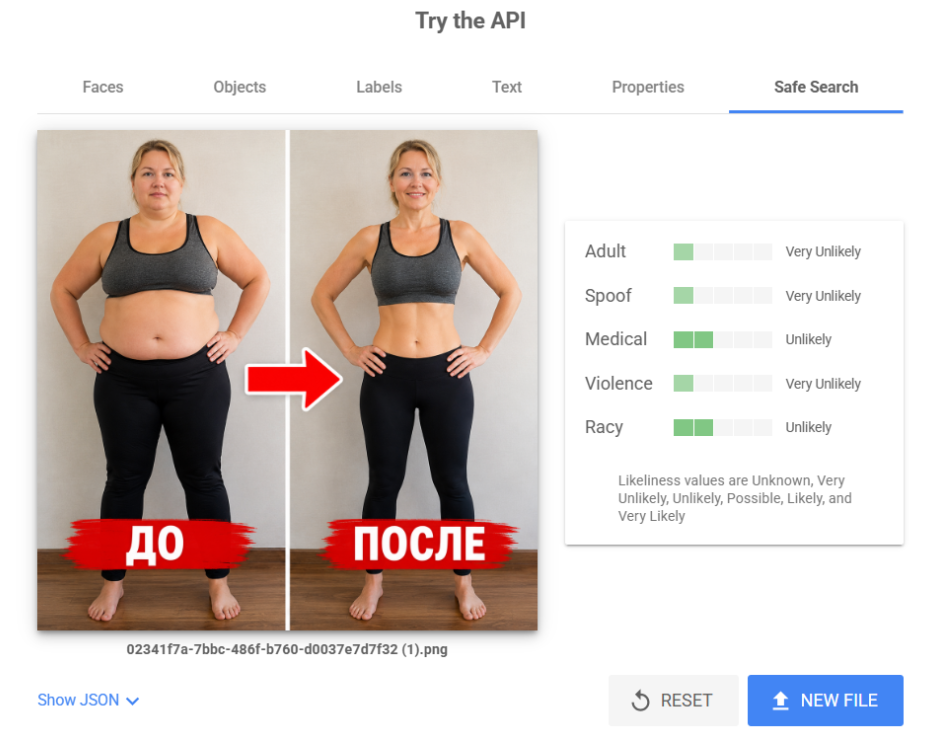
If the check results are disappointing, try changing the color scheme, remove trigger elements (bright pointers, syringes, anatomical images), and make the image lighter.
Optimization and Scaling
To maximize your profit, you don’t need to constantly edit the campaign. It’s important not to interfere with the algorithm, so scale up gradually.
Increase your budget carefully—no more than 20-30% per day and only after you’ve found a working creative-landing combination. If you raise the budget sharply, you risk getting a sudden ban on an already running campaign. Add keywords gradually as well, one or two per day. Google’s trust in your account builds up slowly, and you can see this as bot visits to your site decrease.
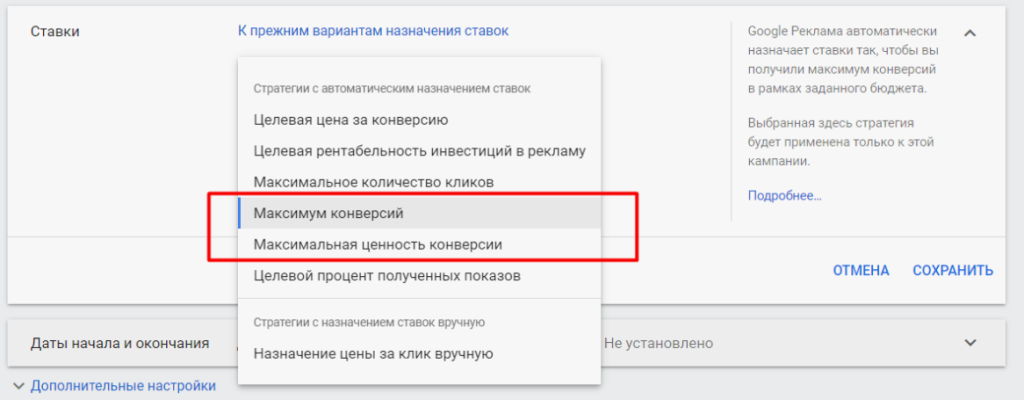
In Demand Gen, it’s better to rely on the “Maximize Conversions” auto-strategy with a set Target CPA. Do the math based on your own numbers.
Suppose the affiliate program pays $30 for a confirmed lead, and the average approval rate for the GEO is 40%. That means one lead brings you $12 on average (30 × 0.4). To cover your costs and stay profitable, keep the Target CPA in your account below this threshold—around $5-6.
A few checkboxes you should uncheck right away to avoid wasting money on junk impressions:
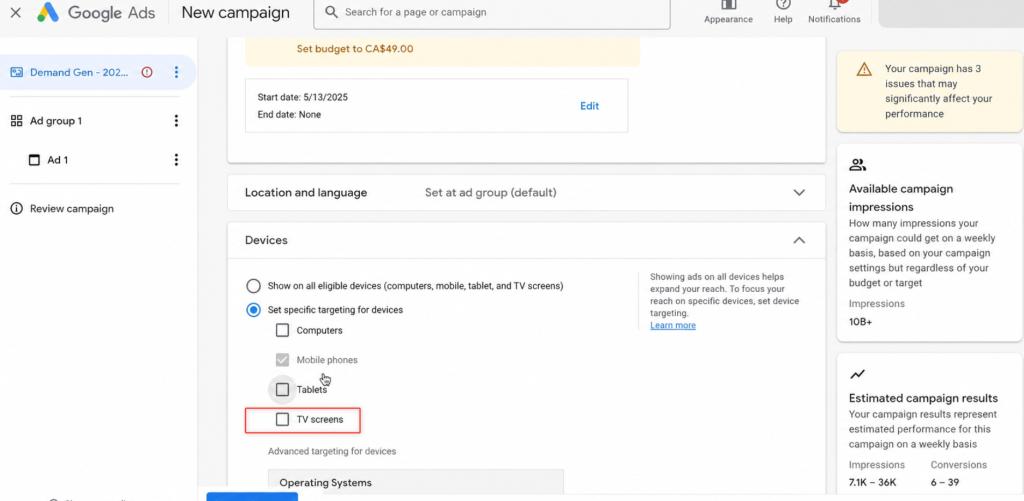
- Turn off TVs. There are tons of impressions from there, but no one will fill out an order form with a TV remote.
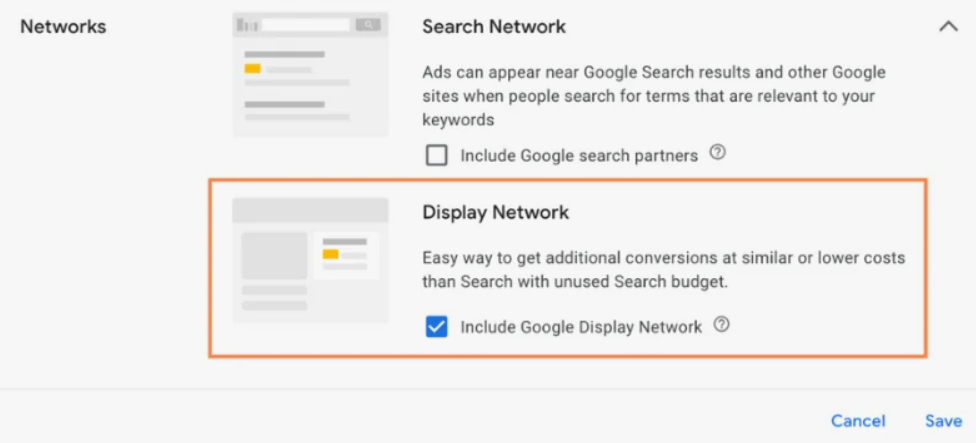
- Turn off Google Display Network. That’s where the most irrelevant traffic from mobile games comes from, and it disrupts optimization.
- Disable the Unknown category. If the offer is targeted at a specific gender or age and the budget is limited, it’s better to turn off this category.
How to Analyze Ads
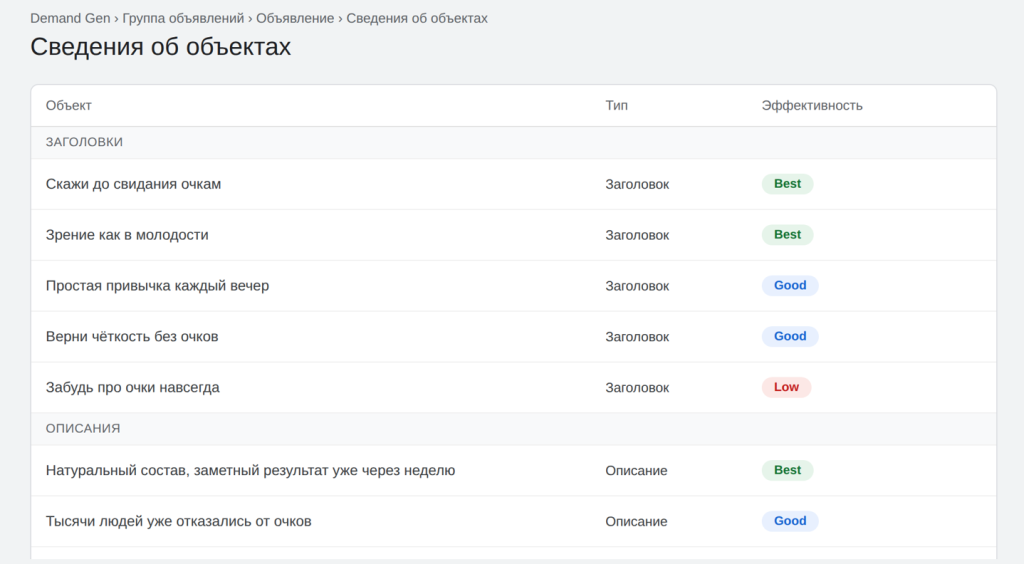
In Demand Gen, you can upload up to five headlines and descriptions per ad, and then Google mixes them in different combinations and selects the top performers. Your job is not to interfere, but later to clean up the bundle by removing weak combinations.
After 5–7 days of running, check the View asset details section. Google will label each element with a performance tag — Low, Good, or Best. Make edits selectively:
- rewrite only the headline marked Low, not the entire ad;
- do not touch Best elements at all, as they are tied to trust and the campaign’s accumulated history;
- never delete the entire ad.
This way, you can update the bundle while keeping the learning progress.
Switching from White Site to Offer
If you were warming up traffic on a “dummy” white site and now it’s time to switch to the offer, don’t stop the white ad. Instead, reduce its spend to a minimum and add a new group for the target site to keep the accumulated history.
If your ad was rejected for malware, first check the codes and scripts on the site, then the domain and hosting.

Successful Launch Cases
Below we’ve collected the most illustrative cases from open sources — affiliate networks and personal channels.
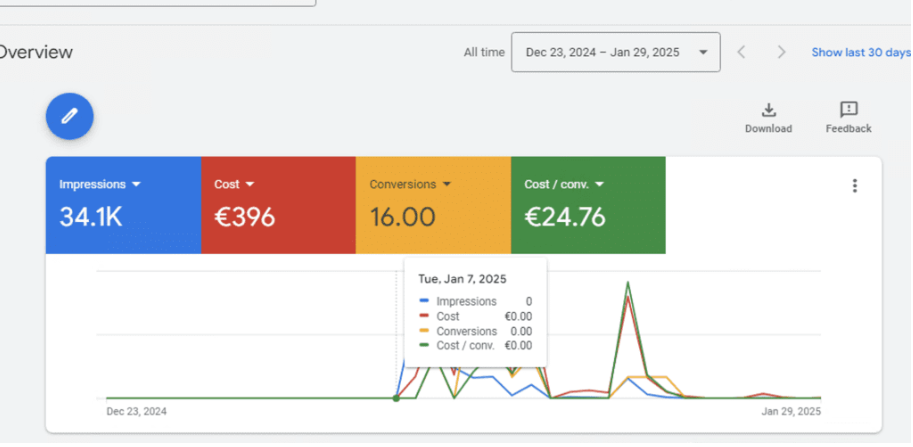
Hypertension via Demand Gen, ROI 69%
Clearly demonstrates how Demand Gen works. The audience was reached not through search keywords, but through visuals in Google feeds.
- Geo: Germany;
- Offer: Cardital (for blood pressure);
- Source: Google Ads, Demand Gen — static, carousel, YouTube video, Discover, and Gmail;
- Approach: targeting 45+, custom audiences from Keyword Planner, two messages — “lower blood pressure” and “natural stabilizer”, daily budget up to $100;
- Result: spend $410, revenue $690, profit $280, ROI 69%, average lead around €24 with 50% approval rate.
Matcha Slim Weight Loss, ROI 218%
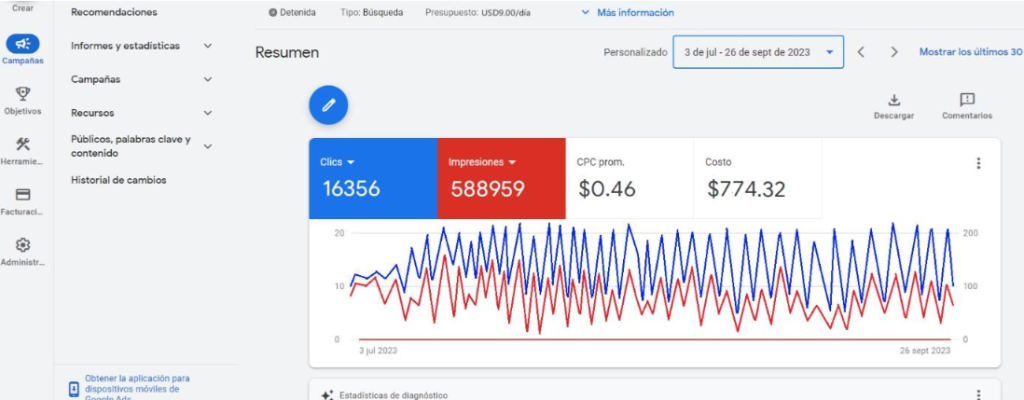
An example of patient scaling in search. Started with $9 per day and increased the budget by only 10% per month to let the algorithm learn smoothly.
- Geo: Peru;
- Offer: Matcha Slim (AdCombo affiliate program);
- Source: Google Ads, search;
- Approach: WordPress landing with a form via affiliate API, keywords and headlines in Spanish (“Comprar Matcha Slim”, “−50% de Descuento”), instead of cloaking — IP protection via Imperva;
- Result: 16,356 clicks, 764 leads, 154 sales at $16 each; spend $774, revenue $2,464, profit $1,690, ROI 218%.
Joint Gel
Interesting for its scaling mechanics. The funnel was scaled carefully and didn’t rely on a single account.
- Geo: Netherlands, Belgium;
- Offer: Motion Free (Adcombo affiliate program);
- Source: Google Ads, GDN;
- Approach: targeting 45+, mobile and tablets only, keywords “knee pain”, “osteochondrosis”, “massage”, copy written by a translator, budget +13% per day, 4 accounts in operation;
- Result: over 2.5 months, spend 221,900 RUB, revenue 522,442 RUB, profit 300,542 RUB.
You shouldn’t expect huge ROI from a single funnel, but even with a landing straight from the affiliate program it’s possible to go positive on the first launch if you don’t interfere with the algorithm and scale smoothly.
If an offer isn’t converting, don’t bury it right away: look for the same offer in other affiliate programs and split test. The same funnel can flop in two networks and bring profit in a third.
Google Ads Algorithm Changes
Demand Gen is a type of campaign in Google Ads where you don’t buy impressions based on search queries, but instead run visual ads in Google’s own feeds: on YouTube (including Shorts), in the Discover feed, and in Gmail. You target your audience by interests and custom segments. The system itself delivers your creative to users who resemble your buyers. This format is relatively new. Google introduced it in 2023, opened it to all advertisers by October of that year, and by early 2024, Demand Gen had fully replaced the previous Discovery campaigns.
In search, Google’s text filters block suspicious campaigns before you even get a chance to scale. In Demand Gen, you enter through images and visuals, not risky keywords like “buy weight loss pills.” It’s easier to pass moderation, and your account lasts longer.
You achieve positive ROI by shifting focus to behavioral patterns, where moderation is more tolerant of visuals.
Other changes in recent years:
- Google has fully replaced expanded text ads with RSA—responsive search ads. You haven’t been able to create old ETAs since 2022;
- starting September 2026, Google is phasing out classic dynamic search ads (DSA) and will automatically migrate them to AI MAX. This is an AI layer for search that combines website content with user intent signals and selects queries for each auction on its own;
- it’s now easy to monitor competitor ads through the Ads Transparency Center, where you can see all creatives from any advertiser;
- AI voiceover for videos is now available directly in Google Ads (in Performance Max, it’s sometimes enabled automatically);
- Discovery campaigns have been fully transformed into Demand Gen with AI-powered audience targeting.
Expert Opinions and Comments
Denis Cherny, CEO of Ads Base, personally chooses Demand Gen for its traffic volume and quality: according to him, conversion is lower than search, but the reach is on par with GDN, and setup is noticeably easier. You can still burn through your budget here, but that’s solved with disciplined bidding. To make your test objective, Denis recommends not judging by a single launch—run several duplicates or run traffic in parallel from multiple accounts.
Fastarter, author of the YouTube channel “Not Your Traffic,” explains why buyers are moving from search to Demand Gen:
“The format works on Google inventory—YouTube, Discover, and Gmail—where moderation is more lenient with visuals, and audiences are targeted not by direct query, but by recent activity in Google services. He specifically insists: every creative should be checked through Google Cloud Vision for Spoof and SafeSearch before launch—otherwise, your ads get rejected and you don’t know why.”
The author of the “Google Hard” channel advises not to stick to just one tool: “Stable work with old rigid approaches is a thing of the past. Google is confidently making Demand Gen its main tool and will be actively reshaping it—in the coming months, expect a package of updates that will once again shake up the format: conversion reworks, new placements, even more AI in moderation, and video automation. My advice—don’t put all your eggs in one basket, diversify and test different directions while you still can.”
Conclusion
To work with nutra in Google Ads in 2026, you’ll need patience and a systematic infrastructure. Here’s a summary:
- Accounts are your main consumable. Set up farming on a flow, keep 30+ accounts, farm each one differently, and always let them rest for a week.
- Don’t interfere with the algorithm. The first 24–72 hours are for learning; running at a loss is normal. Increase your budget by 20–30% daily, add keywords one or two at a time.
- Cloaking and antidetect are a must for gray offers. White is a logical extension of the creative, with a commercial element and a working form.
- Creatives without direct triggers. Teaser, news format, or visuals tailored to intent. Run through Google Cloud Vision, watch for Spoof and Medical.
- Demand Gen is the main workaround where search blocks campaigns before they even start.
Don’t expect huge multipliers from a single setup, but it’s realistic to go positive on your first launch. Focus on testing, splitting, and prepare lots of accounts.

Comments (0)